AzureSpray
Scenario
Master the detection, investigation, and remediation of password spray attacks in Azure AD by analyzing sign-in logs with KQL queries, identifying attack patterns and compromised accounts, implementing Microsoft Sentinel analytics rules for automated detection, and applying security controls including Smart Lockout, Conditional Access policies, and incident response playbooks to protect against credential-based attacks.
Executive Summary
An actor spent nine hours probing Compliant Secure’s Microsoft 365 tenant for addressable application identifiers before launching a two-wave password spray on 29–30 June 2025, distributing 543 credential attempts across 269 AWS eu-central-1 hosts that each retired after no more than six tries — comfortably beneath Azure AD’s default Smart Lockout threshold. Every spray request carried one static, slightly outdated Chrome user agent, the only signal binding the rotation into a single campaign, and wave two additionally rotated the target first-party application on nearly every attempt. The account that fell was never sprayed: it appears in the telemetry only as a probe target, an MFA enrolment interrupt on the Azure Portal, and then two successful token grants against Azure Active Directory PowerShell nine minutes later from the same host, carrying the user agent of a public Entra ID post-exploitation toolkit. A second account was sprayed, had its password validate the following morning, and was stopped by the same enrolment interrupt the first account had walked around by switching authentication paths. Detection was reconstructed afterwards by porting Microsoft’s Entra ID password spray template onto the tenant’s DCR-based custom SigninLogs_CL table, where it surfaced three source addresses out of 269 and neither of the two hosts that actually authenticated.
Artifacts
- Azure AD sign-in logs — ingested into Log Analytics as the custom table
SigninLogs_CL→ query from Microsoft Sentinel → Logs (KQL Query Editor) - Microsoft Sentinel workspace — Content Hub, Analytics (rule templates, scheduled rules, automation rules), Incidents → Azure portal
- Microsoft Entra ID solution — installed from Content Hub to expose the password spray rule templates
Schema note: This is a DCR-based custom table — column names are preserved exactly as declared, with no
_s/_ttype suffixes. Every published walkthrough of this lab assumes the legacy suffixed schema (UserPrincipalName_s,CreatedDateTime_t) and will silently return nothing. Rungetschemafirst;project *throws a syntax error.
SigninLogs_CL | getschema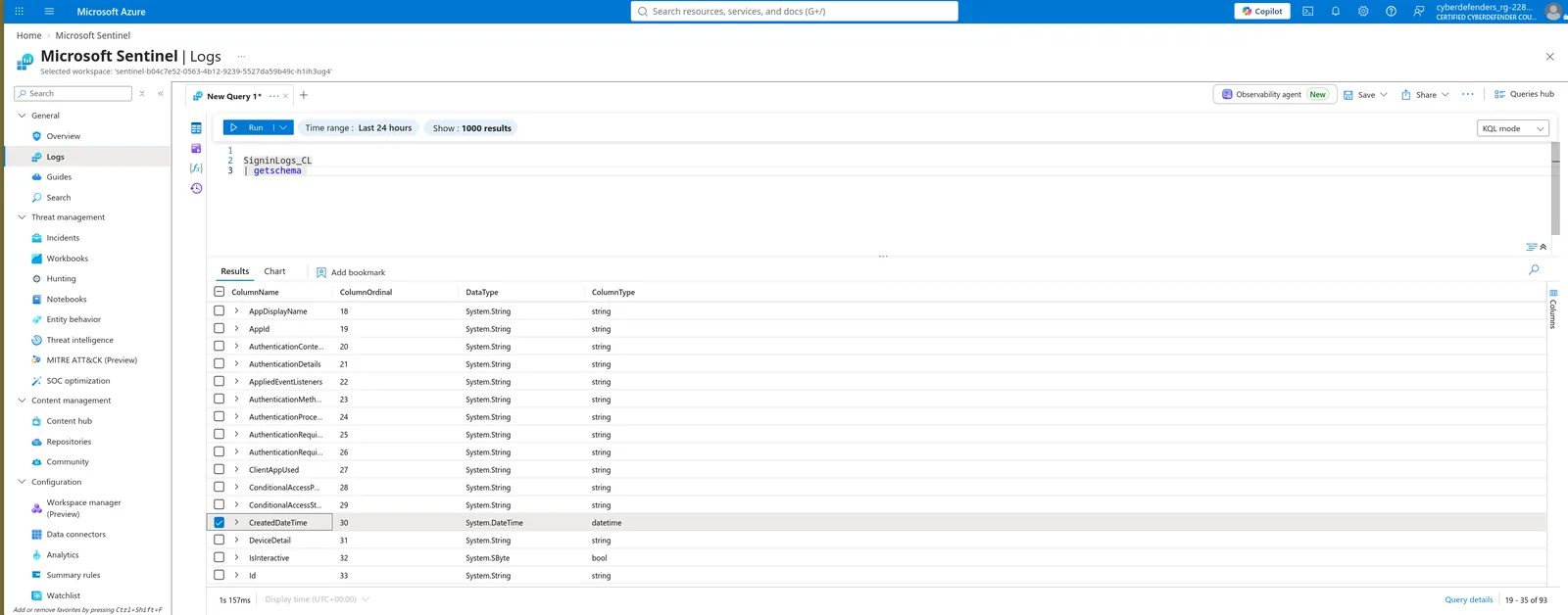
Time picker note: The blade’s time range filters on
TimeGenerated(ingestion time), not event time. This dataset was bulk-ingested recently, so June 2025 events return happily under “Last 24 hours” — and setting the picker to an actual June 2025 window returns zero rows, making the table look empty. Every temporal answer comes fromCreatedDateTime.
Result code baseline: Six codes account for the entire table. Establishing all six up front (Q1) makes most of the rest of the lab a filter exercise, and two of them are answers to later questions.
Discovery
Start with no assumptions and let the distribution speak. Aggregate the whole table by ResultType and sort descending — six codes come back, and one sits at 543 while the next is at 10. That dominant code is the generic invalid-credentials failure, exactly what a spray produces: valid usernames paired with a wrong password, at volume. Read the entire ranking rather than just the top row; the tail is where this lab actually lives. Below the spray code sit the Smart Lockout code, an application-resolution failure, two MFA interrupt codes, and the successes — five records in total across the last three, and those five records are the whole compromise.
SigninLogs_CL
| summarize Count = count() by ResultType
| order by Count desc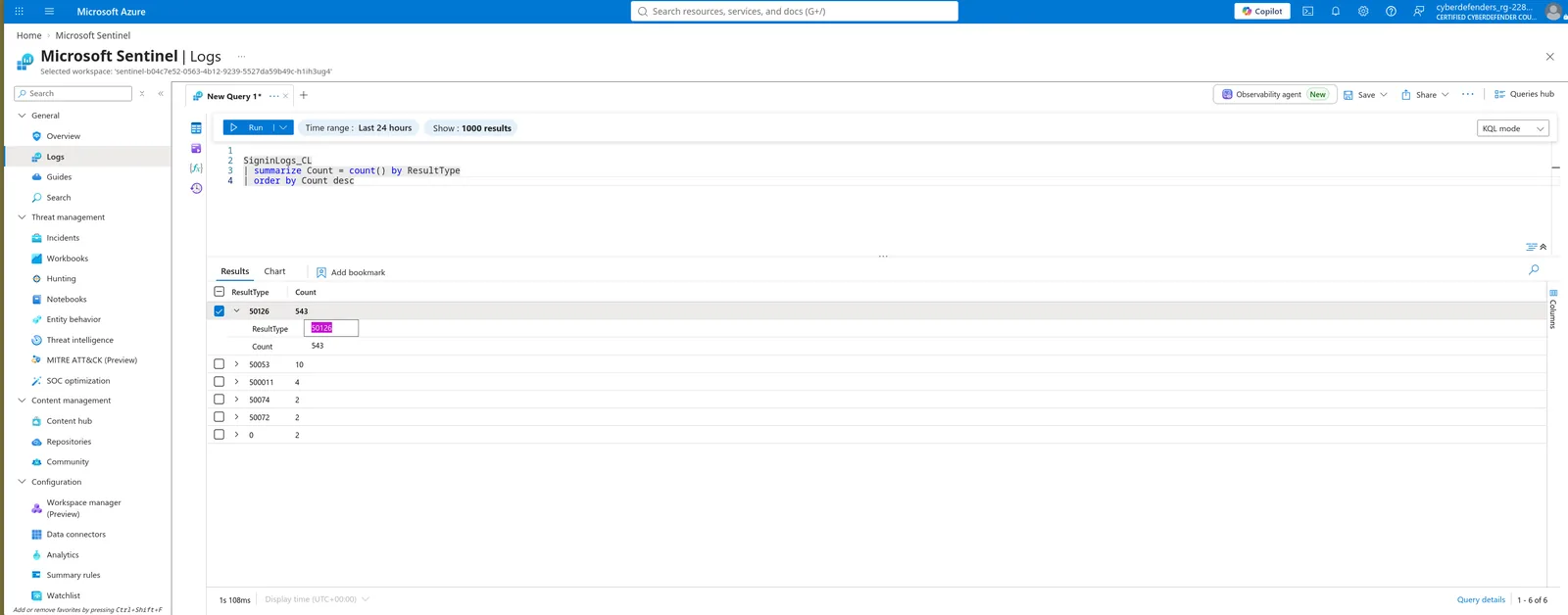
Tip: Note every code and its count now. Two are answers to later questions, one identifies reconnaissance activity that predates the spray, and the pair with a count of two each are the only records in the tenant where a password actually validated.
Credential Access
Filter to failures and count by source. The result is not the tidy handful of attacker hosts the question implies — 269 distinct sources appear, all in AWS eu-central-1 ranges, and the winner takes it by a single attempt with four addresses tied one behind. That flatness is the finding: a rotation this wide with a per-host cap this low is engineered against per-IP counters, and the top host still only reached six attempts against a default lockout threshold of ten.
SigninLogs_CL
| where ResultType != 0
| summarize FailedAttempts = count() by IPAddress
| top 10 by FailedAttempts desc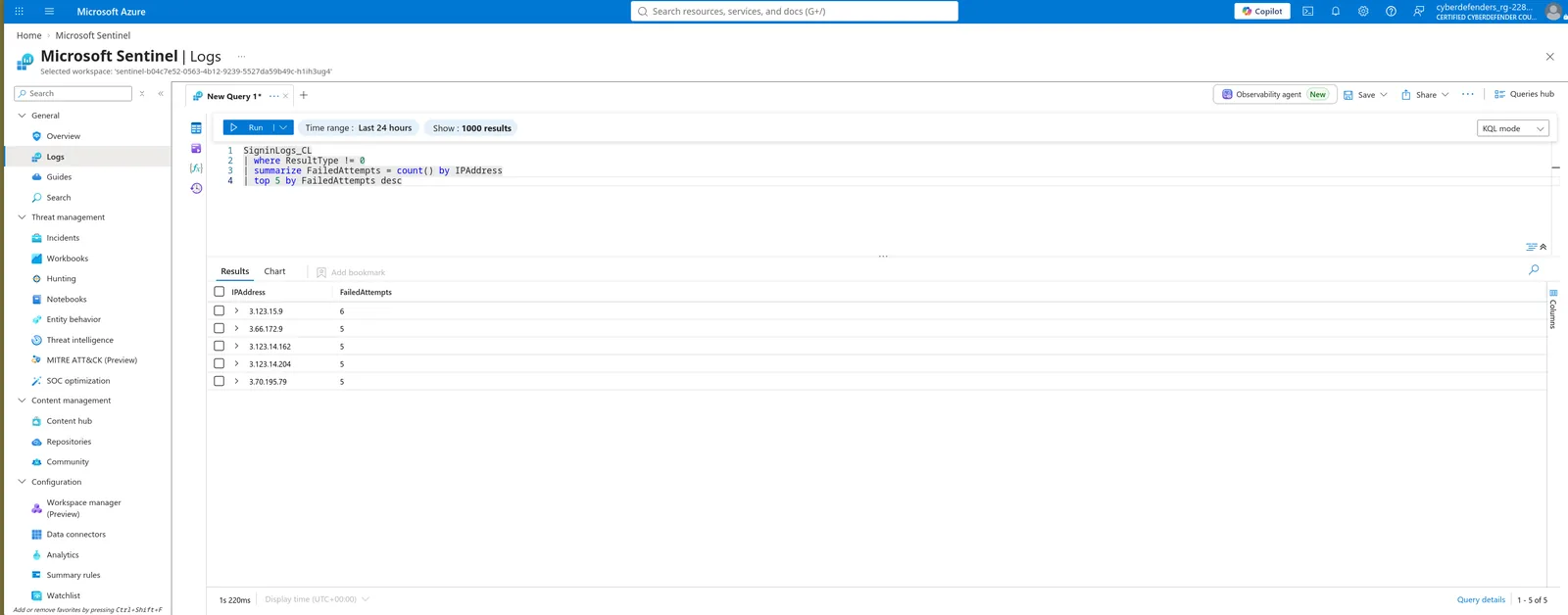
Gotcha: Grouping by
IPAddress, UserAgentsplits the counts and caps the ceiling lower, changing which row comes out on top. Group by IP alone. The higher ceiling under IP-only grouping also tells you a subset of hosts was reused across both waves rather than retiring after a single burst.
Aggregate failures by UserAgent. Only five distinct strings exist across the entire failure set, and one accounts for 557 attempts against singletons for the other four — that single string spans all 269 source addresses from Q2, which is what proves the rotation is one campaign rather than 269 unrelated login problems. It is an unremarkable Chrome-on-Windows-10 string chosen to blend in, with a browser version well behind what the tenant’s real users were running.
SigninLogs_CL
| where ResultType != 0
| summarize FailedAttempts = count() by UserAgent
| top 5 by FailedAttempts desc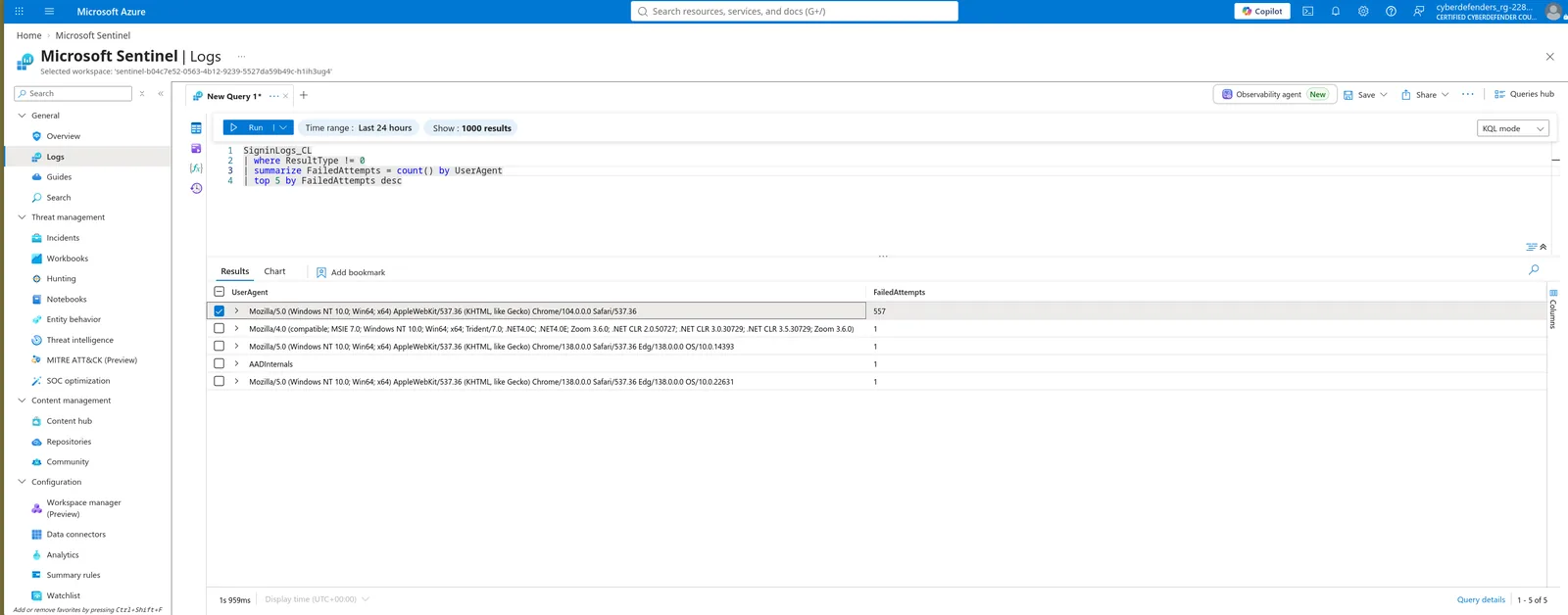
Tip: One singleton is not a browser — it is the default user agent of a public Entra ID post-exploitation toolkit. It is not the answer here, but it is the thread that unravels the rest of the lab. Note also that this failure-only aggregation shows it with a count of one; its successful sign-ins are excluded by the very filter that found it.
A documentation answer, confirmed against the data. Smart Lockout does not emit a distinct event type — it surfaces as its own sign-in error code, second in the Q1 ranking at ten records and numerically adjacent to the spray code. Filtering to it produces the victim list: the small number of principals hit hard enough from a single source to cross the threshold despite the rotation. Ten lockouts against 543 attempts is the rotation working as designed.
SigninLogs_CL
| where ResultType == 50053
| summarize Lockouts = count(), Sources = dcount(IPAddress) by UserPrincipalName
| order by Lockouts desc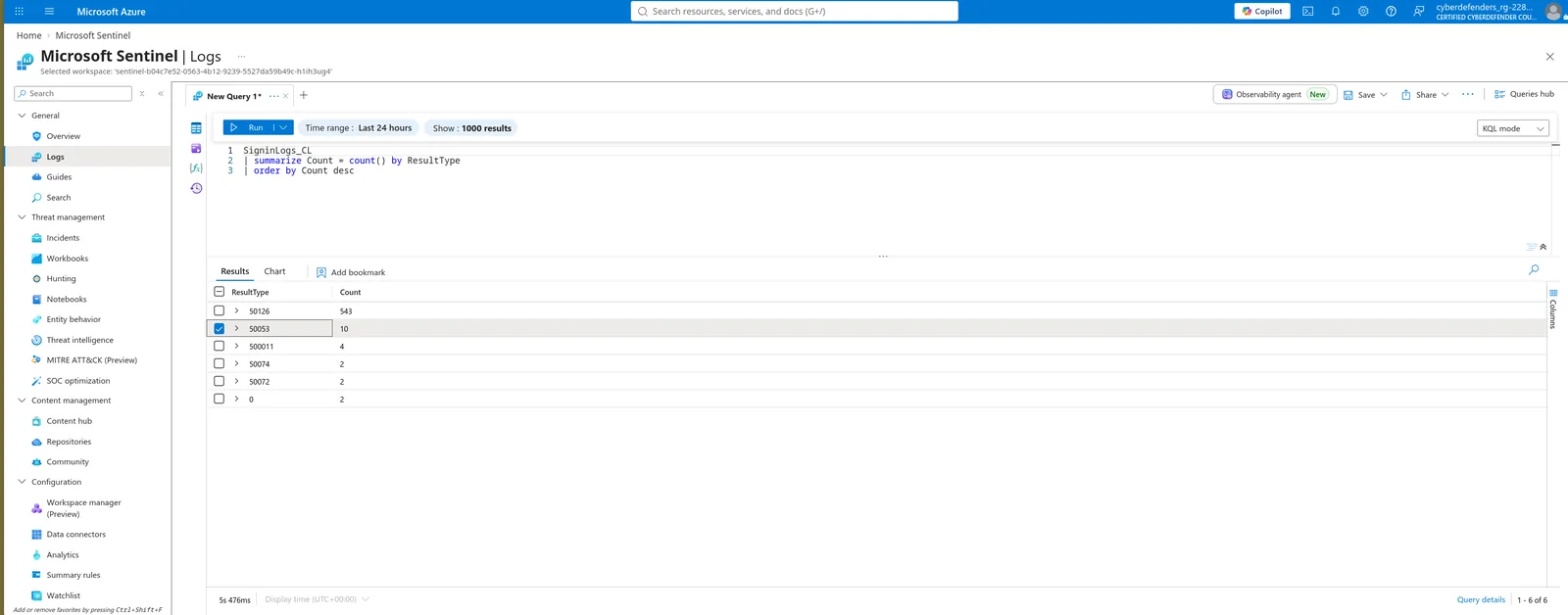
Hint: The code is adjacent to the Q1 answer in Microsoft’s sign-in error reference — check the codes immediately around it before searching wider.
Scope to the Q1 code specifically, not to all non-zero results. Two records at the head of the table and one at the tail carry different failure codes — application-resolution probes and an MFA-challenge record that are not credential failures at all — and they drag both the minimum and the maximum well outside the spray window. With the correct filter the onset is abrupt: more than a dozen distinct source addresses register their first attempt inside a three-second span, a parallel launch rather than a sequential walk through a target list. Truncate to minute precision for submission.
SigninLogs_CL
| where ResultType == 50126
| summarize FirstFailedAttempt = min(CreatedDateTime), LastFailedAttempt = max(CreatedDateTime)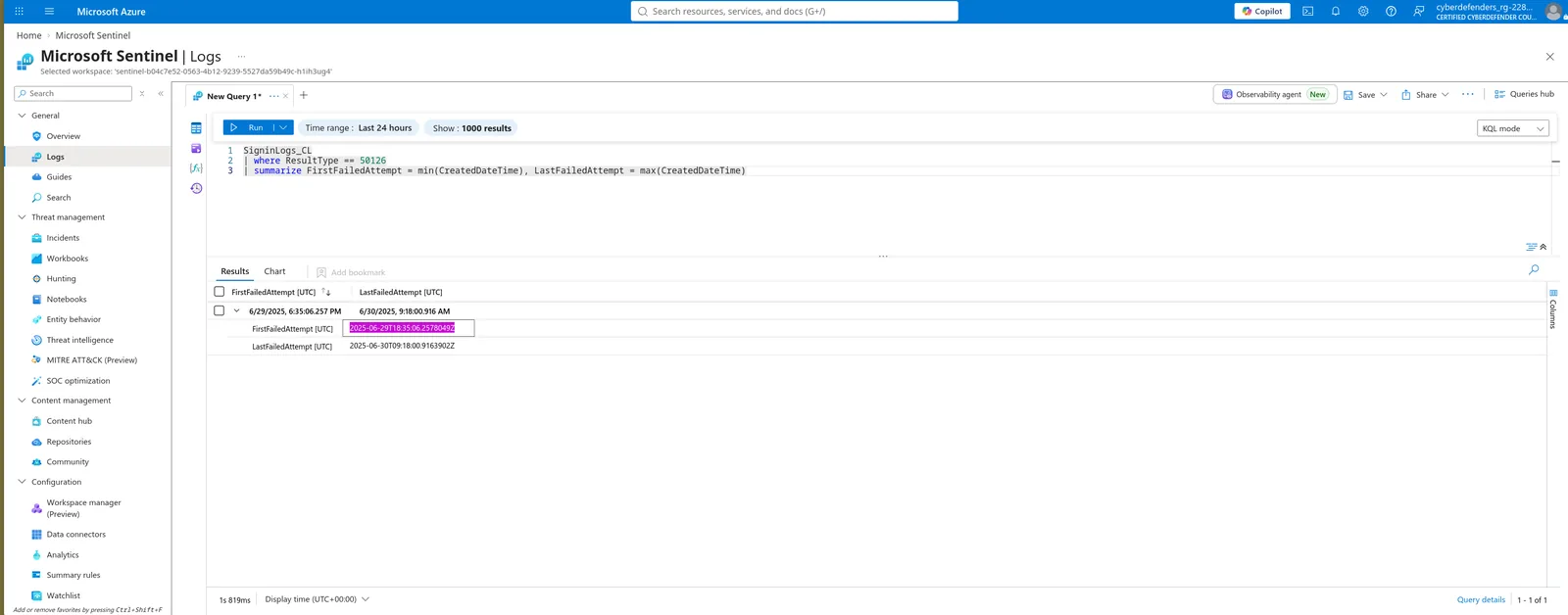
Gotcha: Three separate traps stack here.
min(TimeGenerated)returns a 2026 ingestion timestamp.ResultType != 0returns an application probe from nine hours earlier. OnlyCreatedDateTimescoped to the Q1 code gives the accepted answer.
Count distinct UserPrincipalName scoped to both the corporate domain and the Q1 result code. Both filters are load-bearing for different reasons: the domain filter excludes non-corporate UPNs, and the result-code filter excludes accounts the campaign touched without testing a password against them. Run the loose version with make_set(ResultType) first and it returns 92 across four codes — three principals appear with no spray failure at all. Two are probe-only targets; the third is the account that ends up compromised in Q13, which is worth pausing on rather than filtering away.
SigninLogs_CL
| where ResultType == 50126
| where UserPrincipalName endswith "@compliantsecure.store"
| summarize UniqueUsers = dcount(UserPrincipalName)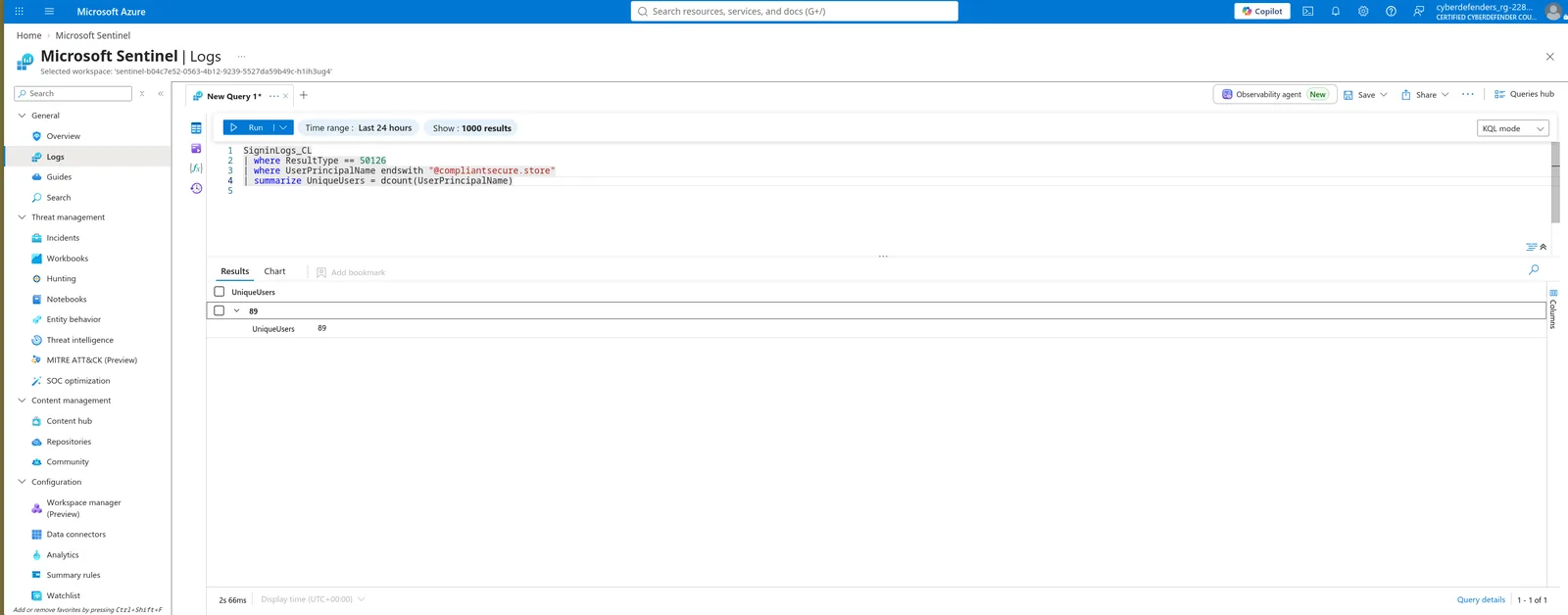
Gotcha:
ResultType != 0returns 92, and switching tosummarize by UserPrincipalName | countstill returns 92 — this is not adcount()approximation problem, it is a filter problem. Identify the three extra principals withsummarize Codes = make_set(ResultType) by UserPrincipalName | where not(Codes has "50126")before moving on; one of them matters a great deal later.
Geolocation lives in LocationDetails, a JSON object carrying city, state, countryOrRegion and coordinates. Aggregating on it directly returns a single dominant value — every one of the 269 sources resolves to the same city and country, consistent with the AWS eu-central-1 ranges throughout, plus two records with empty coordinates. Attribution stops at infrastructure: this identifies where the rented hosts sit, not the operator.
SigninLogs_CL
| where ResultType != 0
| summarize AttemptCount = count() by tostring(LocationDetails)
| top 5 by AttemptCount desc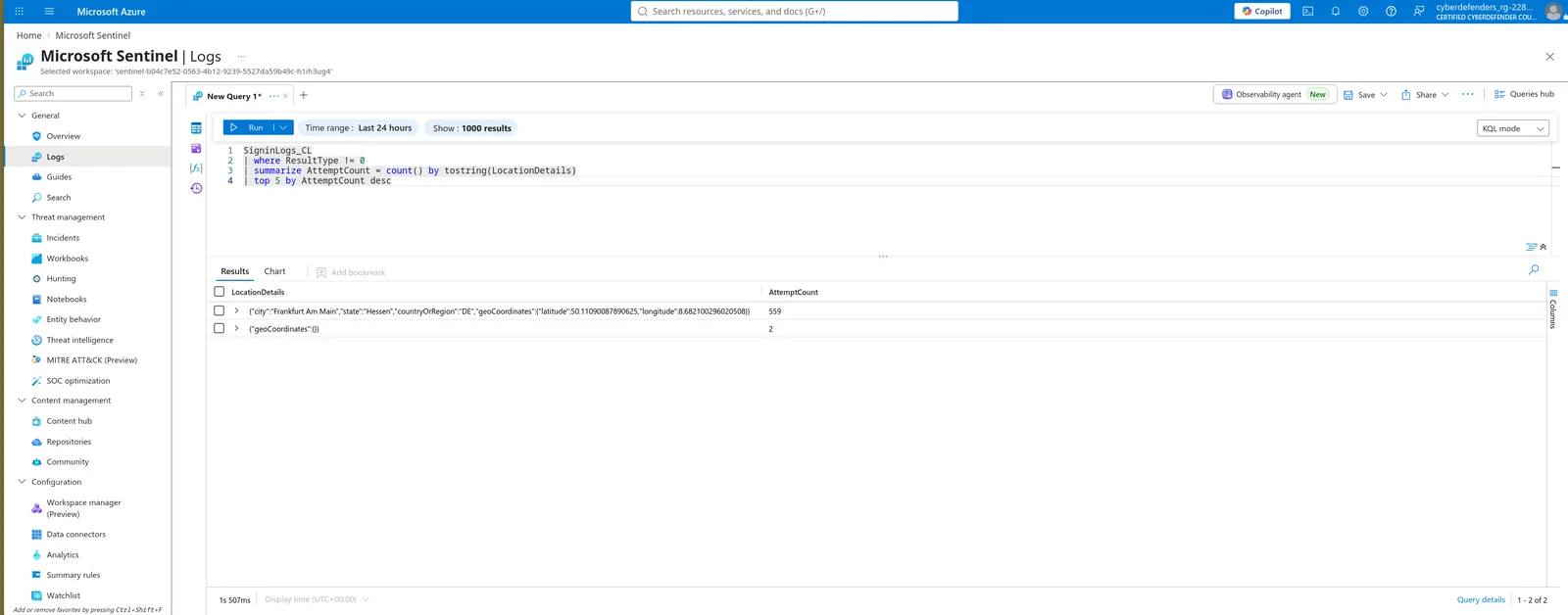
Gotcha:
parse_json()fails silently on double-serialised_CLrecords and returns empty columns with no error.tostring()before the aggregation works regardless of how the column is typed. Submit the value exactly as stored — it is the two-letter code, not the full country name and not the city.
Detection Engineering
Install the Microsoft Entra ID solution from Content Hub, then filter Analytics → Rule templates on “spray”. Three templates match, all Medium severity and all mapped to T1110 under Credential Access. Two are scoped to surfaces this tenant does not use — federated AD FS sign-in logs and the Kerberos-based Seamless SSO path — leaving one that targets Entra ID applications directly. Open it and read the query before moving on: it is the base you rewrite in Q9, and it carries both the authenticationThreshold and authenticationWindow parameters.
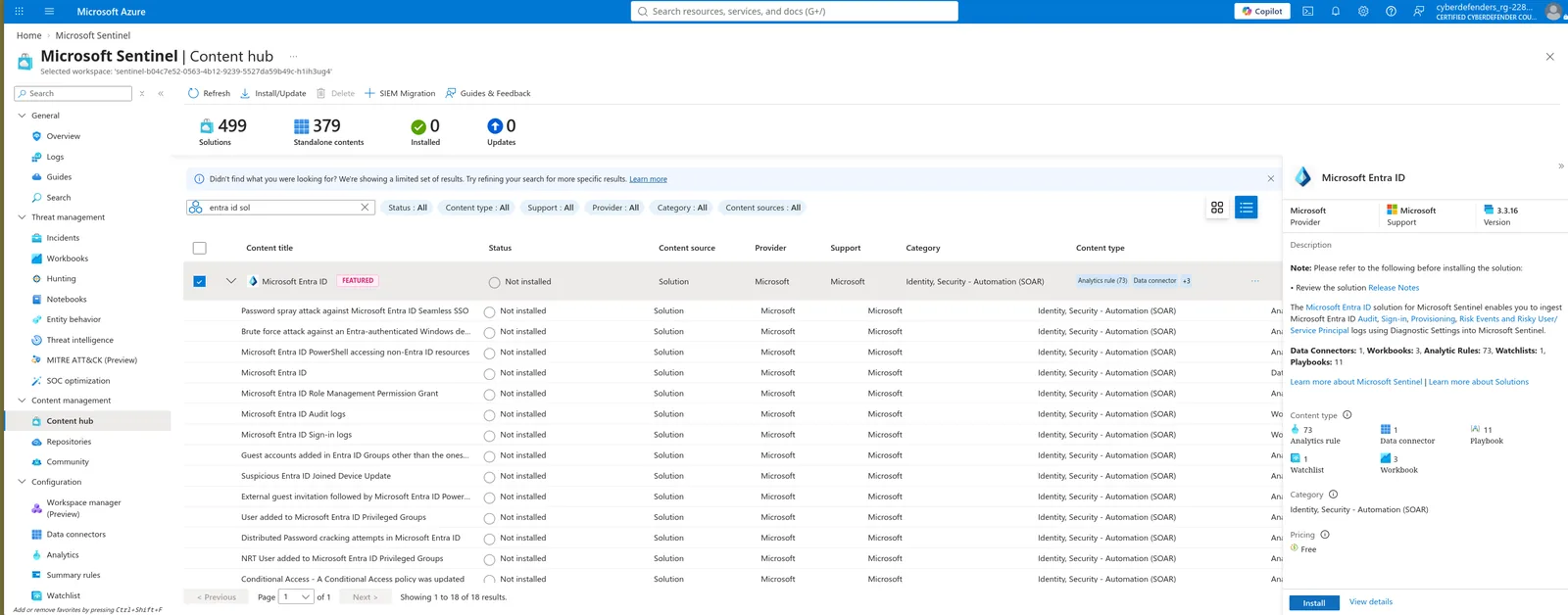
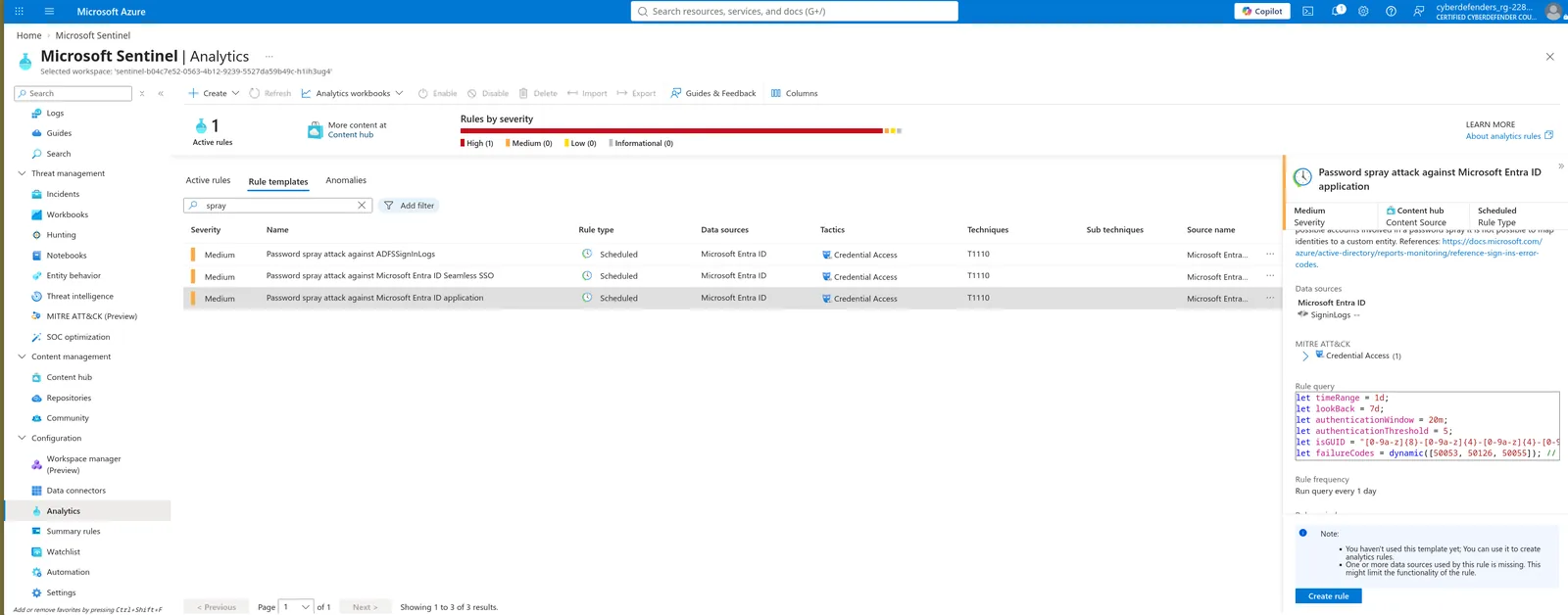
Tip: If templates do not appear, provisioning has not finished. Content Hub shows “Installed” before the templates are queryable — refresh Analytics after a minute.
The port is smaller than expected. Because this table’s columns are unsuffixed, the template’s Identity, UserId, UserPrincipalName and ResultType references already match — the only structural change is the table argument at the bottom, where aadFunc("SigninLogs") becomes aadFunc("SigninLogs_CL"). Drop the AADNonInteractiveUserSignInLogs line entirely: that table does not exist here and union isfuzzy=true will swallow the error, leaving a rule that looks healthy at half coverage. Then compute the threshold rather than guessing it — the rule counts distinct principals per IP per application per window, so the maximum value that still fires is the largest such count the attacker produced. Use Test with current data to confirm before saving.
SigninLogs_CL
| where ResultType != 0
| summarize FailedPrincipalCount = dcount(UserPrincipalName) by bin(CreatedDateTime, 20m), IPAddress
| summarize MaxPrincipalsPerWindow = max(FailedPrincipalCount) by IPAddress
| order by MaxPrincipalsPerWindow desc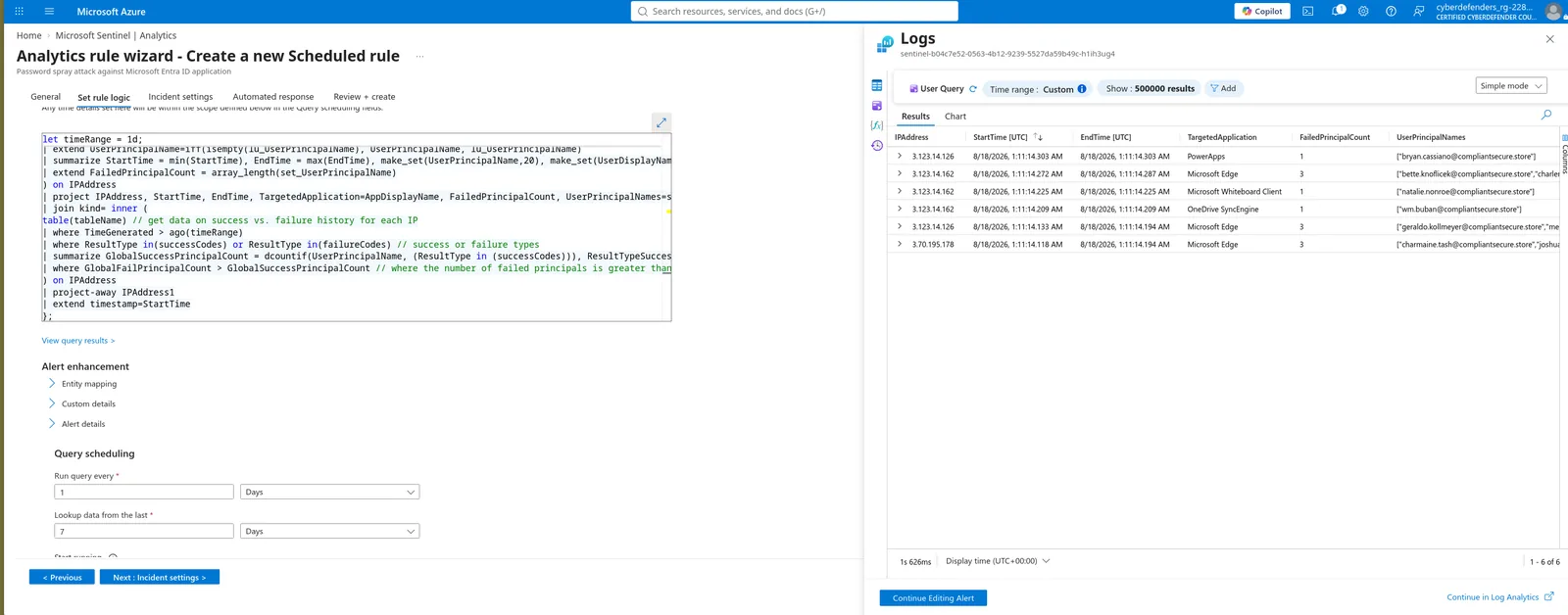
Gotcha: Two structural problems worth naming on camera. The template bins on
bin(TimeGenerated, authenticationWindow), and since this dataset was ingested inside a fraction of a second, every event falls into one bin — the temporal logic is inert and the rule fires by coincidence. And the first summarize groups byIPAddress, AppDisplayName, while the attacker rotated the target application on nearly every wave-two attempt; the simulation output shows one source split across PowerApps, Edge, Whiteboard and OneDrive SyncEngine with counts of 1, 3, 1, 1. Rebinning onCreatedDateTimeand droppingAppDisplayNamefrom the grouping key is the correct engineering — but derive the submitted answer from the stock behaviour.
Read it off the let block, third declaration from the top, unchanged from the stock template. It is consumed by the bin() call in the first summarize, converting a stream of failures into discrete buckets the threshold can evaluate against. Both waves of this attack fit inside a single bin regardless, so the window is not the limiting factor here — the grouping key is. Answer in minutes, stripping the duration suffix.
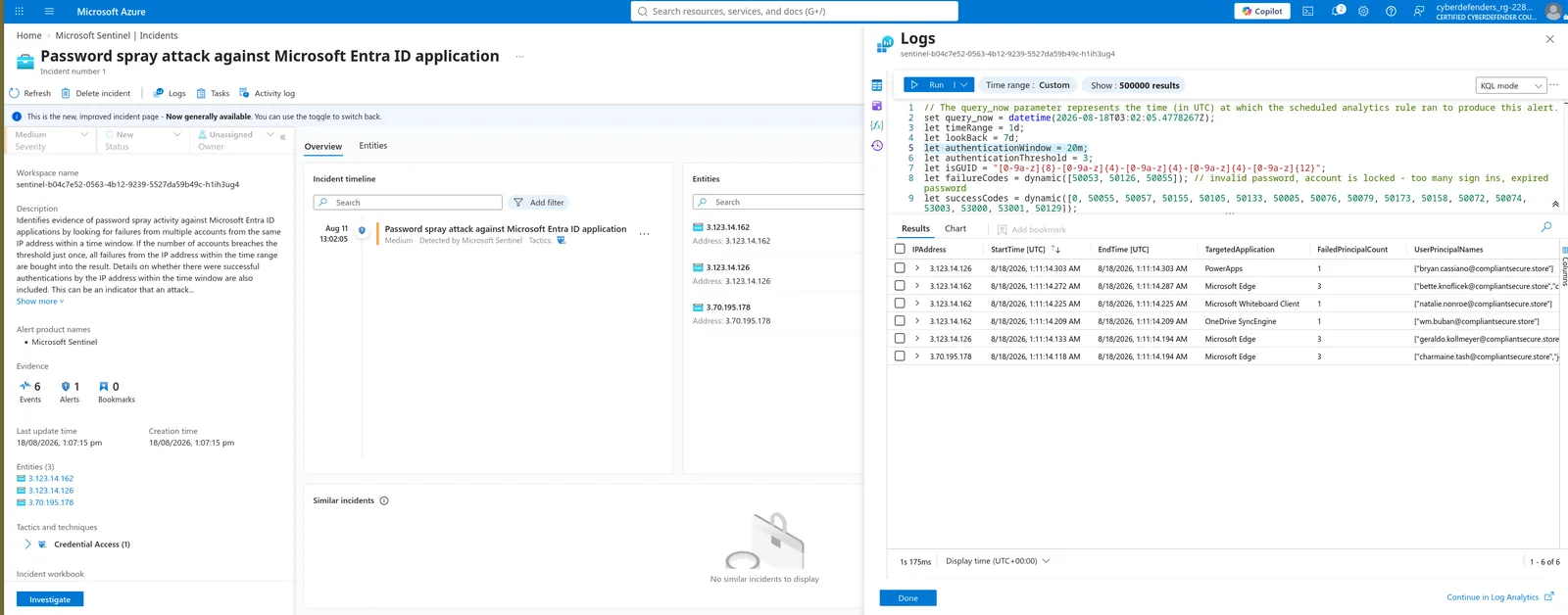
Tip: Window and threshold are a matched pair. Widening the window while holding the threshold constant makes the rule more sensitive, since more attempts land in each bin.
Enable the rule and let it run against the lookback period. One Medium incident generates, titled after the template, with 1 alert, 6 events and 3 IP entities. Submit the entities as a comma-separated list in the order the pane presents them.
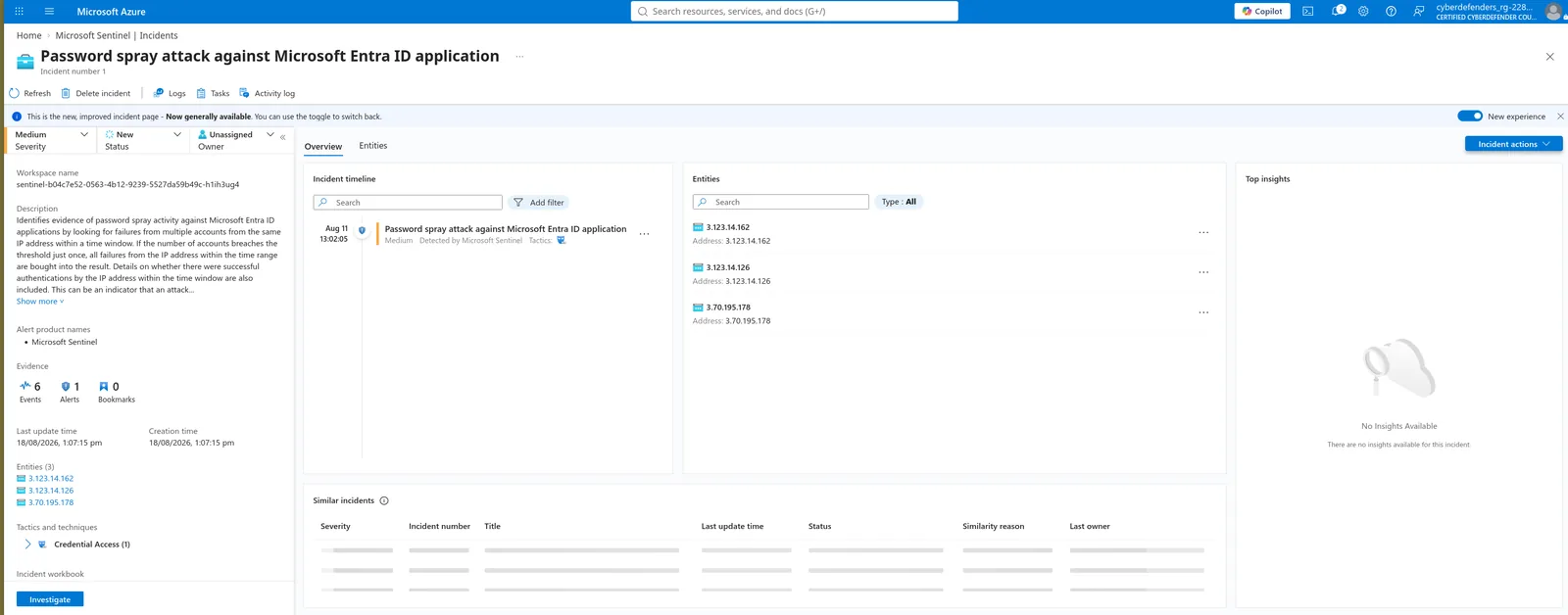
Gotcha: Three entities against 269 sources in the raw telemetry, and the highest-volume failing address from Q2 is not among them — the three that surfaced are the small subset reused across both waves, the only ones that repeated often enough to breach the threshold inside a single grouping bucket. Worse, the template’s
successCodeslist includes both MFA interrupt codes, so the host that actually obtained a token counts as a success in the finalGlobalFailPrincipalCount > GlobalSuccessPrincipalCountfilter and is structurally excluded. The rule cannot surface the compromise it is sitting on top of.
Initial Access
Azure AD’s documented default for Azure Public tenants — US Government tenants default to three, which would have caught this campaign outright. Cross-reference against Q2: the busiest host in the rotation reached six attempts, leaving four of headroom, so nothing was ever going to lock at scale. The same documentation adds a second mechanism working in the attacker’s favour: Smart Lockout tracks the last three bad password hashes and does not increment the counter for a repeated wrong password. A spray uses one password across many accounts, so per account the counter barely moves even before the host rotation is considered.
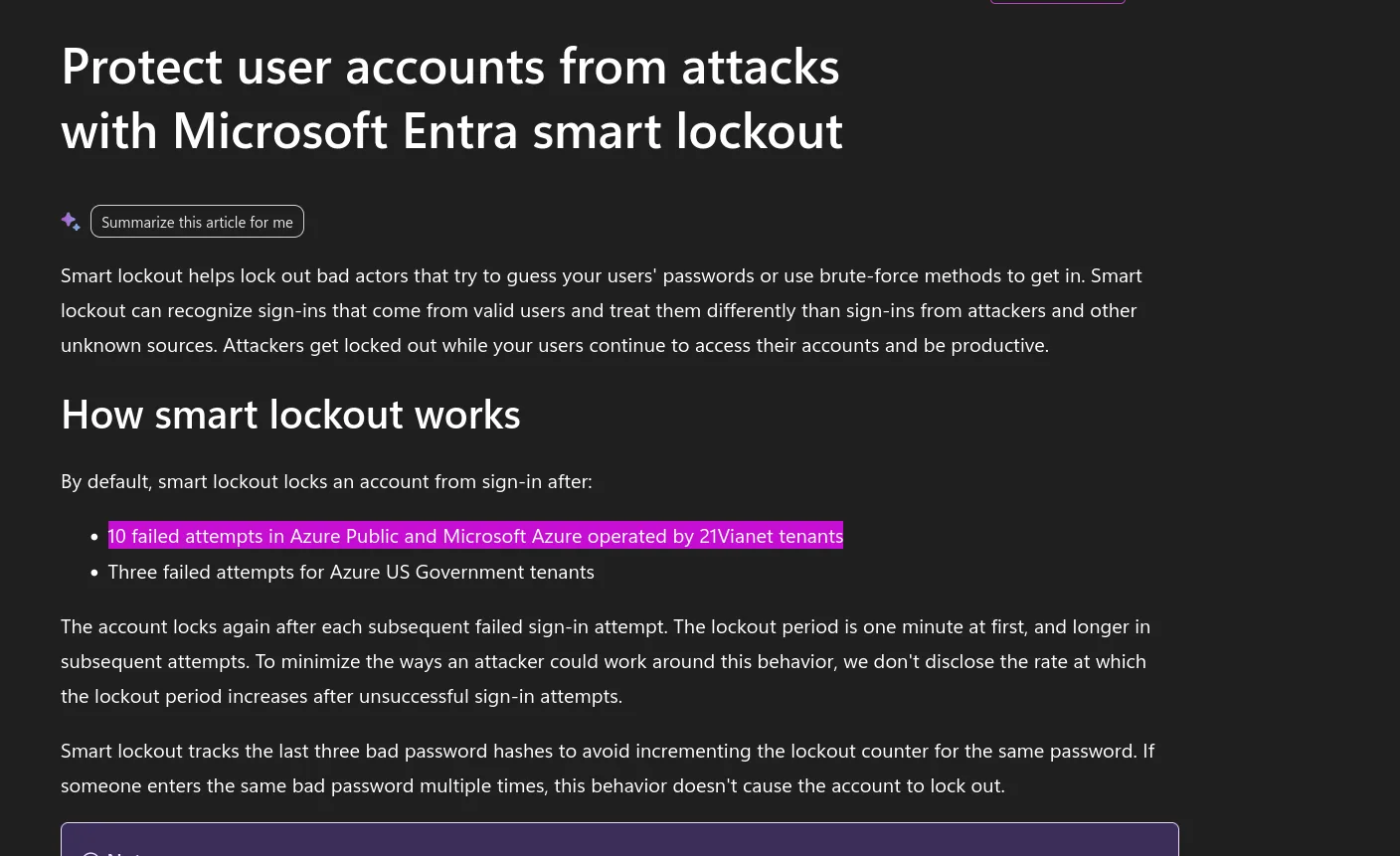
Hint: The value is a round number and it counts per IP-and-account pair, not per account globally — which is precisely what a 269-host rotation is built to exploit.
Filter on outcome and summarize — exactly one principal in the entire tenant ever received a session, from 18.153.49.155, a host appearing nowhere in either spray wave. Two successes 1.6 seconds apart against Azure Active Directory PowerShell, carrying the toolkit user agent from Q3’s tail: scripted token acquisition, not an interactive login. Then check the sequence on that host. Nine minutes earlier the same source authenticated as the same user through the Azure Portal and received an MFA enrolment interrupt — password correct, no session issued. Same credential, same host, different application, opposite outcome. Finally, cross-reference the victim against the Q6 result set: her UPN carries the probe code, the interrupt code and the success code, and no spray failure whatsoever. She was never among the 89 accounts sprayed, which means the credential was obtained outside this telemetry entirely.
SigninLogs_CL
| where ResultType == 0
| summarize FirstSuccess = min(CreatedDateTime), LastSuccess = max(CreatedDateTime), Count = count() by UserPrincipalName, IPAddress, UserAgent, AppDisplayName
| order by FirstSuccess asc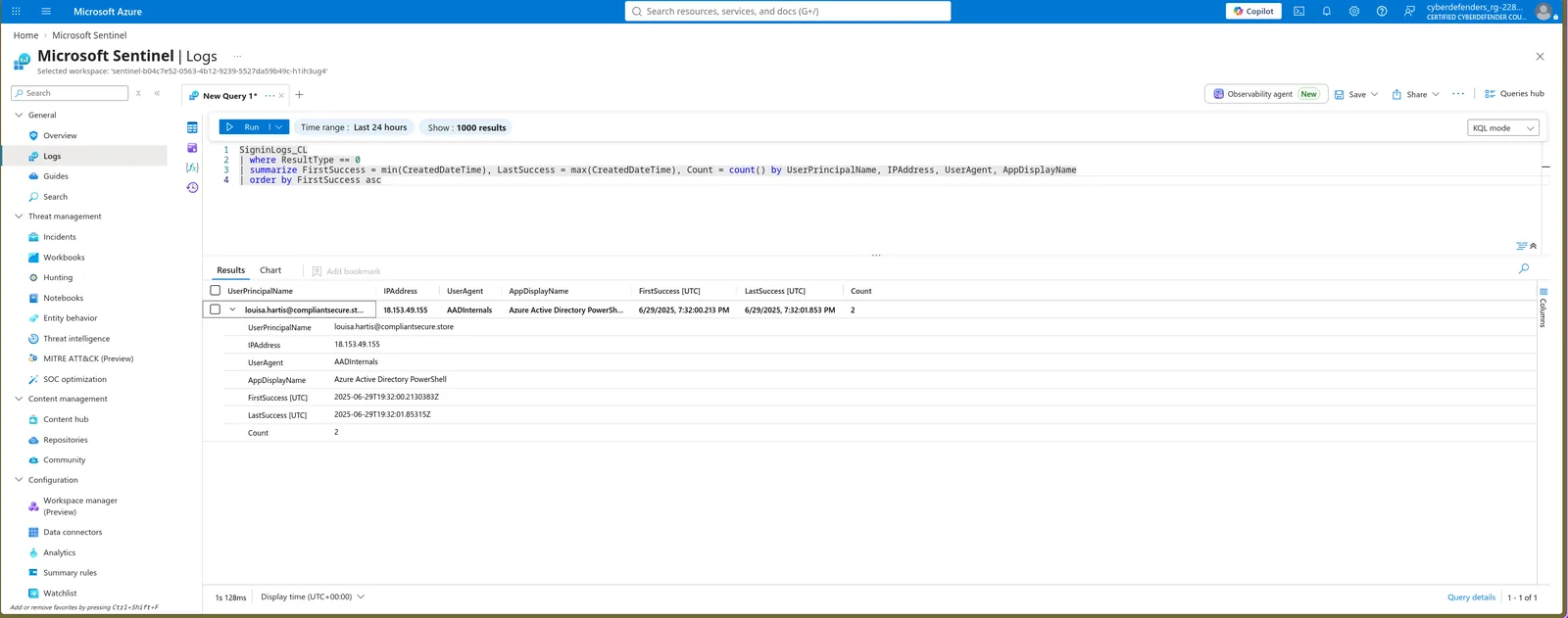
Gotcha: Two false leads. Matching on the Q3 user agent to find the compromise fails, because the successful sign-ins do not use it — spray and credential use are separate stages with separate tooling and separate infrastructure. And two MFA-challenge records elsewhere in the table look like attacker activity but are not: the sources sit outside the AWS ranges, the UPNs are GUIDs rather than corporate addresses, and the user agents do not match. Check source and UPN format before folding any MFA-blocked sign-in into the narrative.
Mitigation and Response
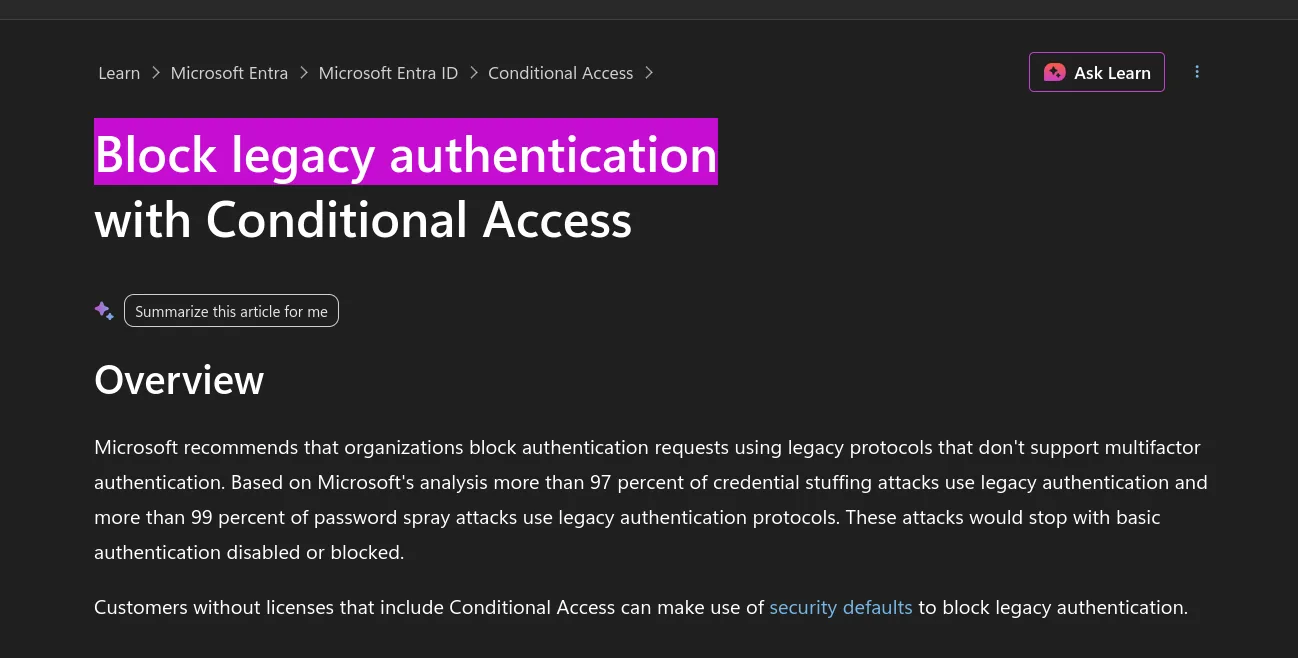
Microsoft’s Conditional Access documentation states the figure directly: more than 99 percent of password spray attacks and more than 97 percent of credential stuffing attacks use legacy authentication protocols, and all of them stop when basic authentication is blocked. The mechanism is what makes it the top control rather than MFA enforcement — legacy protocols cannot carry an MFA challenge or a risk signal, so they expose a clean credential-validation endpoint underneath everything layered above. This lab demonstrates the failure mode rather than asserting it: the interactive portal sign-in from Q13 was interrupted for MFA enrolment and issued nothing, while the same credential from the same host against a different application path received a token unchallenged minutes later.
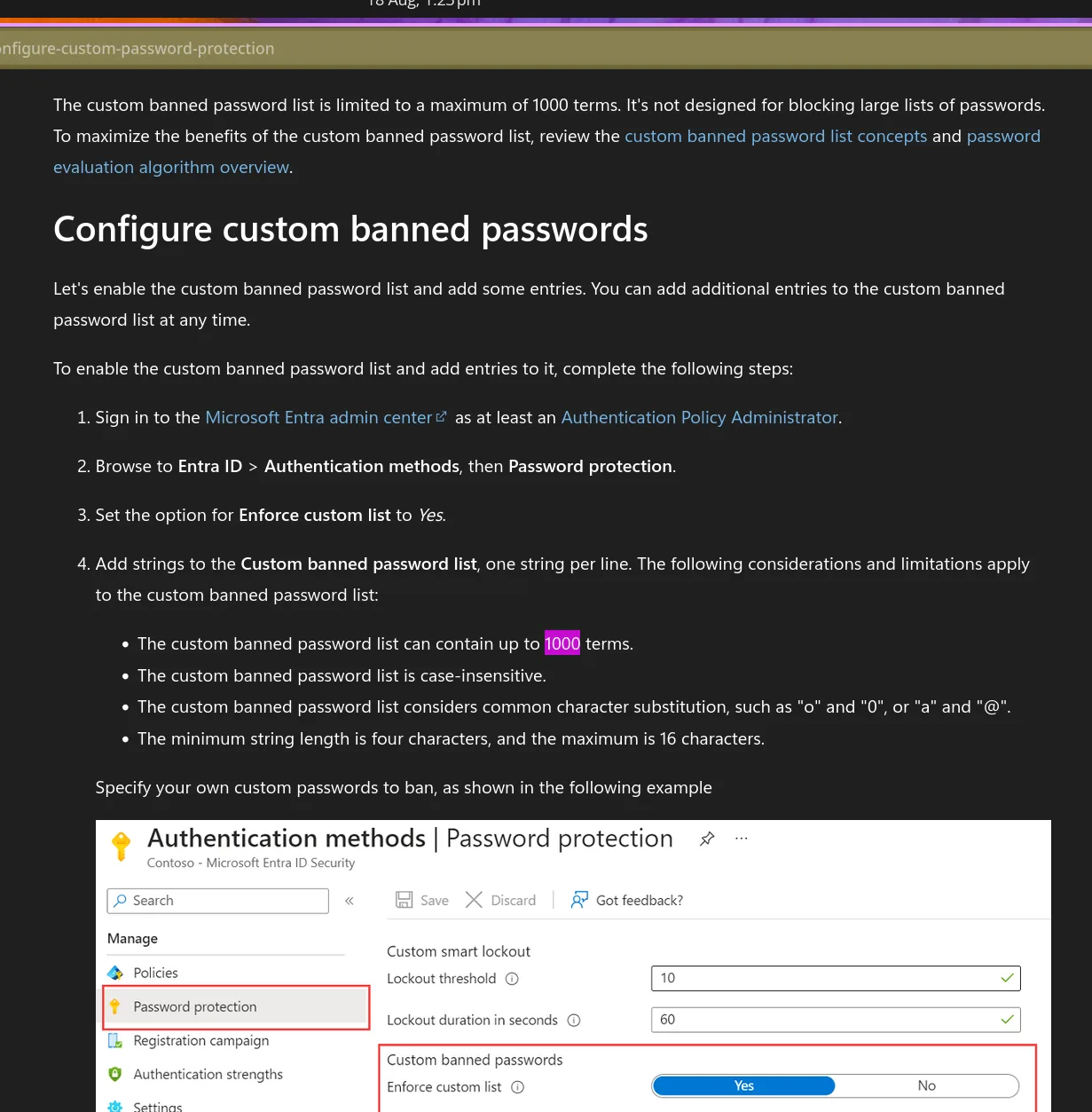
A hard service limit stated in the Password Protection configuration documentation, which is explicit that the list is not designed for blocking large password corpora — Microsoft’s global banned list already covers those automatically. The custom slots are for organisation-specific terms the global list cannot know. Three further constraints on the same page matter in practice: entries are case-insensitive, common character substitutions are handled automatically, and terms must be between four and sixteen characters. One base term therefore covers its leetspeak and case variants rather than consuming multiple slots.
In a federated tenant, authentication is evaluated at AD FS rather than in Azure AD, so cloud-side Smart Lockout never sees the attempt — a spray hits the on-premises federation service directly and Azure AD receives only the outcome. Microsoft’s secure-identity guidance names the AD FS equivalent that closes this gap for AD FS 2016 and 2019 deployments: per-IP tracking of failed attempts at the federation endpoint, with separate handling for external versus internal origins. The name describes exactly that boundary split.
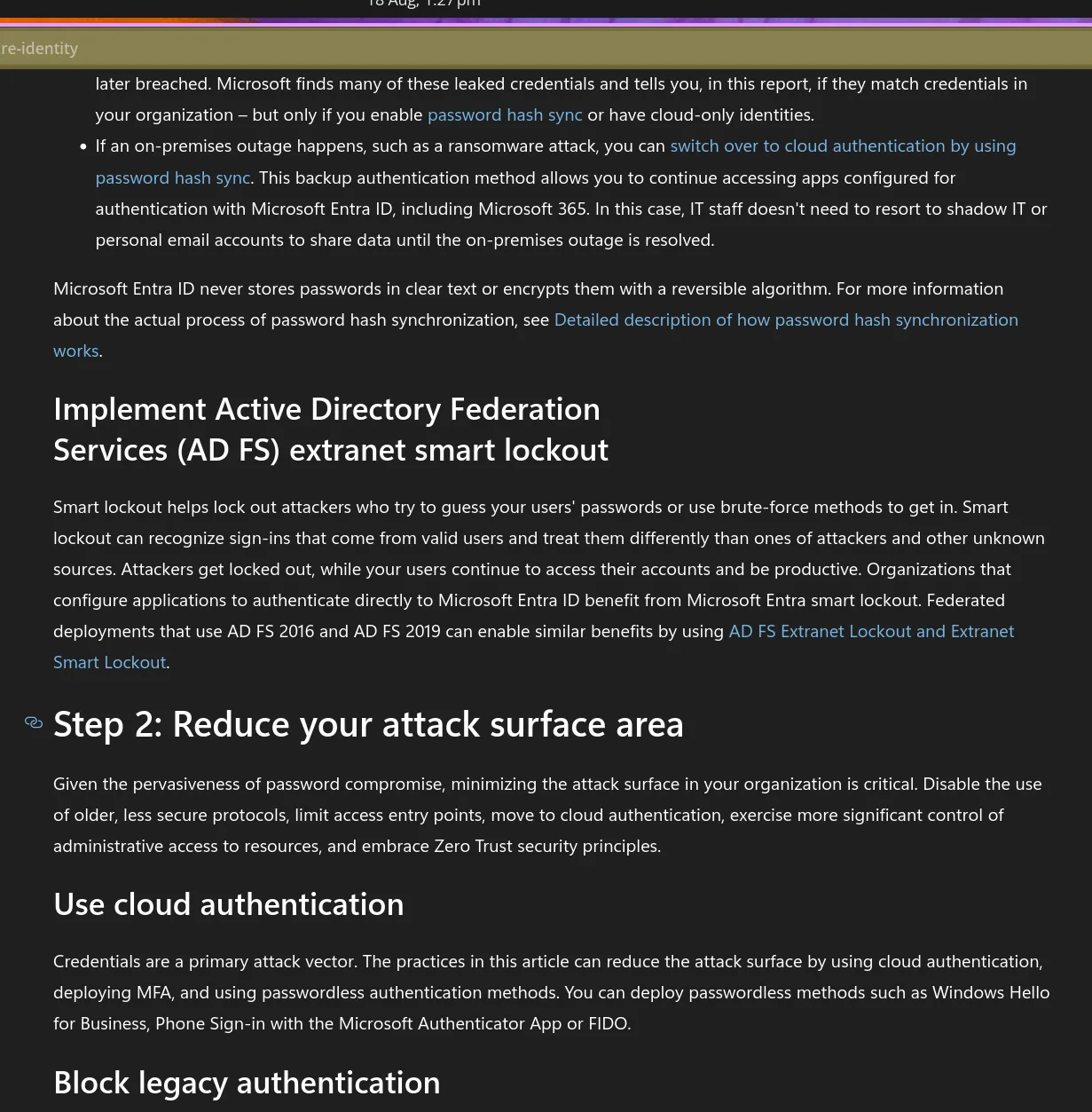
Hint: Combine the term AD FS uses for external-facing traffic with the cloud feature’s own name.
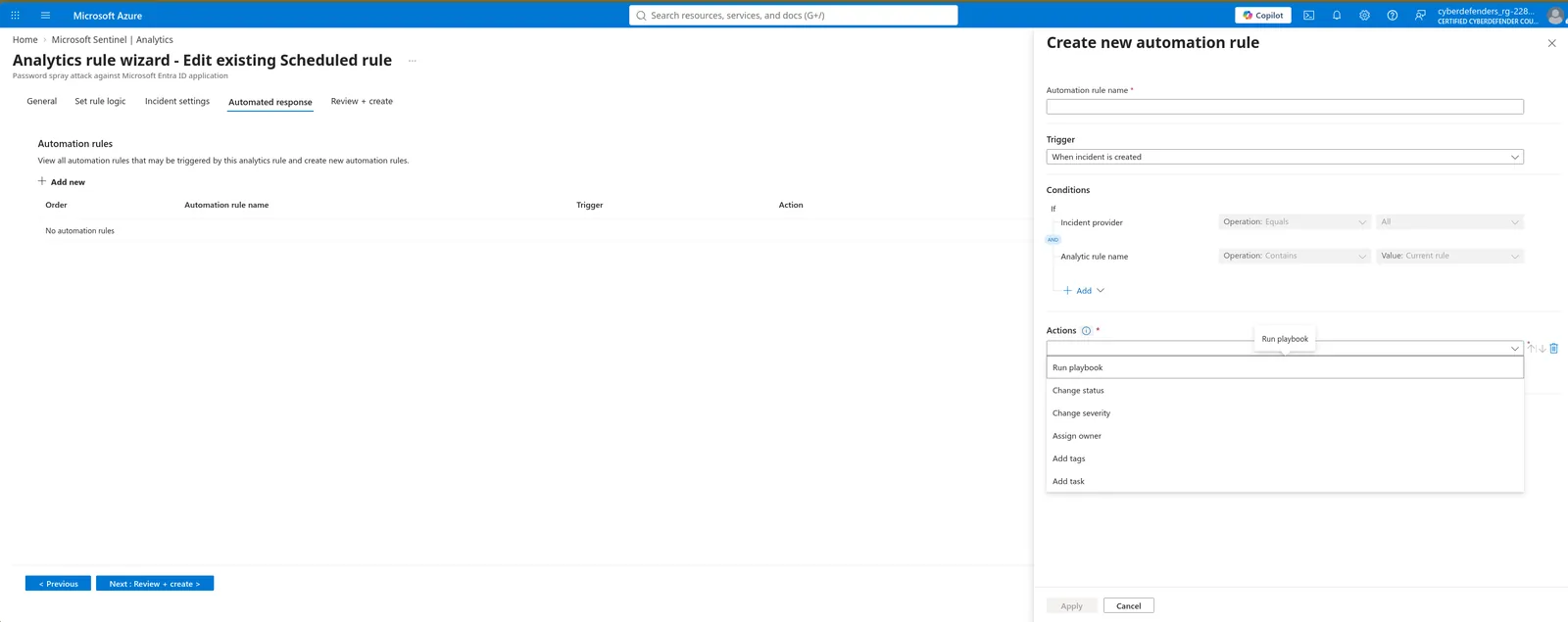
The Automated response tab sits between Incident settings and Review + create in the rule wizard; Add new opens the automation rule blade, where the trigger defaults to “When incident is created” and the Actions dropdown offers Run playbook as the first option. Nothing needs building — the question is hypothetical. The Graph action that matters here invalidates all refresh tokens for a user and forces every client to re-authenticate, issued as a POST against the user object under /v1.0/users/{id}/. Password reset alone is not containment: refresh tokens survive it, and this actor held a token rather than a browser session. The window automation had to beat was nine minutes.
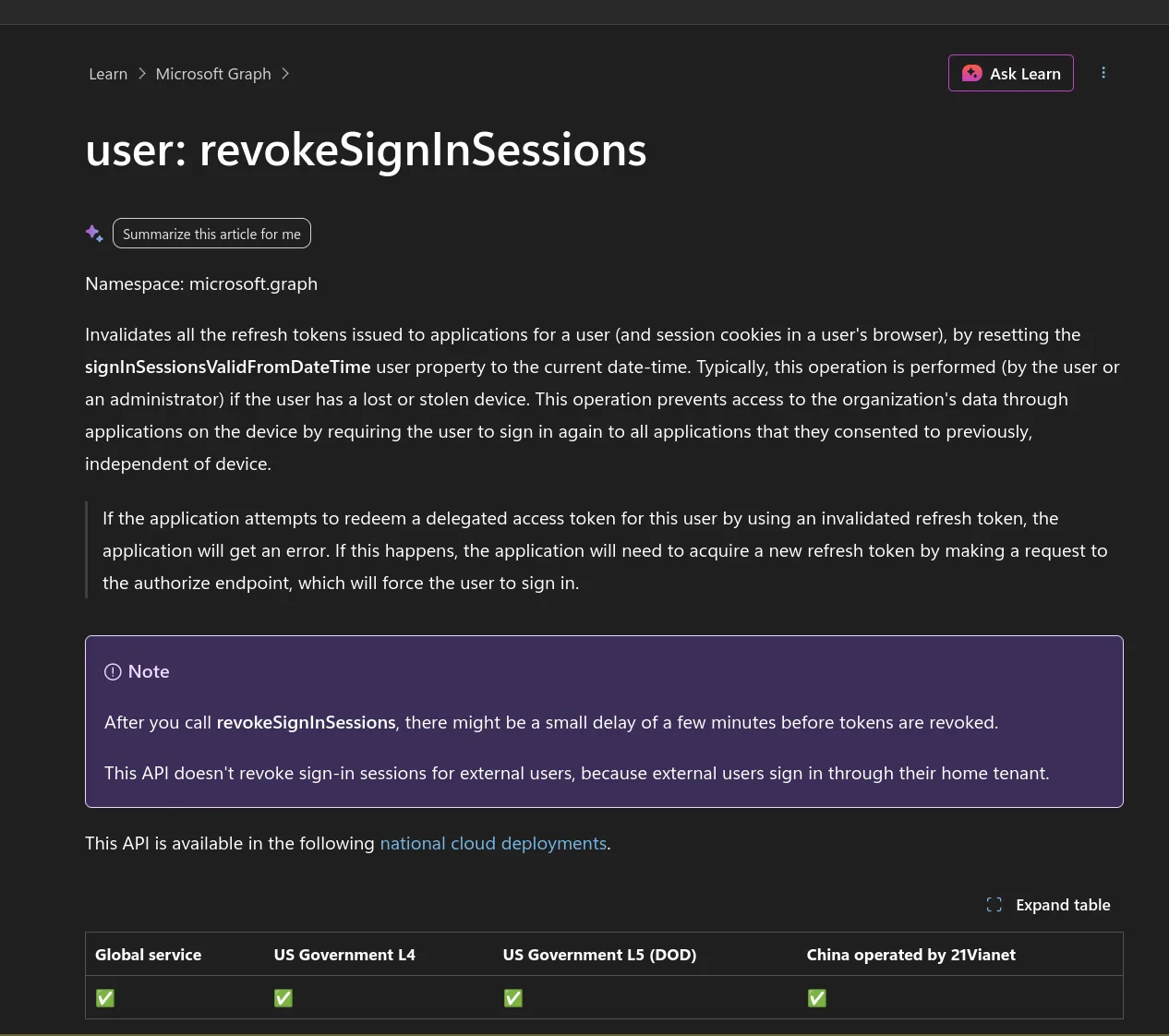
Gotcha: The playbook’s managed identity needs
User.RevokeSessions.All. Without it the action returns 403 at runtime and the incident closes with the session still live.
The requirement is in SP 800-63B section 5.1.1, stated twice: 5.1.1.1 sets the floor for subscriber-chosen memorized secrets, and 5.1.1.2 repeats it as a verifier obligation alongside the 64-character maximum that verifiers should permit. Appendix A.2 discusses why length matters but is non-normative and states no number, which sends a lot of people in circles. The same section discourages composition rules and requires screening against blocklists of compromised values. Against this lab the floor is close to irrelevant: two accounts had credentials in the attacker’s hands and both would have satisfied a minimum-length policy. Breached-password screening and MFA coverage were the controls that mattered.
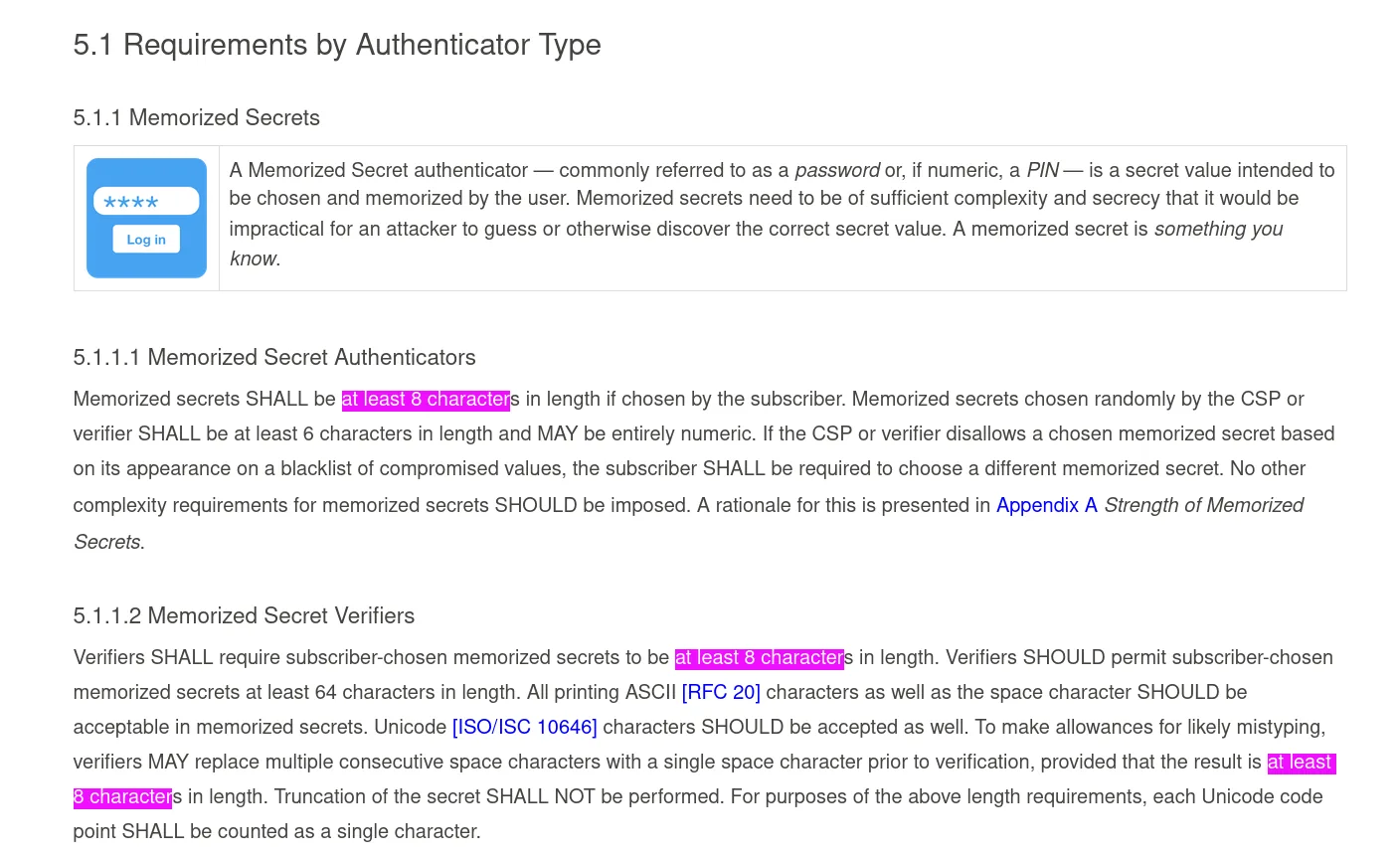
Gotcha: This is Revision 3’s number. Revision 4, finalised in 2024, raises the verifier-enforced minimum to fifteen characters — anyone checking against the current publication will find a different figure and assume they are wrong. Submit the Rev 3 value the lab was written against.
Attack Summary
| Phase | Action |
|---|---|
| Discovery | Probed ronald.veltre via Microsoft Whiteboard Client at 09:52 on 29 June from 3.71.104.45 — 500011, service principal not resolvable, spray user agent already in use |
| Discovery | Probed tonia.coach via Microsoft Edge at 16:18 from 3.70.211.108 — 500011, roughly two hours before wave one |
| Resource Development | Provisioned 269 AWS eu-central-1 hosts, each capped at six or fewer attempts before retiring |
| Reconnaissance | Arrived with a prepared list of 89 valid corporate UPNs, indicating prior OSINT or breach-data collection rather than live enumeration |
| Credential Access | Wave one: parallel spray launched at 18:35 on 29 June, with a dozen-plus hosts registering first attempts inside a three-second span |
| Discovery | Probed louisa.hartis via Accounts Control UI at 18:40 from 3.72.33.236, five minutes into wave one — against the account compromised 43 minutes later |
| Defense Evasion | Rotated source address per attempt to hold every host below the Smart Lockout threshold; one static Chrome user agent across all 269 hosts remained the only linking signal |
| Credential Access | Ten accounts tripped Smart Lockout where per-source pacing slipped |
| Initial Access | Used louisa.hartis credentials at 19:23 via Azure Portal from 18.153.49.155 — an account never sprayed, so the credential was sourced out of band; Azure AD returned 50072 and issued no session |
| Initial Access | Re-authenticated as the same user nine minutes later against Azure Active Directory PowerShell from the same host — the enrolment interrupt was not enforced on that path, and a token was issued |
| Execution / Discovery | Two AADInternals sign-ins 1.6 seconds apart against the AAD PowerShell application — scripted directory and permission enumeration |
| Credential Access | Wave two: resumed 08:56 on 30 June against sonja.cruce, cycling source IP and target application on every attempt across Edge, Visual Studio Legacy, Whiteboard, PowerApps, Accounts Control UI and Power BI |
| Discovery | Fourth probe at 09:05 from 3.66.172.9 against Microsoft Power BI — application enumeration continuing mid-wave rather than finalised up front |
| Credential Access | Validated sonja.cruce credentials at 11:24 from 52.59.211.178 with the AADInternals user agent; 50072 interrupt fired, no session issued, no pivot followed |
Forensic Timeline
| Timestamp | Event |
|---|---|
| 2025-06-29 09:52:18 | Application probe against ronald.veltre via Microsoft Whiteboard Client from 3.71.104.45 — 500011, spray user agent already in use |
| 2025-06-29 16:18:52 | Second probe against tonia.coach via Microsoft Edge from 3.70.211.108 — 500011 |
| 2025-06-29 18:35:06 | Wave one begins — first failures from 3.72.33.236, 3.70.195.88, 18.153.168.141 |
| 2025-06-29 18:35:07 | 3.123.14.219, 18.153.169.72, 3.66.172.43 register first attempts |
| 2025-06-29 18:35:08 | 18.153.169.110, 3.123.14.192, 3.66.172.61, 18.153.169.150, 3.66.172.223 join — twelve-plus sources live within three seconds of onset |
| 2025-06-29 18:35:09 | 3.71.104.205 makes its only attempt and retires; 18.153.169.225 first seen |
| 2025-06-29 18:40:11 | 18.153.169.203 enters the rotation |
| 2025-06-29 18:40:12 | Third probe, against louisa.hartis via Accounts Control UI from 3.72.33.236 — 500011, 43 minutes before her credentials are used |
| 2025-06-29 18:45:16 | 18.153.168.141 last seen — roughly a ten-minute operational lifetime |
| 2025-06-29 18:55:26 | 3.66.172.223 last seen; wave one failures taper |
| 2025-06-29 19:23:14 | louisa.hartis password validates from 18.153.49.155 via Azure Portal — 50072, MFA enrolment required, no session issued |
| 2025-06-29 19:32:00 | Same host authenticates as louisa.hartis against Azure Active Directory PowerShell with the AADInternals user agent — ResultType 0, token issued |
| 2025-06-29 19:32:01 | Second AADInternals sign-in 1.6 seconds later — scripted directory enumeration |
| 2025-06-30 08:56:16 | Wave two begins — sonja.cruce targeted from 3.123.14.204 via Microsoft Edge |
| 2025-06-30 08:56:20 | Second attempt from 3.71.104.43 via Visual Studio - Legacy — source and application both rotated within four seconds |
| 2025-06-30 08:59:18 | Microsoft Whiteboard Client from 18.153.169.225 |
| 2025-06-30 08:59:21 | PowerApps from 3.72.168.174 |
| 2025-06-30 09:02:28 | Accounts Control UI from 3.71.104.86 |
| 2025-06-30 09:02:32 | Microsoft Edge from 18.153.169.109 |
| 2025-06-30 09:05:37 | Microsoft Edge from 3.72.168.90 |
| 2025-06-30 09:05:41 | Fourth probe from 3.66.172.9 against Microsoft Power BI — 500011 |
| 2025-06-30 09:14:57 | Wave two tail — 18.153.169.203 last seen |
| 2025-06-30 11:24:19 | sonja.cruce password validates from 52.59.211.178 with the AADInternals user agent against Microsoft Office — 50072 interrupt, no session issued |
| 2026-08-18 13:07:15 | Custom analytics rule fires and generates the incident — three IP entities, one alert, six events, roughly fourteen months after the activity |
IOCs
| Type | Value |
|---|---|
| Source infrastructure | 269 distinct AWS eu-central-1 addresses across 3.66.x, 3.70.x, 3.71.x, 3.72.x, 3.123.x, 18.153.x |
| Source IP (highest failure volume) | 3.123.15[.]9 |
| Source IP (incident entity) | 3.123.14[.]162 |
| Source IP (incident entity) | 3.123.14[.]126 |
| Source IP (incident entity) | 3.70.195[.]178 |
| Source IP (probe, pre-wave-one) | 3.71.104[.]45 |
| Source IP (probe, pre-wave-one) | 3.70.211[.]108 |
| Source IP (probe, mid-wave-one) | 3.72.33[.]236 |
| Source IP (probe, mid-wave-two) | 3.66.172[.]9 |
| Source IP (credential use, wave one) | 18.153.49[.]155 |
| Source IP (credential use, wave two) | 52.59.211[.]178 |
| User agent (spray) | Mozilla/5.0 (Windows NT 10.0; Win64; x64) AppleWebKit/537.36 (KHTML, like Gecko) Chrome/104.0.0.0 Safari/537.36 |
| User agent (tooling) | AADInternals |
| Compromised account (never sprayed) | louisa.hartis@compliantsecure[.]store |
| Targeted account (sprayed, credential valid, MFA-blocked) | sonja.cruce@compliantsecure[.]store |
| Probed account | ronald.veltre@compliantsecure[.]store |
| Probed account | tonia.coach@compliantsecure[.]store |
| Target domain | compliantsecure[.]store |
| Source location | Frankfurt am Main, Hessen, DE (AWS eu-central-1) |
| Sign-in result code (spray failures) | 50126 |
| Sign-in result code (Smart Lockout) | 50053 |
| Sign-in result code (MFA enrolment interrupt) | 50072 |
| Sign-in result code (resource principal not found) | 500011 |
| Targeted application (post-compromise) | Azure Active Directory PowerShell |
MITRE ATT&CK
| Technique | ID | Description |
|---|---|---|
| Brute Force: Password Spraying | T1110.003 | 543 credential attempts against 89 corporate UPNs across two waves, distributed over 269 rotating cloud hosts each capped below the default Smart Lockout threshold |
| Cloud Service Discovery | T1526 | Four probes against non-resolvable service principals across four applications and four accounts, spanning nine hours before wave one through to mid-wave-two — enumeration run alongside the spray rather than as a discrete phase |
| Valid Accounts: Cloud Accounts | T1078.004 | Authenticated to a legitimate Entra ID identity using a credential absent from the spray’s failure records, reaching a token via an application path that did not enforce the MFA enrolment interrupt |
| Command and Scripting Interpreter: PowerShell | T1059.001 | Two automated sign-ins 1.6 seconds apart against the Azure AD PowerShell application using a public Entra ID post-exploitation toolkit |
| Account Discovery: Cloud Account | T1087.004 | Post-compromise toolkit session queried directory objects immediately on token acquisition |
Defender Takeaways
The account that fell was never sprayed, which inverts the incident’s causal story. louisa.hartis has no failed-authentication record anywhere in the tenant — only an application probe, an MFA enrolment interrupt and two successful token grants. Her password arrived from outside this telemetry: a breach corpus, a separate phish, or a channel not covered by sign-in logging. Treating the spray as root cause closes the incident with the actual credential source uninvestigated, and misses that the noisy 89-account spray ran concurrently with, and plausibly as cover for, targeted use of a known-good credential. Before accepting a spray-to-compromise narrative, confirm the victim actually appears in the sprayed set.
The MFA enrolment interrupt fired correctly and the attacker walked around it in nine minutes. The same credential from the same host was refused a session on the interactive portal path and granted one against the PowerShell application. The control was present, evaluated, and scoped to the wrong surface. Audit MFA and Conditional Access coverage per application and per client type rather than per user, and treat a 50072 followed by any success for the same principal as a high-confidence bypass signal — that two-row sequence is a better detection than anything the 543-attempt spray generated.
Application rotation defeats the grouping key in Microsoft’s own template. Wave two cycled six different first-party applications against a single victim, one per attempt, while also rotating source. Because the template summarises by IPAddress, AppDisplayName, every attempt landed in its own bucket — the rule’s simulation output shows one source split four ways with counts of 1, 3, 1, 1. Any detection whose grouping key includes an attacker-controlled field inherits that field’s evasion surface. Group by principal and time; use application and source as enrichment, not as partitions.
Incident entity lists are rule output, not attacker infrastructure, and the gap here was two orders of magnitude. Three IPs surfaced against 269 in the raw telemetry, and neither host that actually authenticated appears — structurally so, because the template counts MFA interrupt codes as successes and its final false-positive filter drops any source whose successes match or exceed its failures. Reconcile entity lists against a raw summarize by IPAddress before acting, and where source rotation is this wide, pivot containment onto identity and user agent rather than network indicators.
Failure-only aggregations hide successful attacker activity by construction, and result-code scope changes answers. The toolkit user agent showed a count of one in the initial breakdown purely because that query filtered on failures — the two successes were excluded by the filter meant to find the attack. The same scoping error inflates the targeted-account count by three and moves the attack start time nine hours earlier. Run outcome-agnostic aggregations alongside failure views, and carry make_set(ResultType) in exploratory queries so the scope of what you are counting stays visible.
Detection built after the fact is not detection. The rule that found this attack was written fourteen months later and generated its incident in seconds once it existed. Every signal it used — the static user agent, the per-IP principal counts, the geographic concentration — was present in the first three seconds of the spray. Nothing about this campaign was subtle at the aggregate level; the tenant simply had no rule reading the table.
Conclusion
The “one compromised account out of 89 targeted” figure is wrong in the way that matters most: the account that fell was not one of the 89. It was probed, then used, with a credential that appears nowhere in the tenant as a failure — while the account that was sprayed and did have its password validate got stopped by an MFA enrolment prompt the first account walked around by switching authentication paths. The 269-host spray is the loudest thing in this dataset and the least consequential part of what actually happened, and a detection rule tuned perfectly against it surfaced three addresses, none of which ever held a token.