GoogleCloudHunt
Scenario
In today’s cloud-driven environments, security incidents can pose significant risks, particularly when involving unauthorized access to critical resources. This lab walkthrough focuses on investigating a potential credential breach within a Google Cloud Platform (GCP) environment. Acting as a cybersecurity analyst, your task is to trace the attacker’s actions, uncover evidence of malicious activity, and identify the methods used to gain access and maintain persistence. The lab simulates real-world attack scenarios providing an opportunity to strengthen cloud forensic and investigation skills.
Executive Summary
A single Google Cloud principal showed an anomalous volume of authentication events compared to every other account in the environment, marking it as the compromised credential behind this incident. From that foothold, the attacker enumerated and accessed a Cloud Storage bucket holding sensitive documents, returning repeatedly to one specific file in a pattern consistent with exfiltration. The same principal then reached into two Compute Engine instances that shared a single attached service account for their API calls. Using that access, the attacker attempted to export a Cloud SQL database to an external storage bucket — an operation Cloud IAM blocked on a missing permission. Unable to exfiltrate the database directly, the attacker pivoted to persistence, creating a new service account and generating a private key for it to maintain covert, credential-based access going forward.
Artifacts
- GCP Cloud Audit Logs (JSON) —
logs.json→ parse and filter withjq
Tooling note: Every question in this lab is solved by progressively narrowing
jqfilters onprotoPayloadfields —authenticationInfo.principalEmail,resourceName,serviceName,methodName, andauthorizationInfo[]. Each prior answer becomes the pivot value for the next filter.
Initial Access
GCP Cloud Audit Logs record every authenticated API call, so a compromised credential should surface as anomalous access volume rather than needing external threat intel. Pull every principal email out of the log file and rank by frequency — a compromised account under active attacker use will dwarf normal user activity.
# tool: jq
jq '.[] | .protoPayload.authenticationInfo.principalEmail' logs.json | sort | uniq -c | sort -nr
One address sits far above the rest in the ranked output — a volume of activity no legitimate user generates in this timeframe, and the account this entire investigation centers on for every subsequent question.

Discovery
With the compromised principal confirmed, narrow the logs to resource access events referencing storage buckets rather than reviewing every log line — resourceName is the field that carries this, and filtering on it directly isolates every bucket interaction in the dataset.
# tool: jq
jq '.[] | select(.protoPayload.resourceName != null and (.protoPayload.resourceName | contains("buckets"))) | {bucket: .protoPayload.resourceName, user: .protoPayload.authenticationInfo.principalEmail}' logs.json
One bucket appears first in the output and repeatedly thereafter, every hit tied to the compromised principal — the attacker’s first target once inside the environment.

Compute Engine access from the same compromised principal needs a different filter — scope to the compute.googleapis.com service and specifically to authorizationInfo entries referencing instance resources, rather than every API call the principal made.
# tool: jq
jq '.[] | select(.protoPayload.authenticationInfo.principalEmail == "david.smith8391273718@gmail.com" and .protoPayload.serviceName == "compute.googleapis.com" and .protoPayload.authorizationInfo[].resource? != null and (.protoPayload.authorizationInfo[].resource | contains("/instances/"))) | .protoPayload.authorizationInfo[].resource' logs.json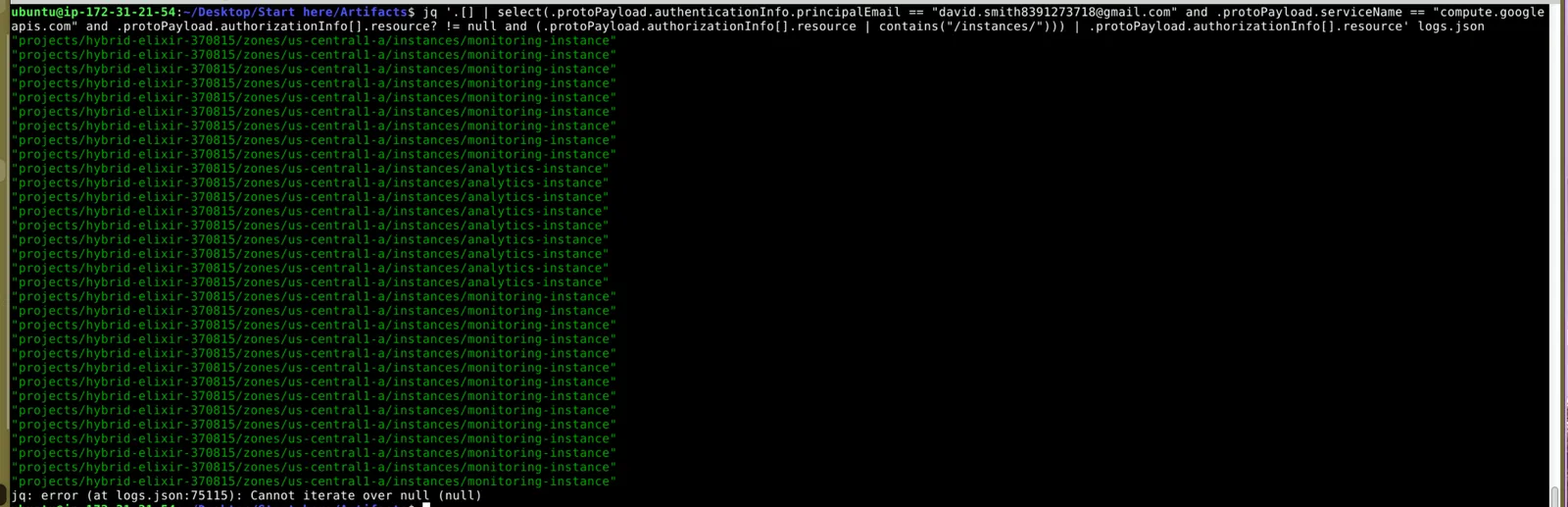
Two distinct instance names repeat across the filtered output — the attacker didn’t stop at one machine, touching both with sustained, repeated access rather than a single opportunistic connection.
Compute instances authenticate to Google Cloud APIs through an attached service account rather than a user identity — filter for log entries carrying serviceAccountDelegationInfo, a field that only populates when a service account is doing the calling on the instance’s behalf.
# tool: jq
jq '.[] | select(.protoPayload.authenticationInfo.serviceAccountDelegationInfo != null) | {instance: .protoPayload.resourceName, serviceAccount: .protoPayload.authenticationInfo.principalEmail}' logs.json
The same service account address ties back to both instances identified in Q4, confirming a single shared identity handling API calls for both — one credential worth targeting for persistence rather than two.

Collection
Rather than list every object in the bucket identified in Q2, scope the filter specifically to that bucket’s path and pull the object names referenced inside it — repeated access to a single object, versus one-off browsing, is what marks exfiltration rather than reconnaissance.
# tool: jq
jq '.[] | select(.protoPayload.resourceName != null and (.protoPayload.resourceName | test("/buckets/confidential-documents-482374561/"))) | {bucket: (.protoPayload.resourceName | split("/")[3]), object: .protoPayload.resourceName}' logs.json
One file name recurs across multiple access events tied to the compromised principal — the object the attacker returned to repeatedly, consistent with staging it for exfiltration rather than a single incidental read.

Exfiltration
With the compromised principal already confirmed, scope the filter to the cloudsql.googleapis.com service directly rather than searching broadly — Cloud SQL activity from that principal narrows straight to the database in question.
# tool: jq
jq '.[] | select(.protoPayload.authenticationInfo.principalEmail == "david.smith8391273718@gmail.com" and .protoPayload.serviceName == "cloudsql.googleapis.com") | {database: .protoPayload.resourceName, user: .protoPayload.authenticationInfo.principalEmail}' logs.json
One database name repeats throughout the filtered output, tied consistently to the compromised principal — the attacker’s target for the exfiltration attempt that follows.

Export attempts leave a trace even when they fail — filter for the specific cloudsql.instances.export permission against the database identified in Q6, and pull both the resource URI and any status message the API returned.
# tool: jq
jq '.[] | select(.protoPayload.resourceName != null and (.protoPayload.resourceName | contains("analytics-db")) and (.protoPayload.authorizationInfo[].permission == "cloudsql.instances.export")) | {uri: .protoPayload.resourceName, message: .protoPayload.status.message}' logs.json
The output names the destination bucket the attacker targeted for the export, alongside a status message confirming the operation failed — the attacker had the database targeted, but lacked the storage.objects.create permission needed to actually write the export out.

Gotcha: A failed operation still fully discloses attacker intent in the logs — don’t skip entries just because
status.messageshows an error.
Persistence
Blocked from exfiltrating the database directly, the attacker’s next move is establishing persistence — filter for the CreateServiceAccount IAM method specifically, which fires exactly once per new service account and names both the creator and the new account ID.
# tool: jq
jq '.[] | select(.protoPayload.methodName == "google.iam.admin.v1.CreateServiceAccount") | {createdBy: .protoPayload.authenticationInfo.principalEmail, serviceAccountId: .protoPayload.request.account_id}' logs.json
The output confirms the compromised service account itself created a brand-new service account — a textbook cloud persistence move that survives even if the original compromised user credential gets rotated.

A new service account alone doesn’t grant remote access — it needs a key. Filter for the CreateServiceAccountKey method to find exactly when, and for which account, a key was minted.
# tool: jq
jq '.[] | select(.protoPayload.methodName == "google.iam.admin.v1.CreateServiceAccountKey") | {createdBy: .protoPayload.authenticationInfo.principalEmail, serviceAccountId: .protoPayload.response.name}' logs.json
The response.name field returns the key ID generated for the service account created in Q8 — the credential that gives the attacker standing, covert access to the environment independent of the originally compromised user.

Attack Summary
| Phase | Action |
|---|---|
| Initial Access | Compromised GCP principal identified via anomalous authentication volume across cloud audit logs |
| Discovery | Attacker enumerated and accessed a Cloud Storage bucket holding sensitive documents |
| Collection | Repeated access to a specific document within the bucket, consistent with staging for exfiltration |
| Discovery | Attacker accessed two Compute Engine instances sharing a common service account |
| Discovery | Shared service account identified as the identity used for API calls from both instances |
| Exfiltration | Attacker attempted to export a Cloud SQL database using the shared service account’s access |
| Exfiltration | Export attempt targeted an external storage bucket but failed due to missing IAM permission |
| Persistence | Attacker created a new service account to maintain access independent of the original credential |
| Persistence | Secret key generated for the new service account to enable covert, ongoing API access |
IOCs
| Type | Value |
|---|---|
| Account | david.smith8392173781@gmail.com |
| Storage Bucket | projects/_buckets/confidential-documents-482374561 |
| File | Financial_Report_2023_Classified.pdf |
| Compute Instance | monitoring-instance |
| Compute Instance | analytics-instance |
| Service Account | cloudops-service@hybrid-elixir-370815.iam.gserviceaccount.com |
| Database | analytics-db |
| Storage Bucket | backup-repository-543268313682 |
| Service Account | cloud-ops-service |
| Secret Key ID | 16569a4f4b09194fc21077d353a2513bada24b3 |
MITRE ATT&CK
| Technique | ID | Description |
|---|---|---|
| Valid Accounts: Cloud Accounts | T1078.004 | Attacker operated using a single compromised GCP principal for all initial access |
| Cloud Infrastructure Discovery | T1580 | Attacker enumerated Cloud Storage buckets and Compute Engine instances via authenticated API calls |
| Data from Cloud Storage | T1530 | Attacker repeatedly accessed and staged a sensitive object within a Cloud Storage bucket |
| Exfiltration to Cloud Storage | T1567.002 | Attacker attempted to export a Cloud SQL database to an attacker-designated storage bucket |
| Create Account: Cloud Account | T1136.003 | Attacker created a new service account using the compromised identity’s IAM permissions |
| Account Manipulation: Additional Cloud Credentials | T1098.001 | Attacker generated a secret key for the newly created service account to maintain persistent access |
Defender Takeaways
Per-principal authentication volume is the single strongest signal in this incident, and it’s cheap to monitor continuously. No malware signature or IOC feed would have caught this — only a baseline of expected API call volume per identity, with alerting on outliers. Any principal generating an order-of-magnitude more authenticated events than its historical norm deserves immediate review, especially personal-domain email addresses operating alongside enterprise identities in the same project.
A single service account shared across multiple Compute Engine instances multiplies blast radius unnecessarily. Compromise of one instance’s credentials granted the attacker equivalent access on a second, unrelated instance purely because both were configured to authenticate as the same identity. Scoping service accounts per-instance or per-workload, following least privilege, would have contained the compromise to a single machine.
cloudsql.instances.export and storage.objects.create are exactly the kind of narrow, high-impact IAM permissions that warrant real-time alerting regardless of outcome. The export attempt in this case failed only because the attacker’s service account lacked one specific permission — a coincidence of misconfiguration, not a designed control. Alert on every export attempt against production databases, successful or not, rather than relying on IAM to silently absorb the failure.
google.iam.admin.v1.CreateServiceAccount and CreateServiceAccountKey are rare, high-signal events that should never pass without review. Legitimate service account creation is infrequent and usually tied to a change-management ticket. Any unattributed creation of a new service account, followed immediately by a key generation for that same account, is close to a definitive persistence indicator and should trigger automated alerting, not just periodic audit review.
Conclusion
The attacker never needed to escalate privileges or pivot through a network — a single compromised cloud credential was enough to browse storage, ride a shared service account across compute instances, and attempt a database export. The one control that actually stopped data from leaving the environment was a narrowly scoped IAM permission the attacker’s service account didn’t have; every other layer of this environment let the compromise walk straight through.
I successfully completed GoogleCloudHunt Blue Team Lab at @CyberDefenders! https://cyberdefenders.org/blueteam-ctf-challenges/achievements/inksec/googlecloudhunt/
#CyberDefenders #CyberSecurity #BlueYard #BlueTeam #InfoSec #SOC #SOCAnalyst #DFIR #CCD #CyberDefender