ShadowRoast
Scenario
Investigate and analyze malicious activity in an Active Directory environment using log analysis and Splunk queries to identify initial access, persistence, lateral movement, and data exfiltration techniques.
Executive Summary
A masqueraded update utility gave the attacker an initial foothold on a corporate workstation, spawning command-line and PowerShell children that staged tooling in a low-visibility default-profile temp directory. Persistence was pinned to a randomised HKCU Run key tied to the same masquerading binary. From the staging directory, the attacker ran a Kerberos AS-REP Roasting utility to harvest a crackable hash for one domain account, then pivoted to a credential-dumping tool disguised as a system utility to compromise a second account. The same dumping tool was later used to register a rogue domain controller, manipulating Active Directory replication data outside the audit trail a legitimate DC write would generate. The attacker flipped the RDP registry flag on the domain controller and file server to move laterally, then staged a compressed archive of sensitive files on the file server ahead of exfiltration.
Artifacts
- Sysmon/Windows Event Logs (EVTX) — triage collection from
Office-PC,FileServer,DC01→ open with Event Log Explorer or process via KAPE/EZ Tools - Splunk instance — same logs ingested under index
shadowroast→ primary tool used throughout this investigation for cross-host SPL queries
Initial Access
The environment naming convention (Office-PC, FileServer, DC01) makes the workstation the likely entry point rather than a server, so start there. Pull Sysmon process creation events (Event ID 1) for Office-PC and filter for the two shells an attacker reaches for first post-compromise.
# tool: splunk
index="shadowroast" AND event.code=1 AND winlog.computer_name=Office-PC.CORPNET.local AND (winlog.event_data.Image=*cmd* OR winlog.event_data.Image=*powershell*)
The result set surfaces AdobeUpdater.exe running out of CORPNET\sanderson’s Downloads folder as the parent of both shells — no legitimate update mechanism spawns a shell from a user’s Downloads directory. Pivoting on that PowerShell instance’s ProcessId to trace its children confirms a masqueraded credential-dumping tool running underneath it, tying this same execution directly into the credential access phase later in the chain.
# tool: splunk
index="shadowroast" AND event.code=1 AND winlog.computer_name=Office-PC.CORPNET.local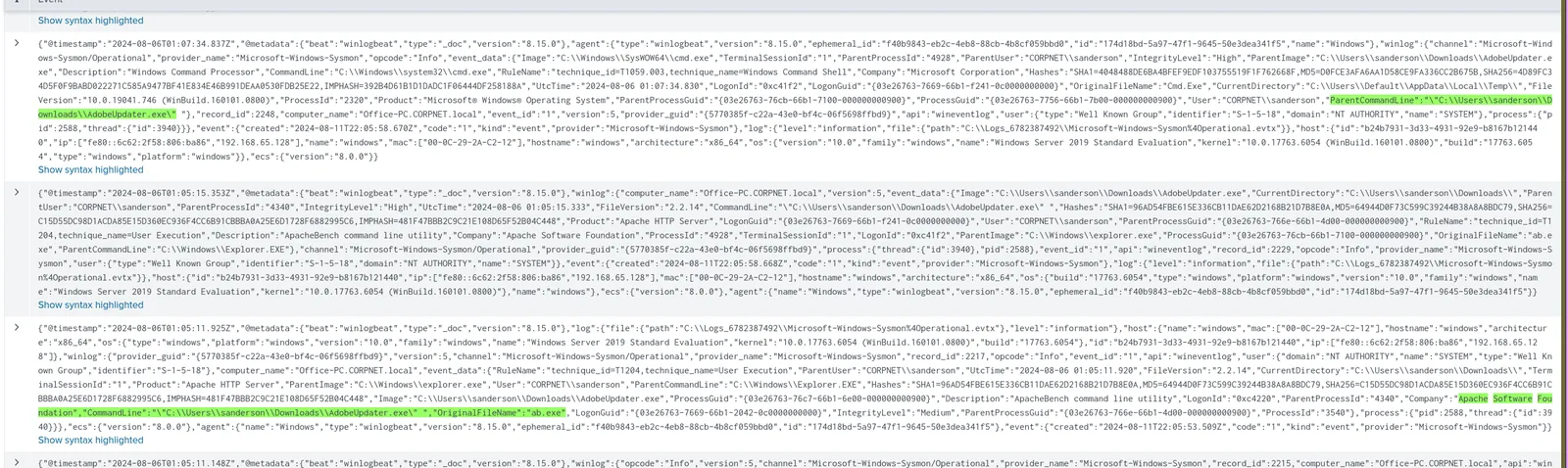
Tip: The Downloads path is the tell — no updater binary belongs there. Anchor the pivot on the process ID, not the filename, since the attacker renames every subsequent tool.
Persistence
With AdobeUpdater.exe confirmed as the malicious parent, persistence should sit close to it. Registry object modifications land under Sysmon Event ID 13 — filter Office-PC for any TargetObject touching a Run key.
# tool: splunk
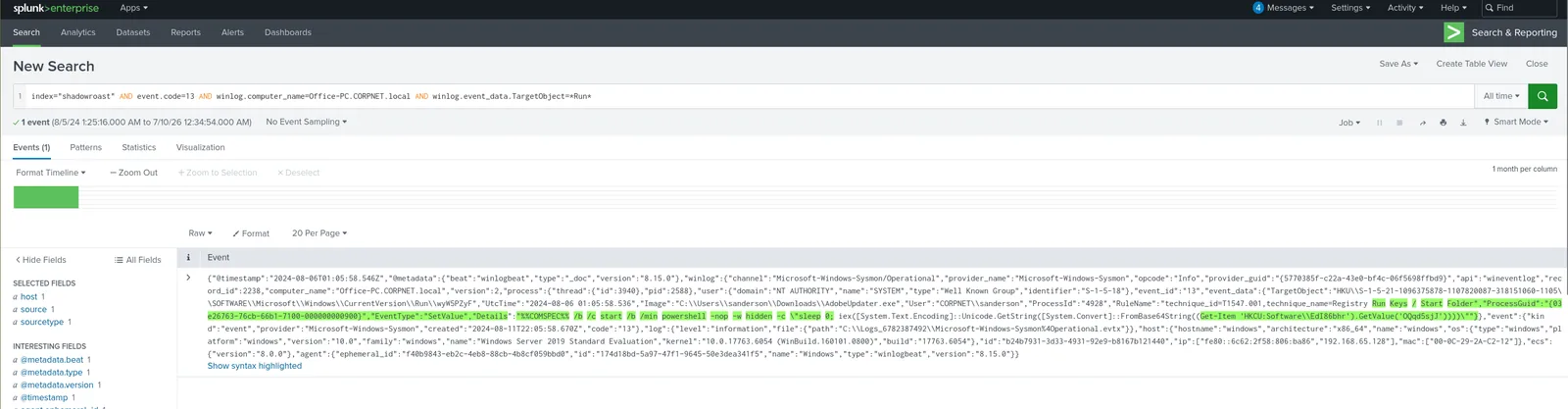
index="shadowroast" AND event.code=13 AND winlog.computer_name=Office-PC.CORPNET.local AND winlog.event_data.TargetObject=*Run*
One value stands out among the noise: a randomly-generated run key name written to HKCU\Software\Microsoft\Windows\CurrentVersion\Run by AdobeUpdater.exe itself — a random string avoids a recognisable persistence entry sitting next to legitimate startup items.
Credential Access
Tracing AdobeUpdater.exe’s process tree in Q1 already surfaces the working directory its child processes execute from — a default-profile temp path, not the compromised user’s own profile. Attackers favour a default-profile temp directory for exactly this reason: it survives outside the compromised user’s normal file activity and sits in a profile that’s rarely reviewed during triage.
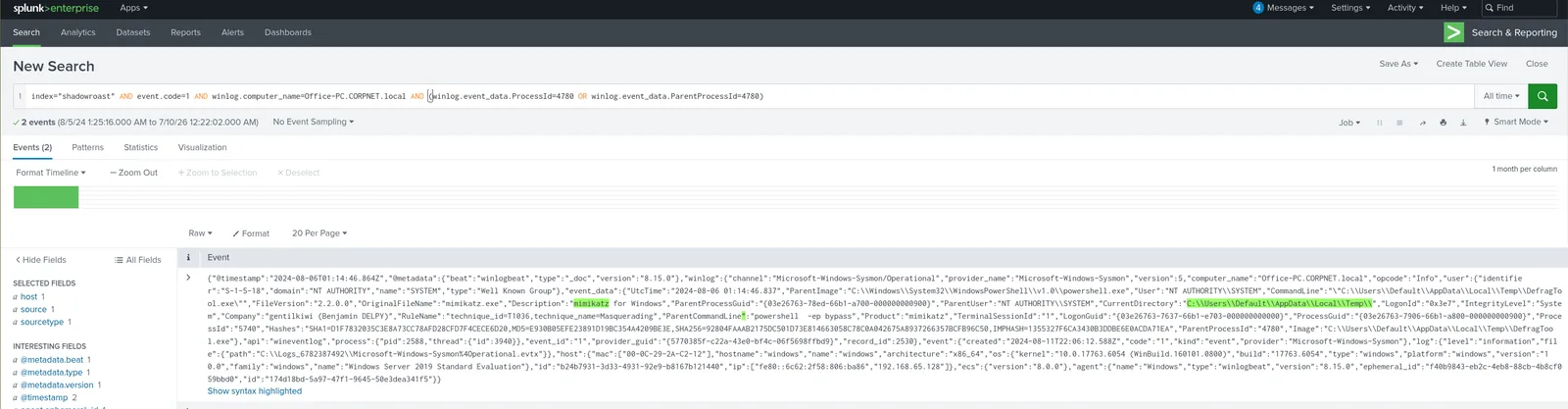
With the staging directory confirmed in Q3, pivot to every process launched from it rather than guessing at tool names — CurrentDirectory is a cleaner filter than fingerprinting hashes or filenames the attacker has already renamed.
# tool: splunk
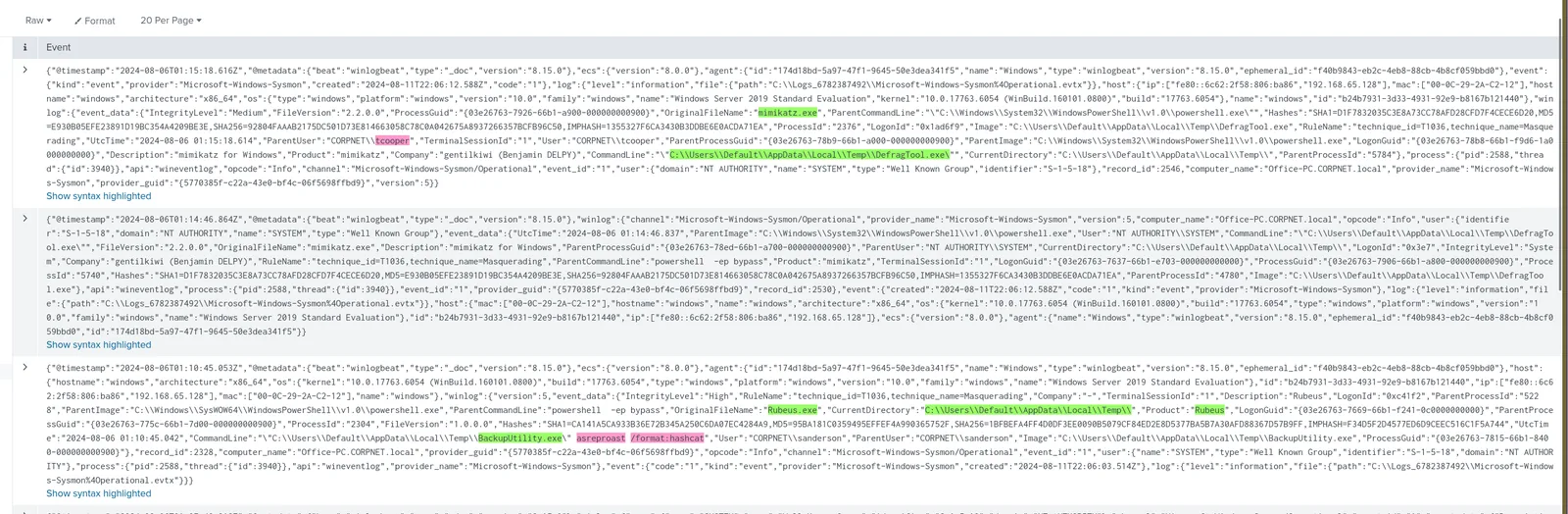
index="shadowroast" AND event.code=1 AND winlog.computer_name=Office-PC.CORPNET.local AND "winlog.event_data.CurrentDirectory"="C:\\Users\\Default\\AppData\\Local\\Temp\\"
Two renamed binaries surface: BackupUtility.exe and DefragTool.exe — neither a name Windows ships. Command-line arguments on the first identify it as Rubeus running an AS-REP Roasting attack, requesting Kerberos AS-REP tickets for accounts with pre-authentication disabled and pulling back hashes crackable offline, all without touching the KDC’s normal authentication logging path. The parent user context on the request confirms CORPNET\sanderson as compromised. The second binary, executed in the same session, is Mimikatz under the defrag-tool alias; its parent user field resolves to a different account entirely — CORPNET\tcooper, a second domain credential harvested from the same host.
Tip: AS-REP Roasting only works against accounts with Kerberos pre-authentication disabled — check
UserAccountControlacross the domain post-incident to find every other account exposed the same way.
Defense Evasion
The DefragTool.exe Mimikatz alias reappears in the timeline with no clear purpose yet — AS-REP Roasting and credential dumping are already accounted for in Q4/Q5, so this execution is doing something else. Mimikatz’s DCShadow module registers the compromised host as a rogue domain controller, letting the attacker push arbitrary AD object changes that replicate to real DCs while bypassing the audit trail a legitimate DC write would generate. Confirm it against Security Event ID 4929, which logs AD schema/attribute replication changes — the source host and timestamp line up exactly with the second Mimikatz execution.
# tool: splunk
index="shadowroast" AND event.code=4929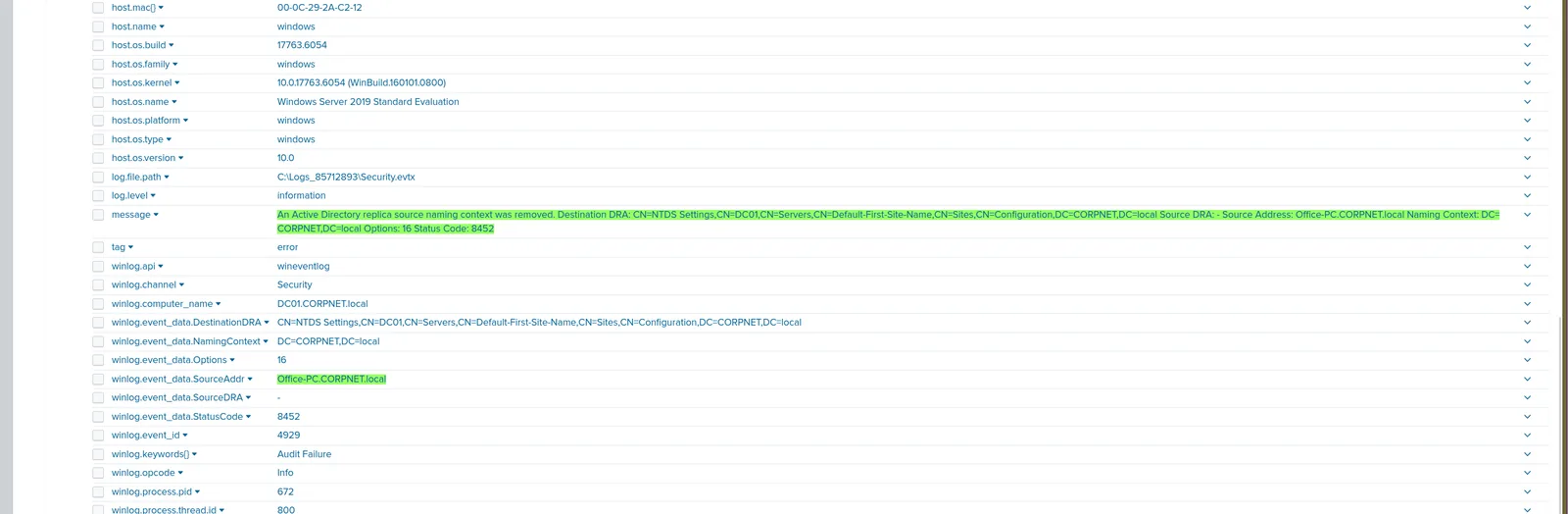
Gotcha: 4929 fires on legitimate schema changes too — cross-reference the timestamp against the Mimikatz execution or you’ll chase administrative noise.
Lateral Movement
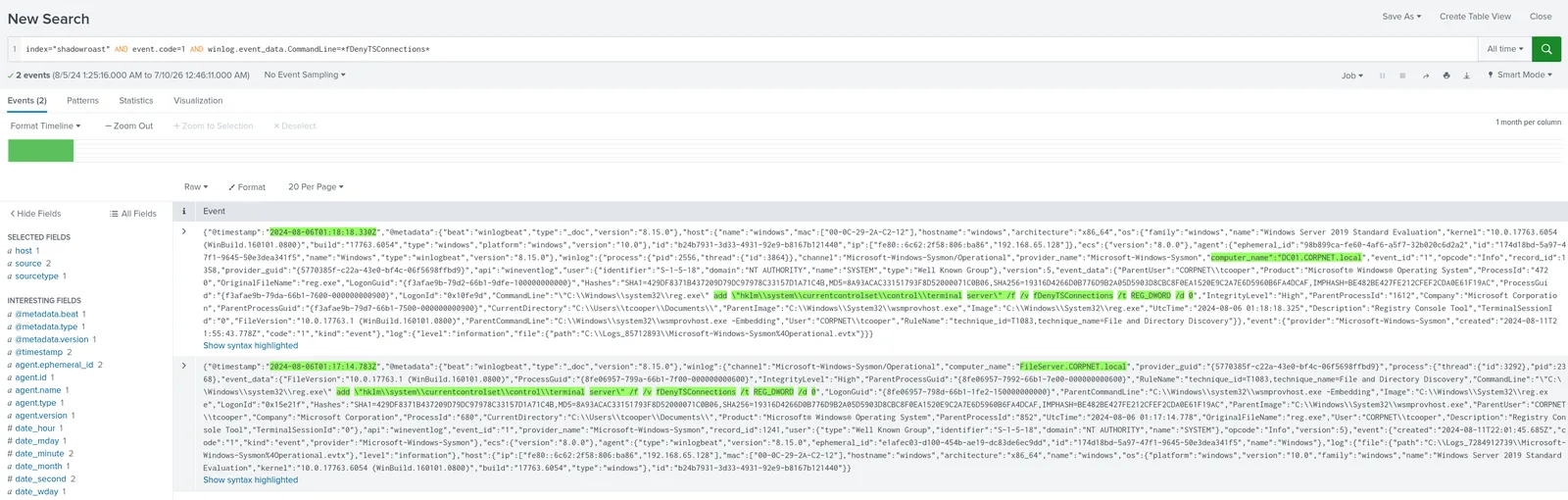
Lateral movement over RDP needs the target host reachable first — Windows blocks it by default via fDenyTSConnections under HKLM\SYSTEM\CurrentControlSet\Control\Terminal Server, which has to flip to 0 before any RDP session lands. Filter Sysmon process creation across the environment for command lines touching that value directly rather than guessing which host was targeted first.
# tool: splunk
index="shadowroast" AND event.code=1 AND winlog.event_data.CommandLine=*fDenyTSConnections*
The hits land on both DC01 and FileServer, run via reg add rather than GPO or a PowerShell cmdlet — a quieter, one-line change that doesn’t touch Group Policy audit logs.
Collection
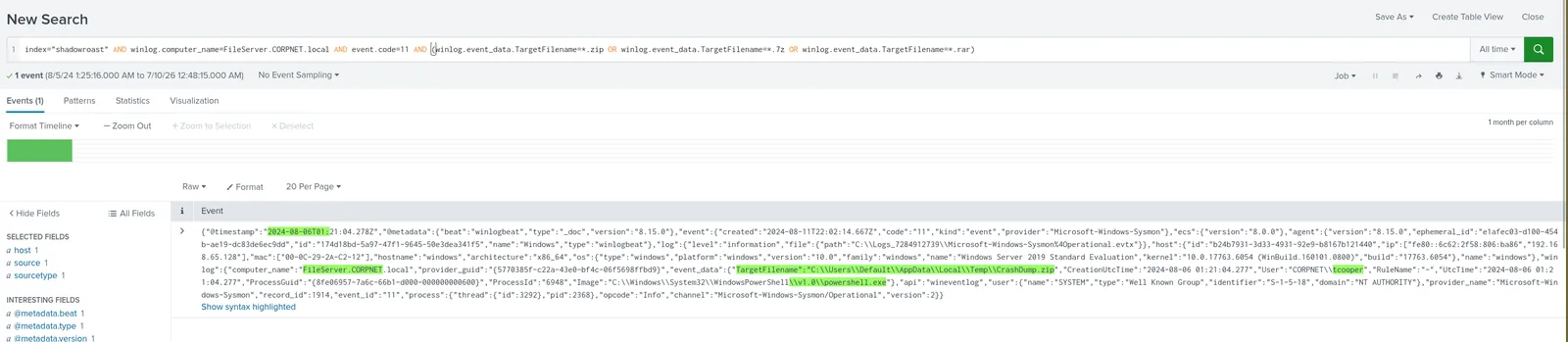
FileServer is the only host in this environment plausible as a target for bulk data collection, so narrow file creation events (Sysmon Event ID 11) there to common archive extensions rather than searching the whole estate.
# tool: splunk
index="shadowroast" AND winlog.computer_name=FileServer.CORPNET.local AND event.code=11 AND (winlog.event_data.TargetFilename=*.zip OR winlog.event_data.TargetFilename=*.7z OR winlog.event_data.TargetFilename=*.rar)
One hit: a PowerShell process creating a zip archive in the same default-profile temp directory used for tool staging back in Q3 — the attacker reusing established, low-visibility infrastructure for the collection step rather than standing up something new.
Attack Summary
| Phase | Action |
|---|---|
| Initial Access | Attacker executed AdobeUpdater.exe from CORPNET\sanderson’s Downloads folder on Office-PC, spawning cmd/PowerShell children |
| Persistence | Registry Run key written under HKCU tied to the malicious binary for reboot survival |
| Staging | Additional renamed tools dropped and executed from C:\Users\Default\AppData\Local\Temp\ |
| Credential Access | Rubeus (as BackupUtility.exe) ran AS-REP Roasting, harvesting a crackable hash for CORPNET\sanderson |
| Credential Access | Mimikatz (as DefragTool.exe) dumped credentials, compromising a second account, CORPNET\tcooper |
| Defense Evasion | Mimikatz’s DCShadow module registered a rogue domain controller to push unaudited AD replication changes |
| Lateral Movement | fDenyTSConnections flipped to 0 via reg add on DC01 and FileServer to enable RDP |
| Collection | Sensitive files compressed into an archive in the staging directory on FileServer ahead of exfiltration |
IOCs
| Type | Value |
|---|---|
| File | AdobeUpdater.exe |
| File | BackupUtility.exe (Rubeus) |
| File | DefragTool.exe (Mimikatz) |
| Registry Key | HKCU\Software\Microsoft\Windows\CurrentVersion\Run\wyW5PZyF |
| Directory | C:\Users\Default\AppData\Local\Temp| |
| Archive | CrashDump.zip |
| Registry Value | HKLM\SYSTEM\CurrentControlSet\Control\Terminal Server\fDenyTSConnections |
| Account | CORPNET\sanderson |
| Account | CORPNET\tcooper |
MITRE ATT&CK
| Technique | ID | Description |
|---|---|---|
| User Execution: Malicious File | T1204.002 | Attacker executed a masqueraded update utility for the initial foothold |
| Masquerading: Match Legitimate Name or Location | T1036.005 | Malicious binaries named AdobeUpdater.exe, BackupUtility.exe, DefragTool.exe to blend with legitimate software |
| Command and Scripting Interpreter: PowerShell | T1059.001 | PowerShell spawned as a child of the malicious update binary |
| Command and Scripting Interpreter: Windows Command Shell | T1059.003 | cmd.exe used alongside PowerShell for execution |
| Boot or Logon Autostart Execution: Registry Run Keys | T1547.001 | Randomised Run key created under HKCU for persistence |
| Steal or Forge Kerberos Tickets: AS-REP Roasting | T1558.004 | Rubeus targeted accounts with Kerberos pre-authentication disabled |
| OS Credential Dumping: LSASS Memory | T1003.001 | Mimikatz used to dump credentials, compromising a second account |
| Rogue Domain Controller | T1207 | Mimikatz’s DCShadow module registered a rogue DC to manipulate AD replication |
| Modify Registry | T1112 | fDenyTSConnections flipped via reg add to enable RDP |
| Remote Services: Remote Desktop Protocol | T1021.001 | RDP enabled on DC01 and FileServer for lateral movement |
| Archive Collected Data: Archive via Utility | T1560.001 | PowerShell compressed sensitive files into a zip archive pre-exfiltration |
Defender Takeaways
A file named for a trusted update mechanism running from a user’s Downloads folder should be an automatic detection, not a manual catch. Legitimate updaters don’t execute from %USERPROFILE%\Downloads, and they don’t spawn cmd.exe or powershell.exe as children. A Sysmon-based detection rule keying on ParentImage matching known updater names paired with an unusual ParentImage path, or simply any updater-named process spawning a shell, would have flagged this at the first hop.
Randomised Run key names are themselves an anomaly worth alerting on. A registry value name that doesn’t resemble any installed application, written by a process running from a user profile rather than Program Files, is a stronger signal than the key path alone. Baseline expected Run key entries per host and alert on any addition that doesn’t match the baseline.
C:\Users\Default\AppData\Local\Temp\ is a blind spot in most EDR tuning. It’s writable by any user, rarely touched by legitimate software, and gets deprioritised in review because it “looks like” a system path. Treat process execution and file creation from Default-profile paths as high-signal regardless of the binary name.
AS-REP Roasting is a detection gap that lives entirely in account configuration, not network telemetry. Any account with Kerberos pre-authentication disabled is roastable with zero interaction with the KDC’s normal audit trail. Auditing UserAccountControl for the DONT_REQ_PREAUTH flag across the domain and alerting on any account that shouldn’t have it set closes this before an attacker needs to touch a single log.
DCShadow bypasses AD change auditing by design — Event ID 4929 combined with an unexpected replication source host is the only reliable tripwire. Because the technique abuses legitimate replication mechanics, standard AD audit policies won’t flag it as malicious on their own. Alert specifically on 4929/4928 events sourced from a host that isn’t in the known DC inventory, and monitor for computer objects registering as DCs outside change-management windows.
Conclusion
The attacker never needed a single piece of custom malware to go from a Downloads-folder foothold to controlling Active Directory replication — Rubeus, Mimikatz, and a
reg addcommand did all the work. Every stage relied on a legitimate tool renamed or a built-in mechanism abused, so the detection value in this case lived entirely in path anomalies, process lineage, and account configuration hygiene, not signatures.
I successfully completed ShadowRoast Blue Team Lab at @CyberDefenders! https://cyberdefenders.org/blueteam-ctf-challenges/achievements/inksec/shadowroast/
#CyberDefenders #CyberSecurity #BlueYard #BlueTeam #InfoSec #SOC #SOCAnalyst #DFIR #CCD #CyberDefender