Spooler - APT28
Scenario
The SOC team was notified by the IT department regarding a potentially compromised workstation recently reassigned to a new government employee named Keela. Upon receiving the workstation, Keela reported unusually slow performance and suspected the system had not been properly cleaned before being handed over. The IT team initiated a routine cleanup but identified indicators of suspicious activity suggesting that the machine, and possibly the department’s website may have been previously compromised.
As a forensics investigator, you have been provided with a disk image of Keela’s workstation. Your task is to perform a comprehensive investigation to uncover any signs of malicious activity, reconstruct the timeline of events, and assess the scope and impact of the potential compromise.
Executive Summary
APT28 used a compromised internal HR portal to push a malicious archive to a department workstation, where the machine’s previous user — not Keela — opened a disguised shortcut inside it. That LNK invoked mshta against a remotely-hosted HTA, which staged a renamed legitimate Windows binary alongside a malicious DLL pulled down via certutil, executing a textbook DLL sideload. The actor anchored persistence twice: once at the user level through a Run key pointing back at the sideloaded binary, and again at SYSTEM level by registering a rogue Print Spooler port monitor against an external, government-impersonating SMB share — a foothold that never actually loaded because the share was unreachable at boot. Two days later the actor returned, ran a privilege-escalation enumeration tool, found the AlwaysInstallElevated policy enabled at both machine and user scope, and abused msiexec to install a malicious MSI package that spawned a command shell under SYSTEM.
Artifacts
- SAM hive —
C:\Windows\System32\config\SAM→ Registry Explorer - NTUSER.DAT (yanis) —
C:\Users\yanis\NTUSER.DAT→ Registry Explorer - SYSTEM hive —
C:\Windows\System32\config\SYSTEM→ Registry Explorer - SOFTWARE hive —
C:\Windows\System32\config\SOFTWARE→ Registry Explorer - Chrome History —
C:\Users\yanis\AppData\Local\Google\Chrome\User Data\Default\History→ DB Browser for SQLite - Prefetch folder —
C:\Windows\Prefetch→ PECmd - MFT / $Extend J (UsnJournal) —
C:\$MFT,C:\$Extend\$J→ MFTECmd - Amcache hive —
C:\Windows\AppCompat\Programs\Amcache.hve→ AmcacheParser - PrintService Admin log —
C:\Windows\System32\winevt\Logs\Microsoft-Windows-PrintService%4Admin.evtx→ Windows Event Viewer - Application log —
C:\Windows\System32\winevt\Logs\Application.evtx→ Windows Event Viewer
Timestamp note: Chrome stores timestamps as Chromium time (microseconds since 1601-01-01) — decode raw
end_timevalues with DCode before submitting. Several answers truncate toYYYY-MM-DD HH:MM, no seconds.
Initial Access
Q1 — What is the full name of the previous user of this machine, before it was assigned to Keela?
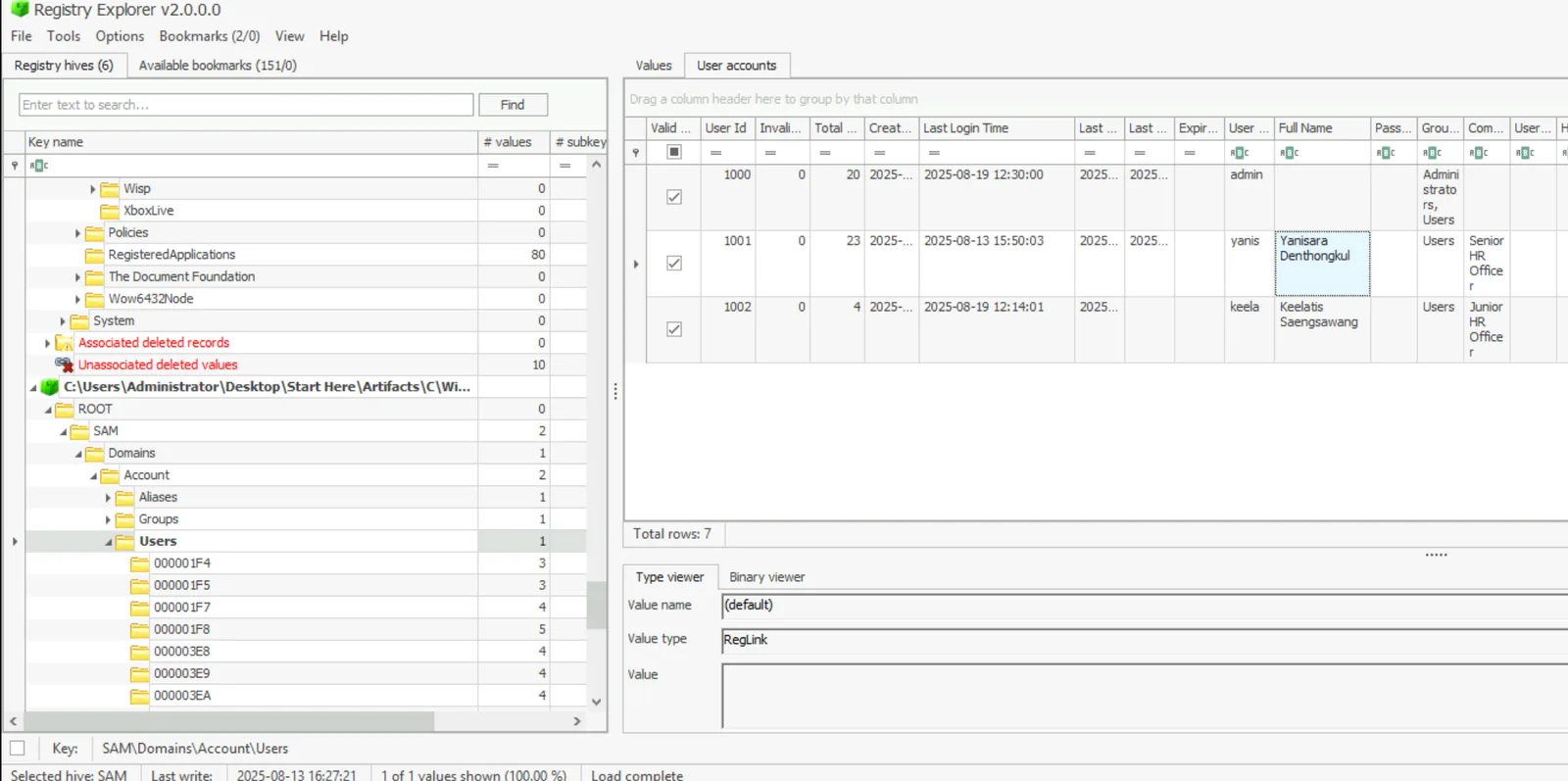
The scenario only tells you Keela is the new assignee, not who she replaced. The Users folder lists five profiles — admin, Default, keela, Public, yanis — which narrows it to yanis by elimination, but the SAM hive confirms it properly. Open SAM in Registry Explorer and check the User Accounts view: yanis carries RID 1001 with a last logon of 2025-08-13 15:50:03, predating Keela’s account at RID 1002. RID ordering on a local system starts at 1000 for the first standard account, so 1001 being older than 1002 confirms yanis as the prior occupant. The Full Name field on that account record gives the answer directly.
Q2 — The previous user downloaded an archive from a compromised internal website that led to the initial infection. When was this archive successfully downloaded?
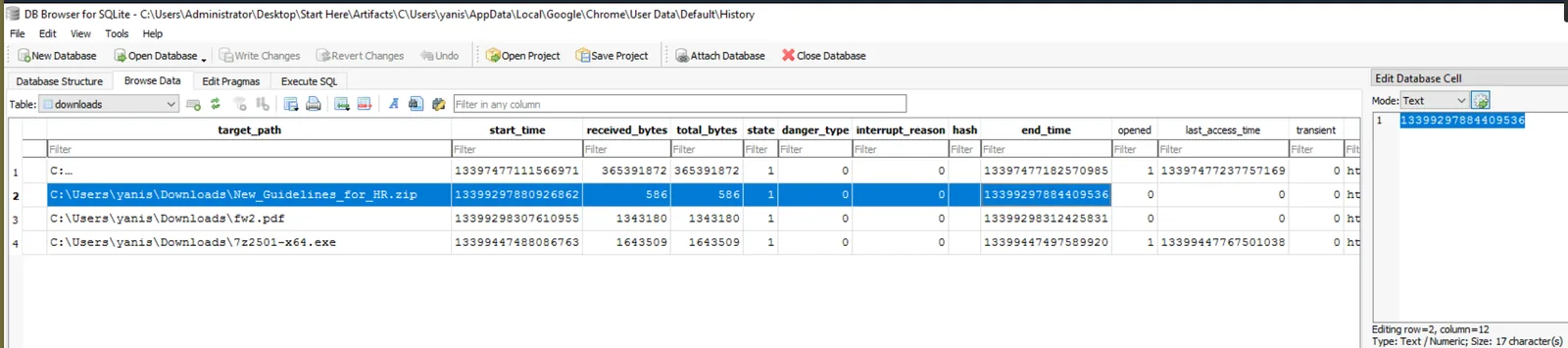
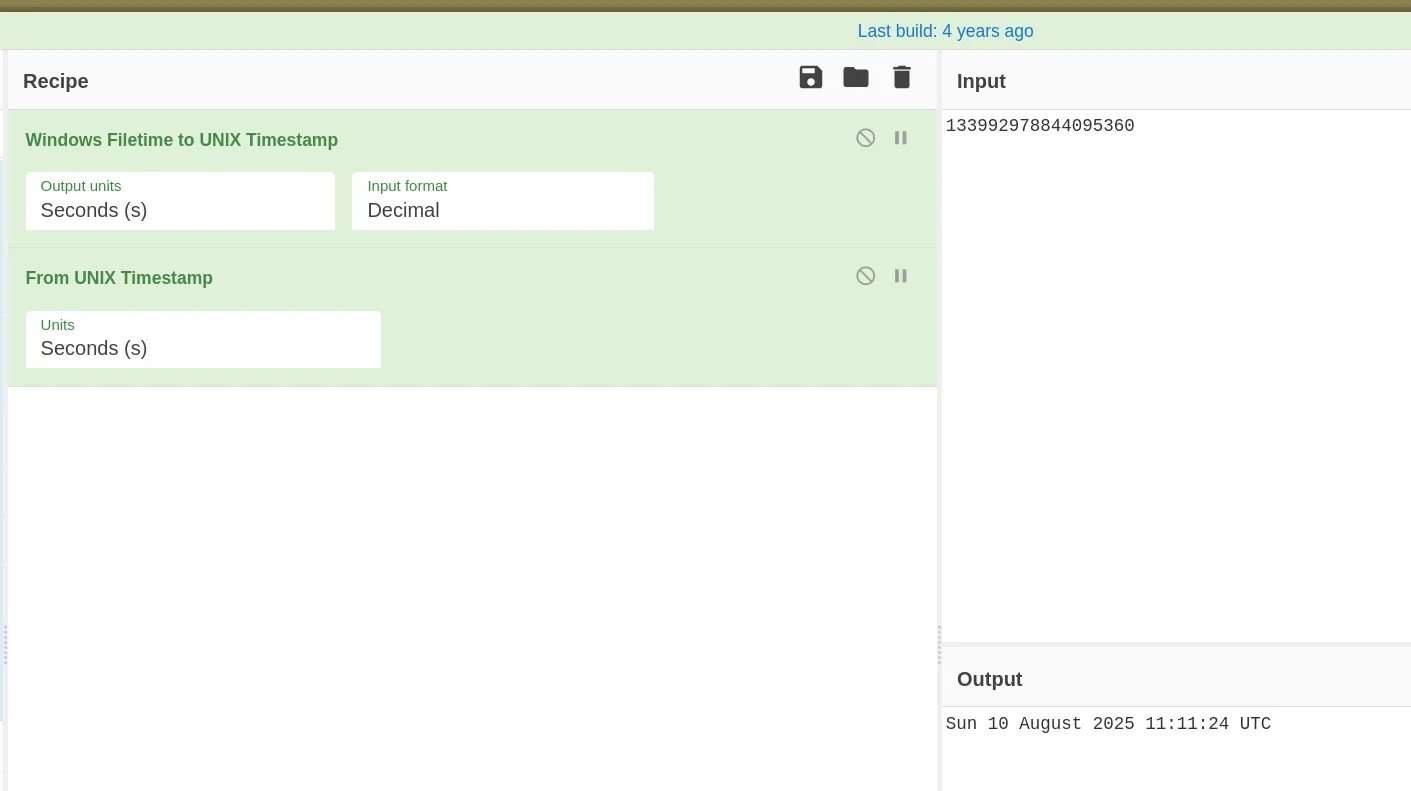
From Q1, yanis is the user whose download history matters here. Chrome was the only browser on this profile, so open History in DB Browser for SQLite. Start with downloads_url_chains rather than downloads — that table preserves the actual final URL fetched even through redirects, where downloads itself only shows the entry as recorded. One result jumps out against everything else (LibreOffice, 7-Zip installers, an IRS PDF): hr.welfare.gov/New_Guidelines_for_HR.zip, matching the scenario’s compromised HR portal. Cross-reference that row in downloads and pull the end_time column — raw value 13399297884409536. Run that through Cyberchef to get the UTC download time.
Gotcha: Don’t stop at
downloads_url_chainsfor the source-of-truth timestamp — that table is for confirming the real download URL through redirects, not for timing. Theend_timeyou need is indownloads.
Execution
Q3 — What is the name of the file executed by the user that initiated the infection chain on this machine?
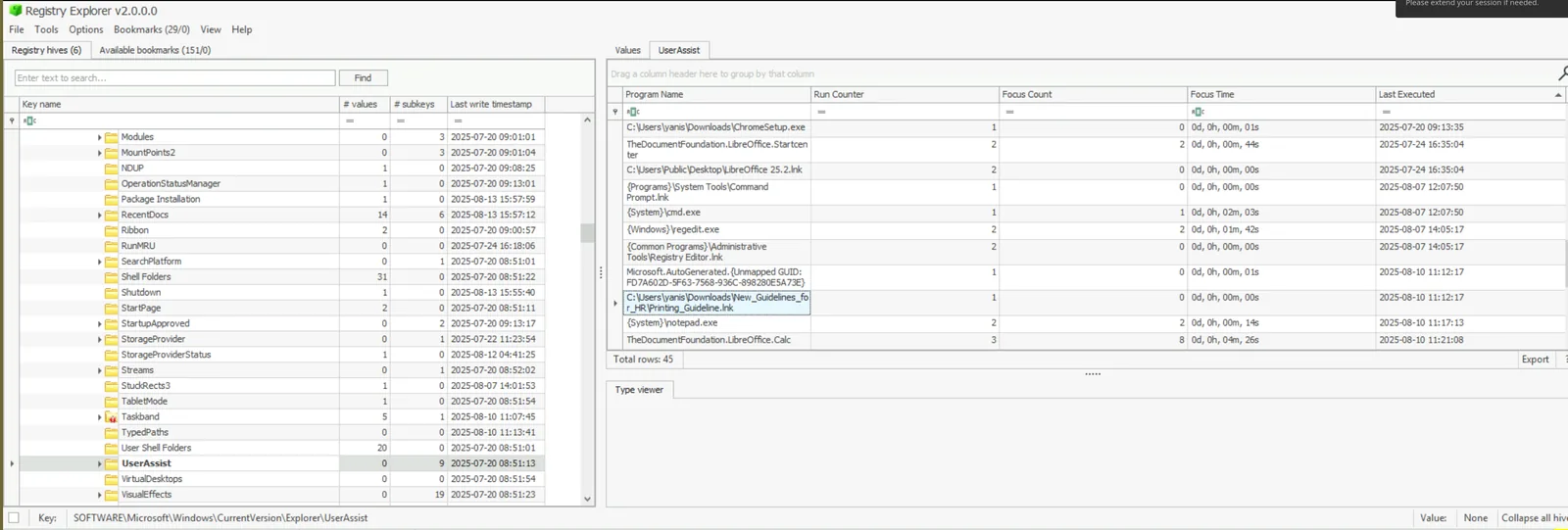
The archive’s contents were deleted long enough ago that both the MFT and UsnJournal entries for the extracted files were already purged — no point chasing that artifact first. UserAssist in NTUSER.DAT survives that kind of cleanup because it logs Explorer-launched programs independent of file deletion. Open the hive in Registry Explorer, navigate to SOFTWARE\Microsoft\Windows\CurrentVersion\Explorer\UserAssist, and sort by Last Executed. 53 seconds after the Q2 download timestamp, at 11:12:17, there’s an entry for Printing_Guideline.lnk launched from C:\Users\yanis\Downloads\New_Guidelines_for_HR\Printing_Guideline.lnk — a shortcut disguised as an HR document, executed almost immediately after the archive landed.
Q4 — Upon executing the file, an HTA script was executed remotely. What is the name of the temporary copy of this script created on this machine?
From Q3, the LNK kicked something off — Prefetch shows what. Parse the Prefetch folder with PECmd:
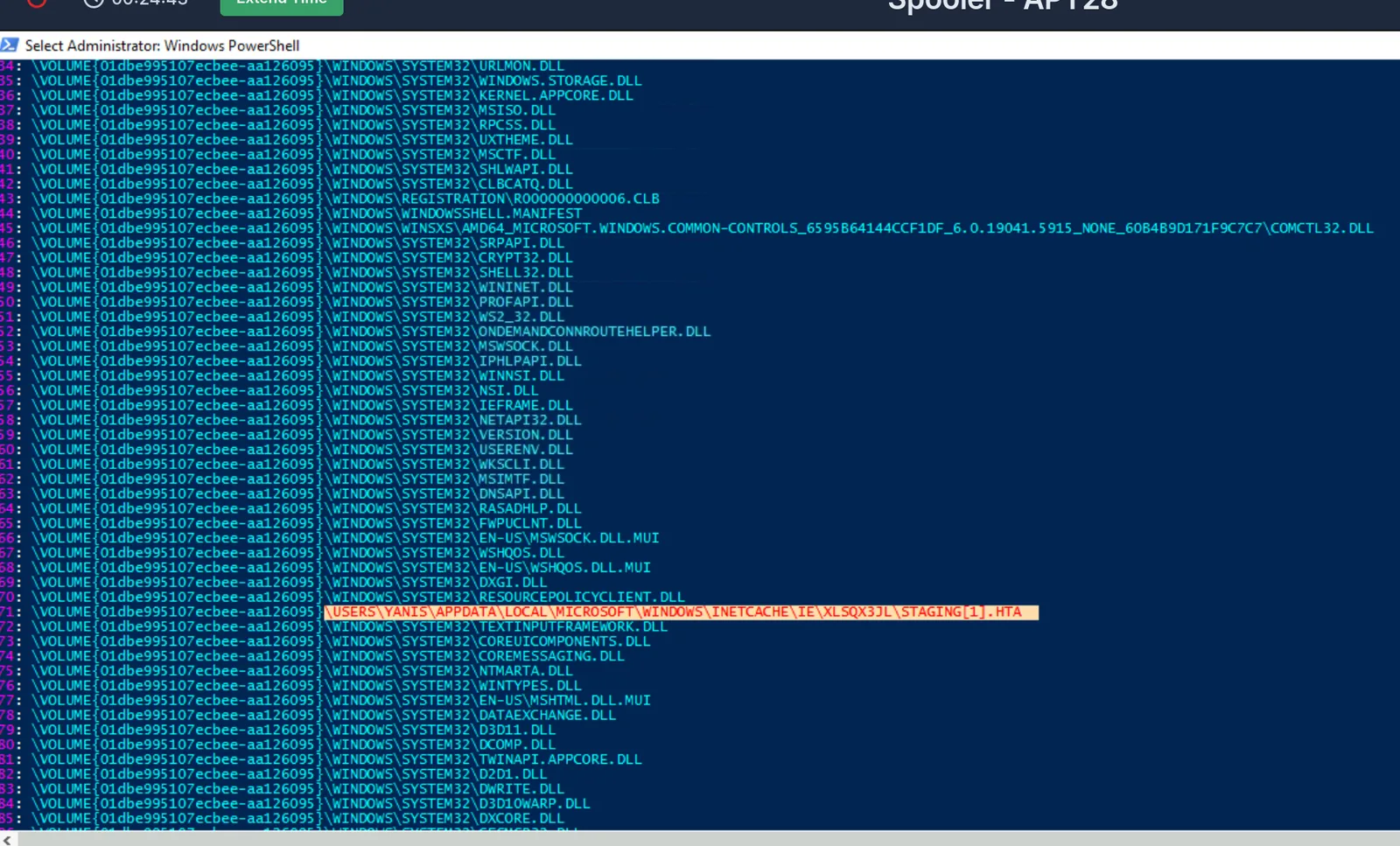
.\PECmd.exe -d "C:\Users\Administrator\Desktop\Start Here\Artifacts\C\Windows\prefetch" --csv c:\temp\ --csvf prefetch.csvOpen the timeline CSV in Timeline Explorer, sort by Run Time, and look one second after the LNK execution — at 11:12:18, MSHTA.EXE fires. Mshta executing this fast after a shortcut click is the classic remote-HTA-via-LNK pattern. To find which script it actually loaded, switch to the detailed output CSV, filter Executable Name to mshta.exe, and expand Files Loaded. Among the loaded files sits a cached copy at \USERS\YANIS\APPDATA\LOCAL\MICROSOFT\WINDOWS\INETCACHE\IE\XLSQX31\STAGING[1].HTA — IE/mshta’s cache directory for remotely fetched HTAs, with the [1] suffix marking the first cached instance of STAGING.HTA.
Q5 — Two files were created in the temporary directory of the compromised user. What are their names? (Provide in alphabetical order)
The HTA from Q4 had to drop something to disk. Parse the MFT and UsnJournal together with MFTECmd so parent paths resolve cleanly:
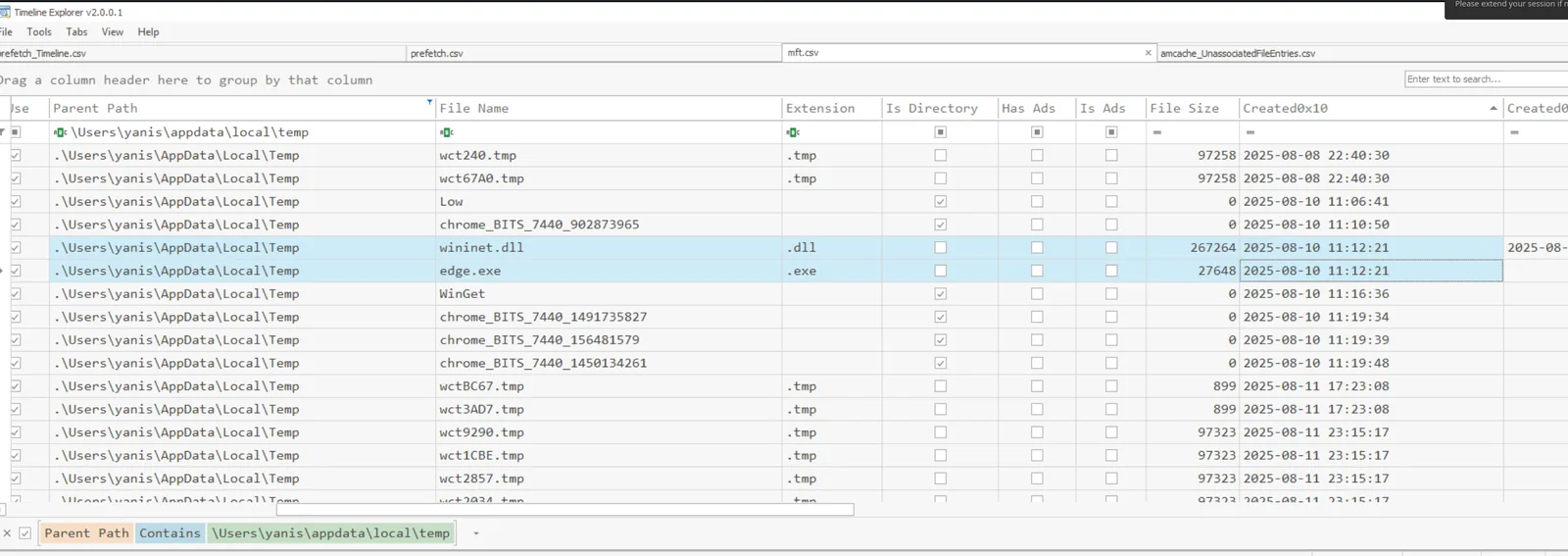
.\MFTECmd.exe -f 'C:\Users\Administrator\Desktop\Start Here\Artifacts\C\$MFT' -m 'C:\Users\Administrator\Desktop\Start Here\Artifacts\C\$Extend\$J' --csv c:\temp\ --csvf mft.csvIn Timeline Explorer, filter Parent Path to yanis\AppData\Local\Temp and sort by Created0x10. Two files land at 11:12:21 — three seconds after mshta launched — wininet.dll (267,264 bytes) and edge.exe (27,648 bytes). Cross-referencing back against mshta’s Files Loaded list from Q4 confirms both: edge.exe shows up there too, meaning the HTA didn’t just drop it, it ran it.
Defense Evasion
Q6 — What is the original filename of the first file identified in the previous question?
An exe and a DLL dropped together into the same Temp folder is the standard sideload setup, so edge.exe is the side to scrutinize first. Parse Amcache:
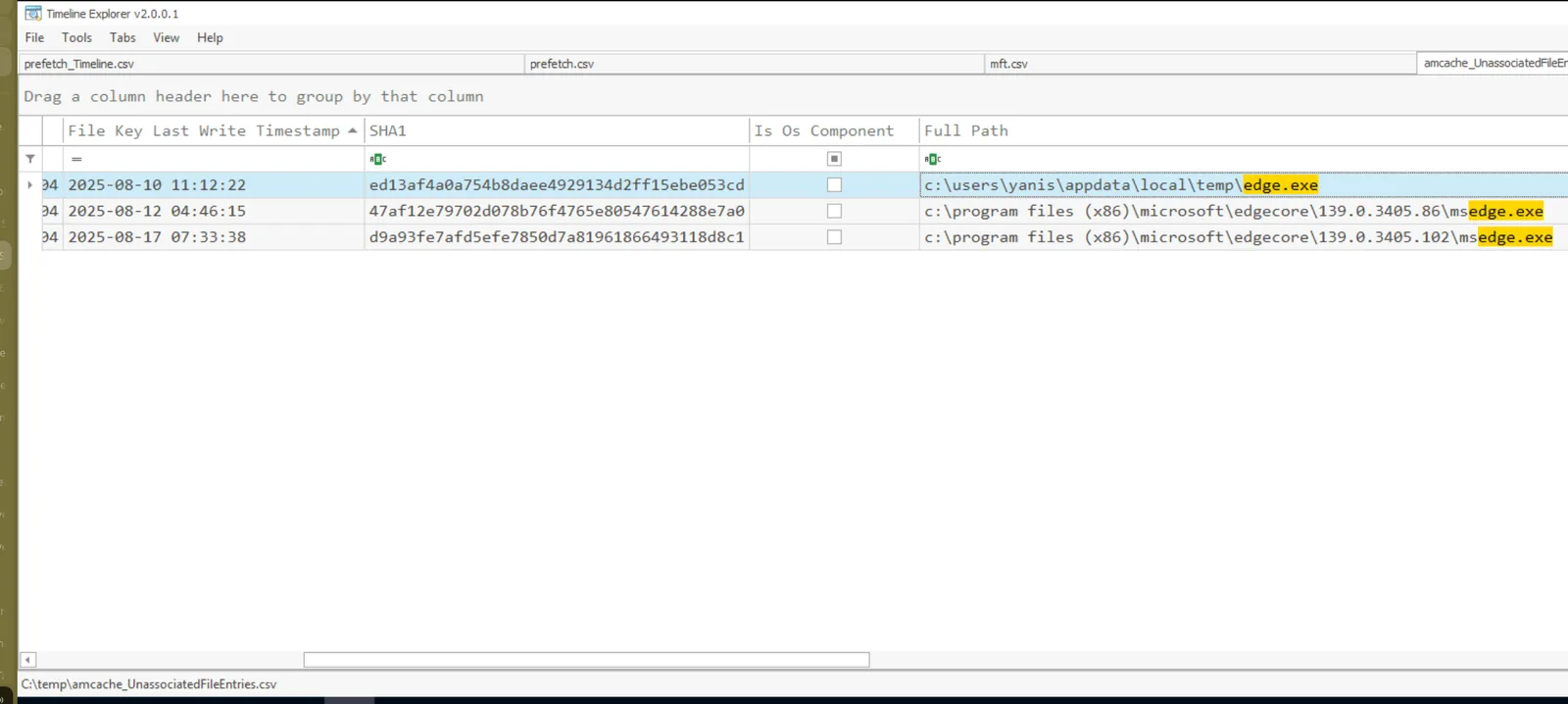
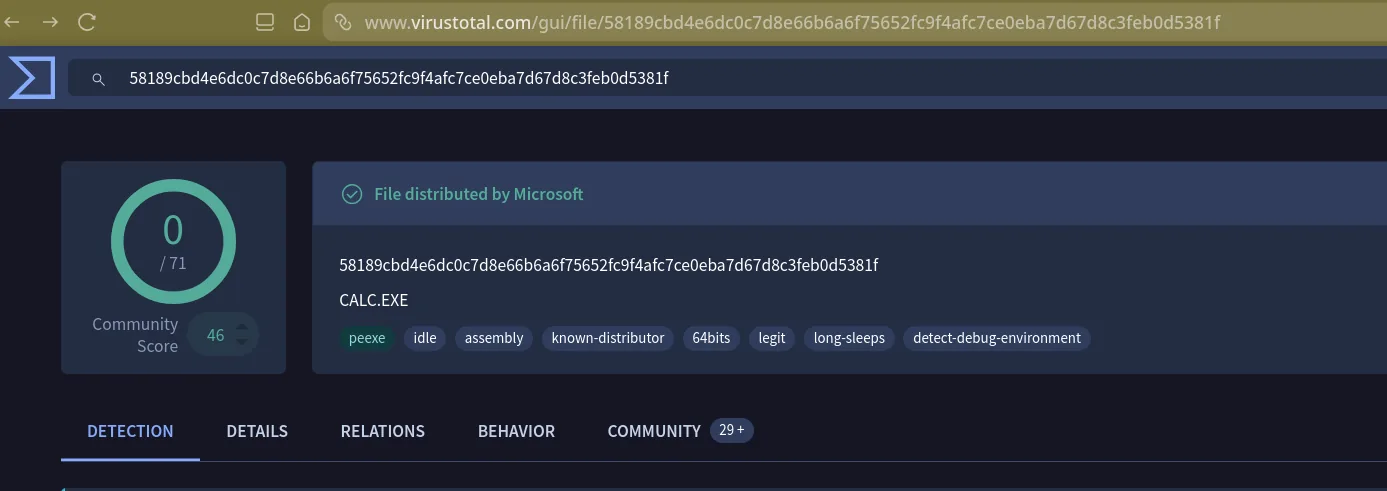
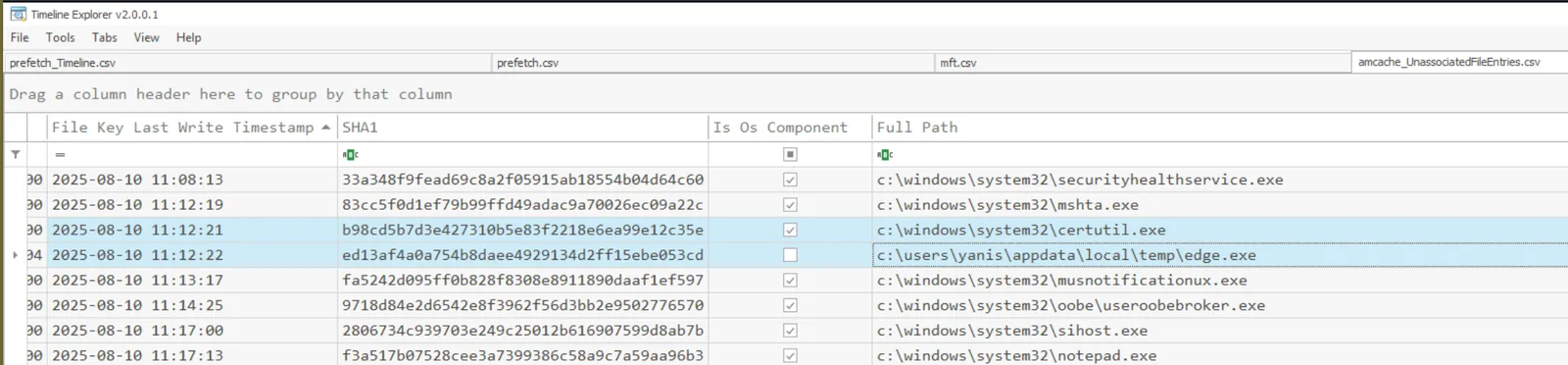
.\AmcacheParser.exe -f 'C:\Users\Administrator\Desktop\Start Here\Artifacts\C\Windows\AppCompat\Programs\Amcache.hve' --csv c:\temp\ --csvf amcache.csvThe entry for c:\users\yanis\appdata\local\temp\edge.exe carries SHA1 ed13af4a0a754b8daee4929134d2ff15ebe053cd. That hash on VirusTotal comes back clean (0/71) and identified as CALC.EXE — the genuine Microsoft Calculator binary, signed, 27.00 KB. The Details tab’s File Version Information confirms it explicitly: Original Name CALC.EXE, Description “Windows Calculator.” edge.exe is just a renamed, unsigned copy of calc.exe sitting where it doesn’t belong.
Q7 — What is the MITRE ATT&CK technique that corresponds to the method the malicious payload used to load itself?
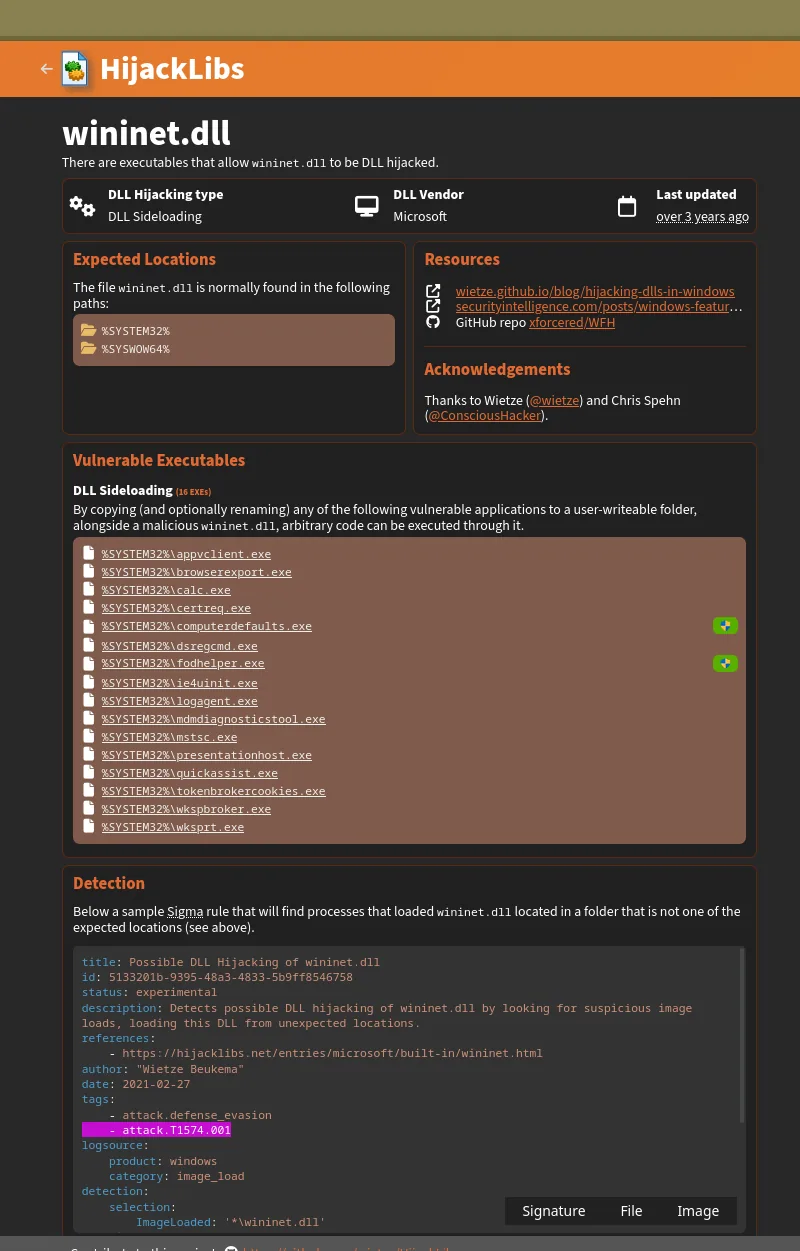
A renamed-but-legitimate calc.exe sitting next to a same-named DLL it imports is DLL sideloading by definition — Windows searches the application’s own directory before System32, so the local wininet.dll wins over the real one. To validate this isn’t a coincidence, check HijackLibs for calc.exe: ten known sideloadable DLLs come back, with wininet.dll listed first and explicitly tagged “DLL Sideloading,” cross-referencing MITRE’s T1574.001 (Hijack Execution Flow: DLL).
Q8 — Which LOLBin was used to download the malicious payload?
Prefetch doesn’t record any download activity beyond mshta itself, so the download mechanism has to be somewhere else in the execution trail. Back in the Amcache output from Q6, sort by File Key Last Write Timestamp and look at what fired in the gap between mshta (11:12:19) and edge.exe (11:12:22): certutil.exe sits right in the middle at 11:12:21. Certutil’s -urlcache flag fetches files from a URL and is a well-worn LOLBin for exactly this reason — signed, present on every Windows box, rarely blocked. It also leaves a cached copy behind in CryptnetUrlCache; filtering the MFT for files matching wininet.dll’s 267,264-byte size turns up a match there, confirming certutil pulled that specific payload.
Persistence
Q9 — What is the name of the Run key persistence entry created by the attacker?
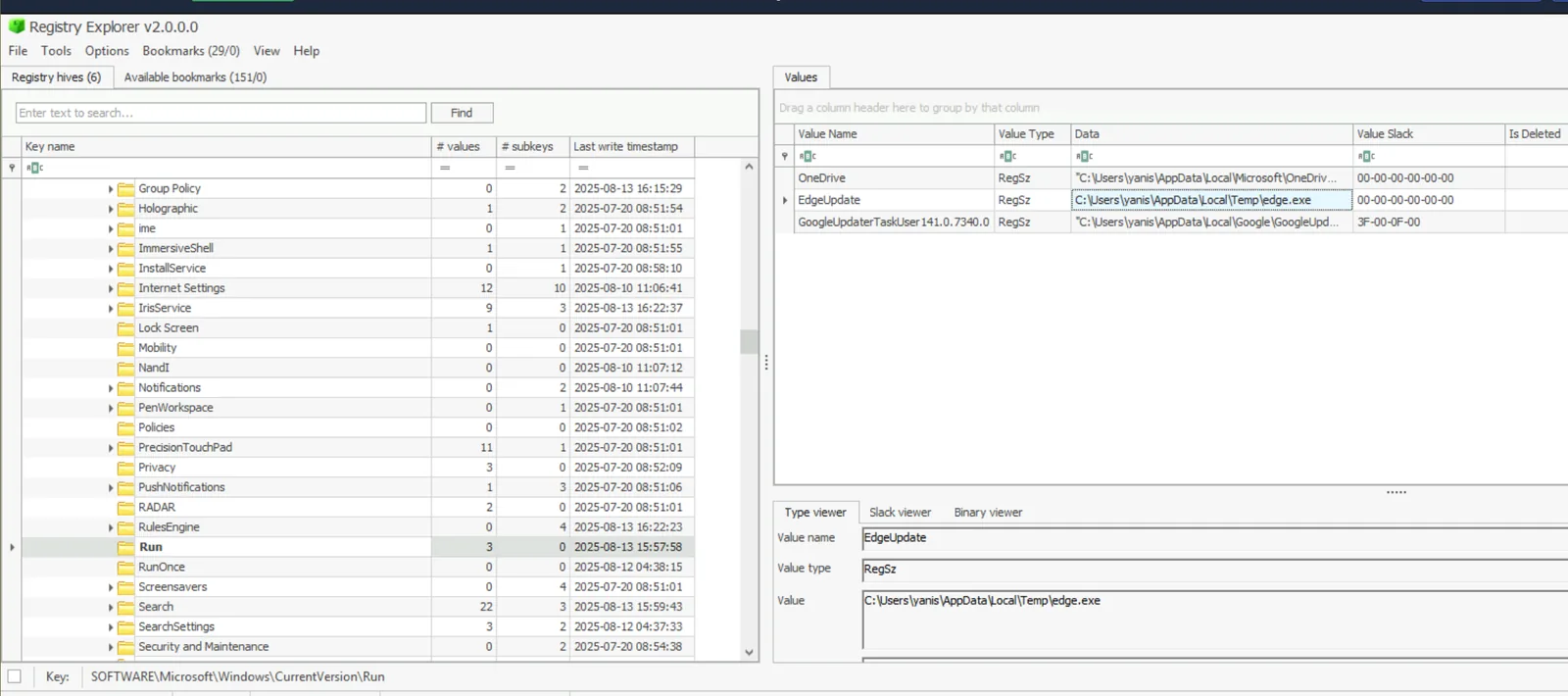
yanis isn’t a local admin, so the attacker’s persistence options at user scope come down to the Run key or the Startup folder — both execute under the user’s own privileges. Open NTUSER.DAT in Registry Explorer and check SOFTWARE\Microsoft\Windows\CurrentVersion\Run. One entry stands out: EdgeUpdate, pointing at C:\Users\yanis\AppData\Local\Temp\edge.exe. Every logon re-launches the renamed calc.exe from the same Temp folder where wininet.dll lives, re-triggering the sideload on a clean schedule.
Q10 — Another Boot or Logon Autostart persistence was configured to execute a DLL payload remotely through the Print Spooler service. What is the MITRE ATT&CK Technique ID associated with this persistence mechanism?
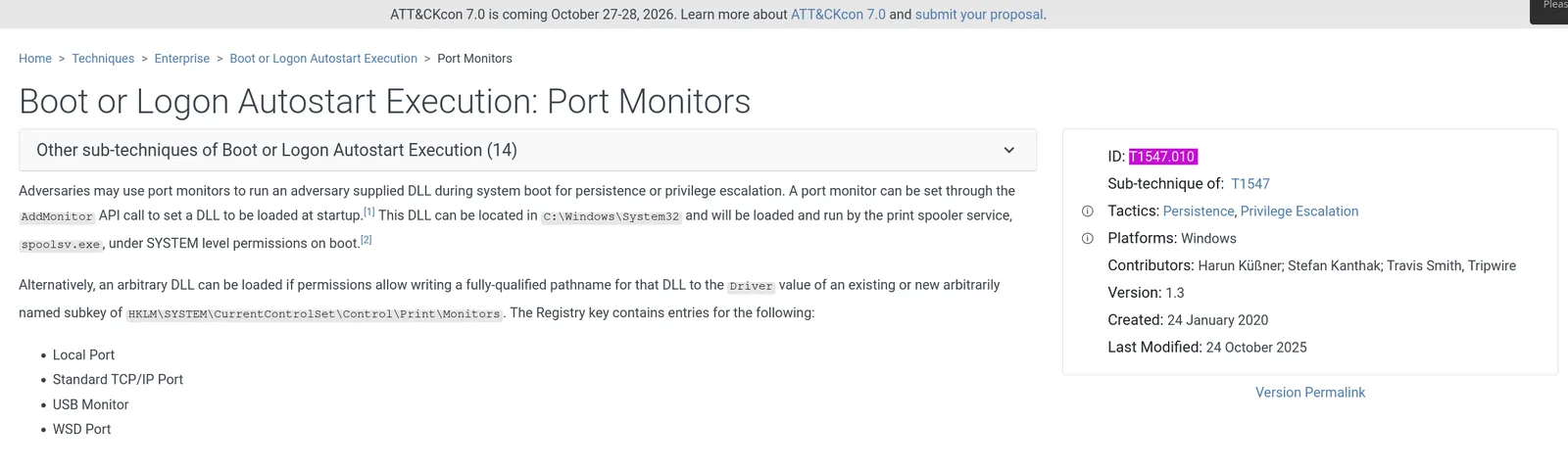
Beyond the user-level Run key, the Print Spooler service offers a SYSTEM-level autostart vector through two registry locations: Port Monitors (HKLM\SYSTEM\CurrentControlSet\Control\Print\Monitors) and Print Processors (...\Print\Environments\[arch]\Print Processors). Both let an attacker register a DLL that spoolsv.exe — running as Local System — loads at boot. Open the SYSTEM hive and check Monitors first: alongside the standard set (Appmon, Local Port, Microsoft Shared Fax Monitor, Standard TCP/IP Port, USB Monitor, WSD Port) there’s an extra subkey named “Printer” with a Driver value pointing off-box. That’s the Port Monitors technique, T1547.010, not Print Processors.
Q11 — What is the full path of the malicious DLL configured to be loaded through the Print Spooler service?
The “Printer” port monitor subkey from Q10 has its answer right in the Driver value: a UNC path to a DLL hosted on an external SMB share, using a domain crafted to look like a legitimate government resource at a glance.
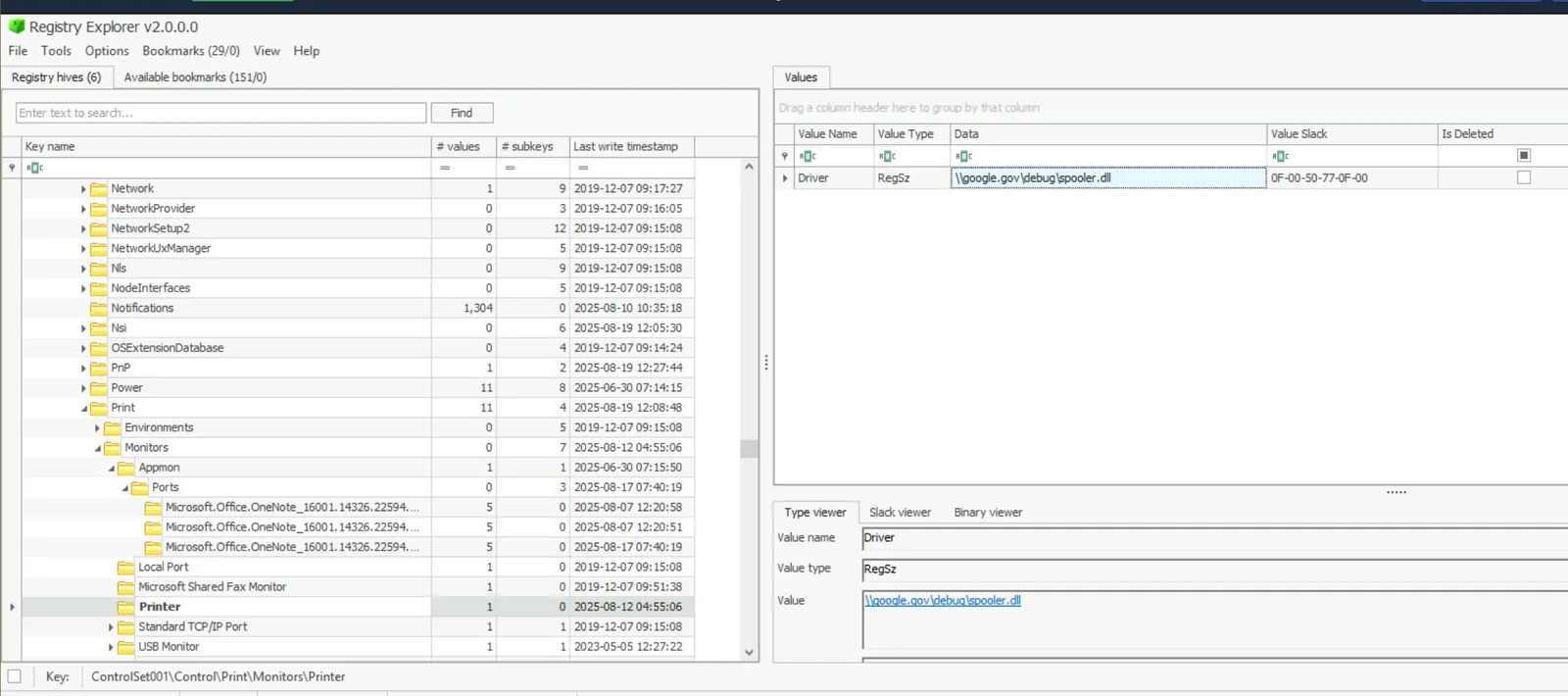
Gotcha:
google.govis not Google — it’s an attacker-registered domain chosen to read as legitimate on a quick scan. Don’t let the brand-name pattern-match distract from the fact it’s an external, unauthenticated SMB share.
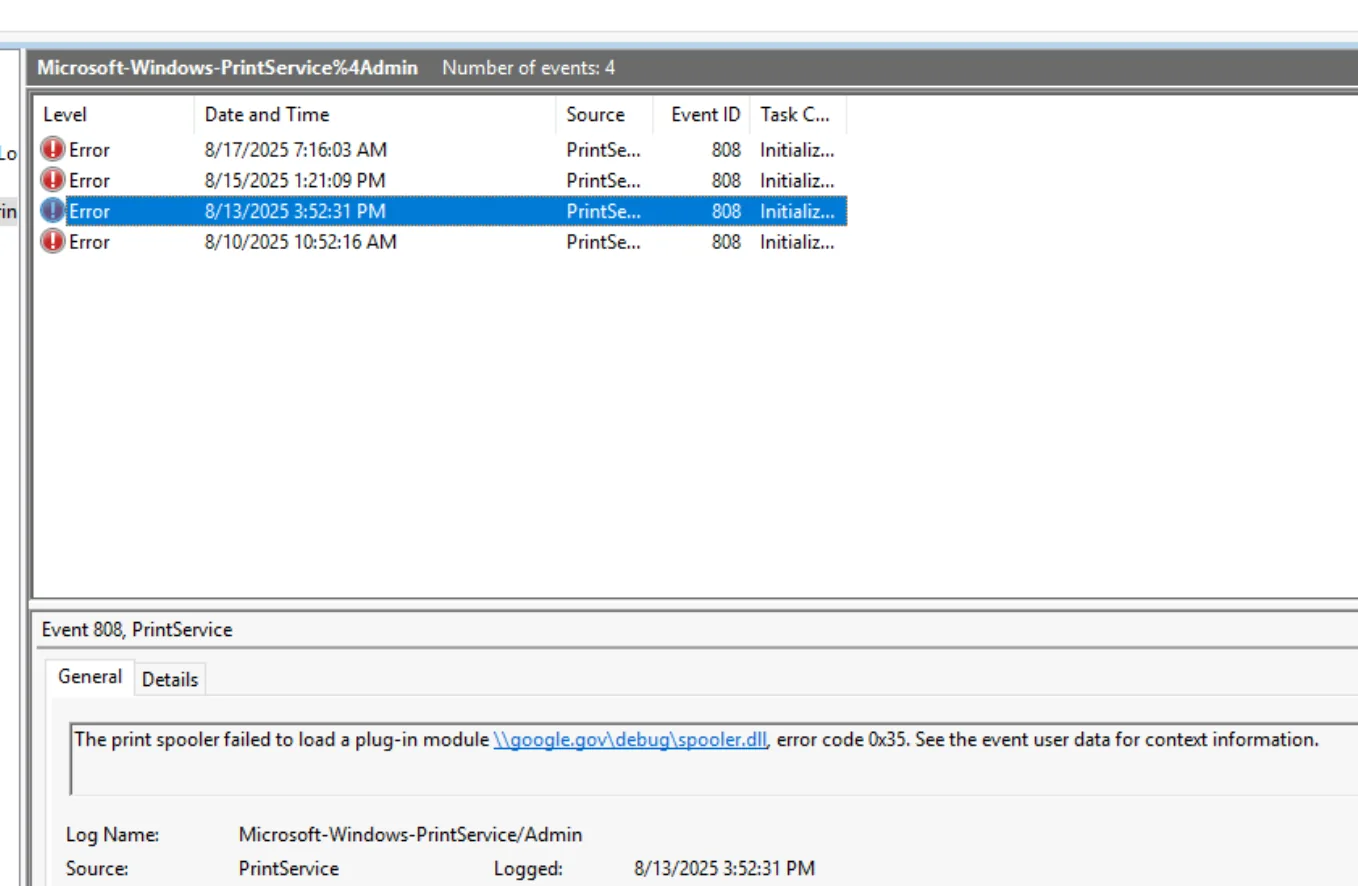
Q12 — According to the event logs, how many failed attempts to load the persistence DLL were recorded due to the network path not being found?
Whether the Q11 port monitor ever actually worked depends on whether that SMB share was reachable when spoolsv.exe tried to load it at boot. The PrintService Admin operational log records exactly that. Open Microsoft-Windows-PrintService%4Admin.evtx in Event Viewer — four total events, three of them Error-level (Event ID 808, source PrintService, Task Category “Initializing”), each carrying the same message: the spooler failed to load \google.gov.dll, error code 0x35. That code maps to ERROR_BAD_NETPATH — the network path wasn’t found, meaning the attacker’s share was offline or unresolvable at each of those three boots.
Privilege Escalation
Q13 — A few days later, the attacker dropped and executed an executable to enumerate possible privilege escalation paths on the machine. What is the filename of this executable?
Neither Amcache nor Prefetch recorded the tool in question, so this one needs Shimcache (AppCompatCache) — HKLM\SYSTEM\CurrentControlSet\Control\Session Manager\AppCompatCache\AppCompatCache. Shimcache logs file path lookups (execution or just access) ordered by insertion position, lower numbers being more recent. Sorting by Cache Entry Position turns up an entry at position 35, dated 2025-08-12 — two days after the initial compromise — for C:\Users\yanis\appdata\local\temp\winPEASx64.exe. WinPEAS is a standard priv-esc enumeration tool, and given everything that follows checks out against what it specifically flags (AlwaysInstallElevated), the timing and context support execution even though Shimcache alone can’t prove it.
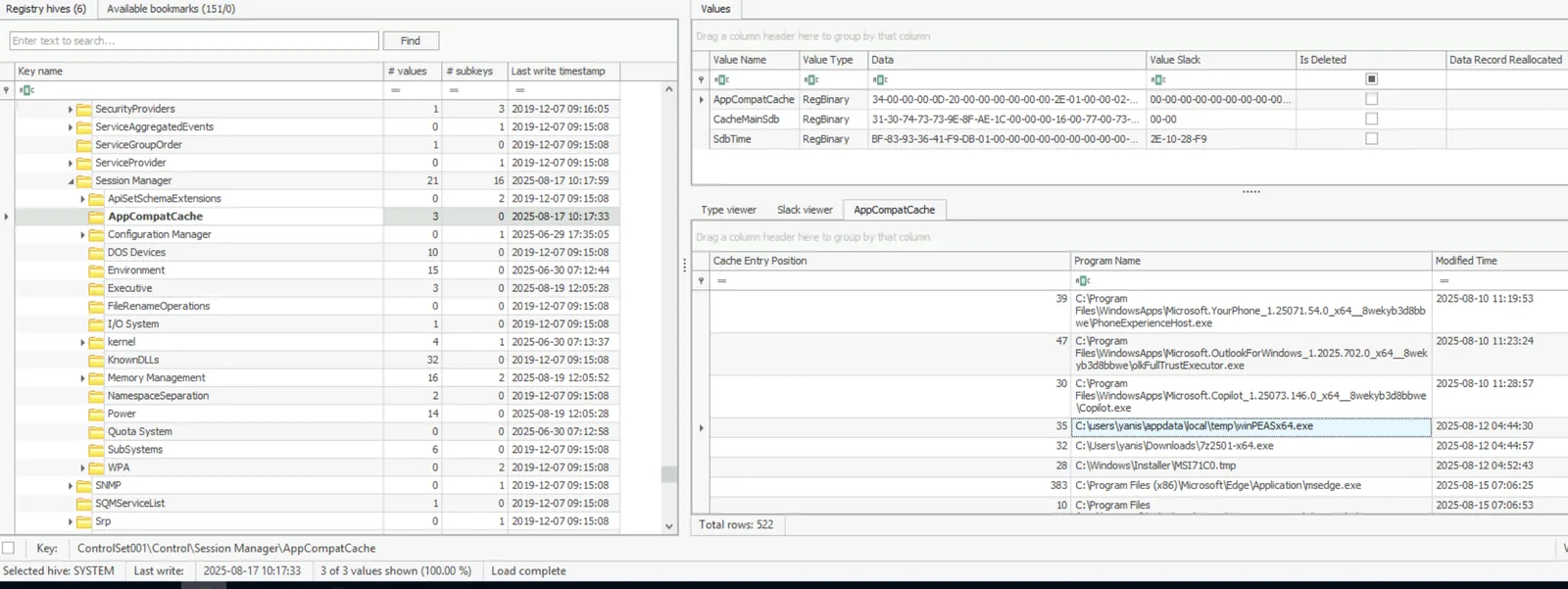
Gotcha: Shimcache entries can come from file access, not just execution — don’t treat this artifact alone as proof of run. The corroborating context (timing relative to the MSI install in Q14) is what makes the case here.
Q14 — The attacker executed a privilege escalation technique by leveraging a Windows Installer file. What is the full path of this installer file?
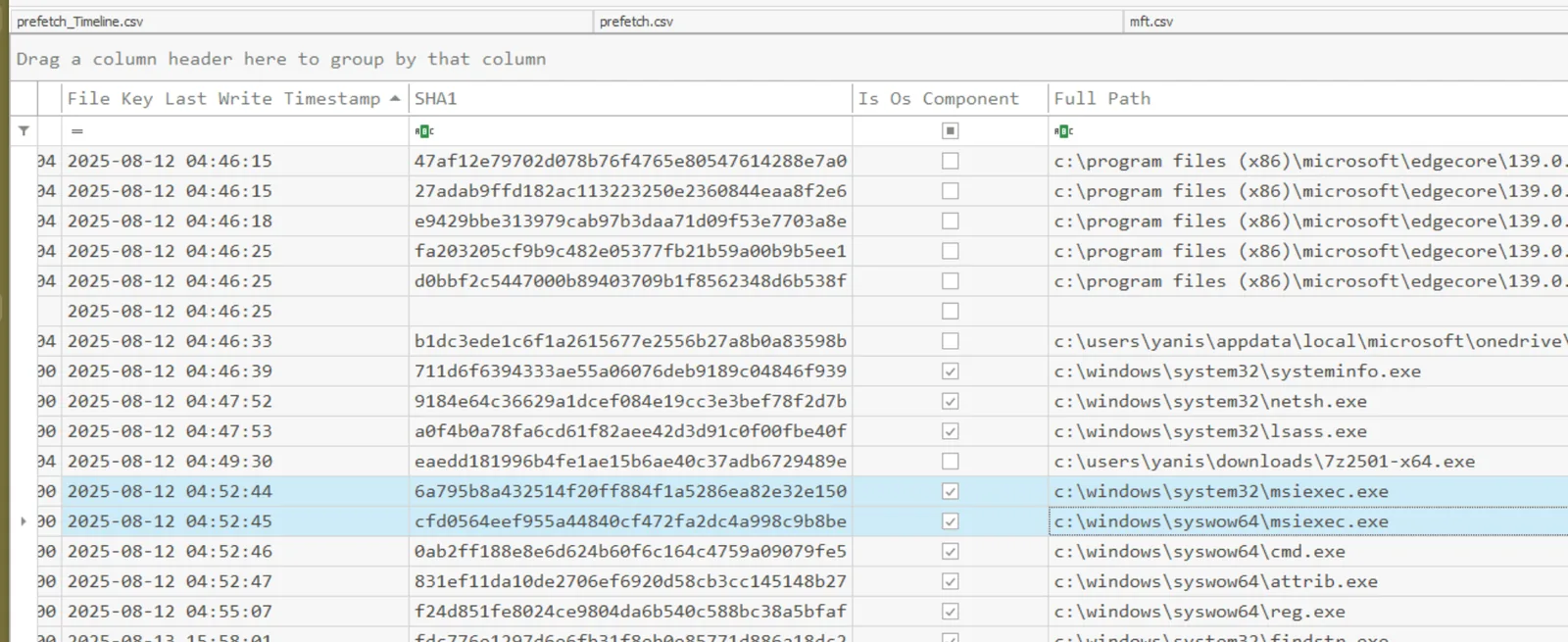
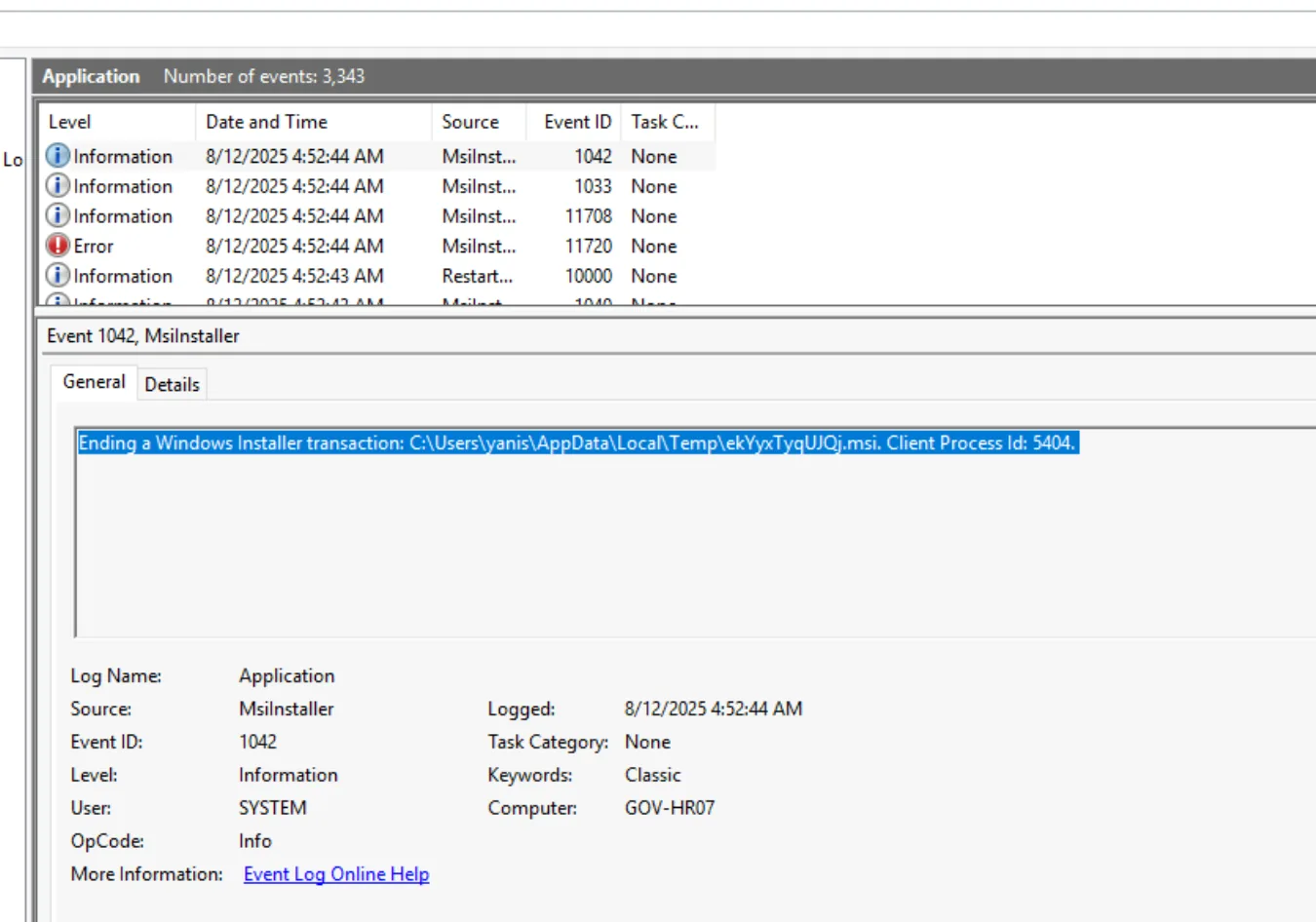
WinPEAS finding something useful (Q13) is the setup; the Application event log shows what the attacker did with it. Filter for source MsiInstaller, Event ID 1040. At 04:52:43 on the same day as the WinPEAS hit, an entry reads: “Beginning a Windows Installer transaction: C:\Users\yanis\AppData\Local\Temp\ekYyxTyqUJQj.msi. Host Process Id: 5404.” A random alphanumeric filename sitting in Temp is not how legitimate software ships. Cross-checking Prefetch confirms MSIEXEC.EXE fired one second earlier at 04:52:42, and Amcache shows cmd.exe spawned at 04:52:46 — the installer’s payload dropping to a shell almost immediately after running.
Q15 — The attacker successfully gained higher privileges by installing software as SYSTEM. Which registry key needed to be enabled for both the user and the software?
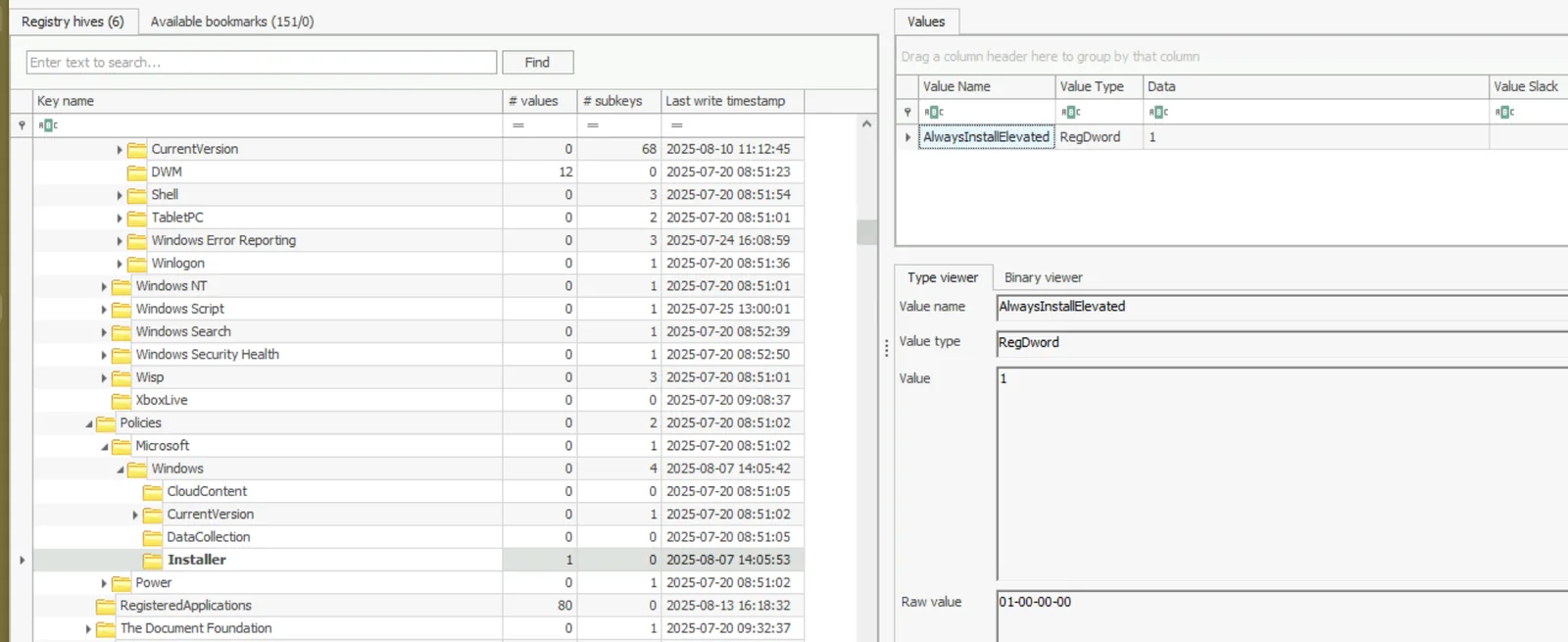
A standard user installing an MSI with SYSTEM rights only works if AlwaysInstallElevated is enabled — and critically, it has to be set to 1 at both scopes simultaneously. Check the machine-wide policy first, in SOFTWARE hive under Policies\Microsoft\Windows\Installer: AlwaysInstallElevated = 1 (DWORD). Then check yanis’s NTUSER.DAT under the matching path, SOFTWARE\Policies\Microsoft\Windows\Installer: same value, same setting. Either side reading 0, or the key missing, would have blocked the exploit entirely — having both flipped is what let ekYyxTyqUJQj.msi install with SYSTEM privileges from a standard account.
Attack Summary
| Phase | Action |
|---|---|
| Initial Access | Compromised internal HR portal serves a malicious archive to a workstation user |
| Execution | User opens a disguised LNK, which triggers mshta to run a remotely-hosted HTA |
| Defense Evasion | HTA uses certutil to pull a malicious DLL, dropped alongside a renamed calc.exe for a sideload |
| Persistence (user) | Run key re-launches the sideloaded binary at every logon |
| Persistence (SYSTEM) | Rogue Print Spooler port monitor configured to load a DLL from an external SMB share at every boot — never successfully loads |
| Privilege Escalation | WinPEAS run two days later identifies AlwaysInstallElevated misconfiguration |
| Privilege Escalation | Malicious MSI installed via msiexec, spawning a SYSTEM-level command shell |
IOCs
| Type | Value |
|---|---|
| Domain | hr.welfare[.]gov |
| URL | hxxp[://]hr[.]welfare[.]gov/New_Guidelines_for_HR.zip |
| File | Printing_Guideline.lnk |
| File | STAGING[1].HTA (\Users\yanis\AppData\Local\Microsoft\Windows\INetCache\IE\XLSQX31\STAGING[1].HTA) |
| File | edge.exe (renamed calc.exe, SHA1: ed13af4a0a754b8daee4929134d2ff15ebe053cd) |
| File | wininet.dll (malicious sideload DLL, 267,264 bytes) |
| Registry | HKCU\SOFTWARE\Microsoft\Windows\CurrentVersion\Run\EdgeUpdate |
| Registry | HKLM\SYSTEM\CurrentControlSet\Control\Print\Monitors\Printer |
| Domain | google[.]gov (spoofed external SMB host) |
| File | winPEASx64.exe |
| File | ekYyxTyqUJQj.msi |
| Registry | HKLM\SOFTWARE\Policies\Microsoft\Windows\Installer\AlwaysInstallElevated |
| Registry | HKCU\SOFTWARE\Policies\Microsoft\Windows\Installer\AlwaysInstallElevated |
MITRE ATT&CK
| Technique | ID | Description |
|---|---|---|
| User Execution: Malicious File | T1204.002 | Previous user double-clicked a disguised LNK shortly after downloading the archive |
| System Binary Proxy Execution: Mshta | T1218.005 | mshta.exe executed a remotely-hosted HTA, cached locally as STAGING[1].HTA |
| Ingress Tool Transfer | T1105 | certutil -urlcache fetched the malicious wininet.dll sideload payload from attacker infrastructure |
| Hijack Execution Flow: DLL | T1574.001 | wininet.dll sideloaded next to a renamed calc.exe (edge.exe) via DLL search order |
| Boot or Logon Autostart Execution: Registry Run Keys | T1547.001 | EdgeUpdate Run key re-launched the sideloaded pair at every user logon |
| Boot or Logon Autostart Execution: Port Monitors | T1547.010 | Rogue “Printer” port monitor configured Print Spooler to load a DLL from an external SMB share at SYSTEM level on every boot |
| System Binary Proxy Execution: Msiexec | T1218.007 | AlwaysInstallElevated misconfiguration abused to install a malicious MSI with SYSTEM privileges |
Defender Takeaways
LOLBin chaining is the real signal here, not any single binary. mshta → certutil → renamed-calc.exe is three signed Microsoft binaries in a row, each individually unremarkable. The detection value lives entirely in the sequence: mshta spawning a download utility, that utility writing into a user’s Temp directory, followed almost immediately by execution of something from that same directory. Sequence-based EDR rules or even a simple Sysmon-fed correlation (parent/child chains rooted at mshta.exe) would catch this where signature-based AV never will.
A signed binary in the wrong directory is still a red flag. edge.exe hashed clean as Microsoft’s own calc.exe — the binary itself was never the problem. What gave it away was location and naming: a “Calculator” running from %LOCALAPPDATA%\Temp under a browser-sounding filename, alongside a DLL it has no business needing there. File integrity monitoring that flags known-system-binary hashes appearing outside their expected install paths (System32, Program Files) would have caught this at drop time, well before the sideload executed.
The Print Spooler port monitor registry path needs active monitoring, not just patching. This persistence mechanism doesn’t rely on a CVE — it’s a documented configuration surface (Control\Print\Monitors) that any process with sufficient write access can register against. A baseline of expected port monitor subkeys (Appmon, Local Port, Standard TCP/IP, USB, WSD, Fax) with alerting on any new subkey appearing is a near-zero-noise detection for this exact technique, and it would have fired the moment “Printer” was created — independent of whether the DLL ever successfully loaded.
AlwaysInstallElevated is a policy audit gap, not a technical vulnerability. Both registry locations being set to 1 simultaneously is a deliberate (if misguided) configuration choice somewhere upstream, likely a legacy GPO meant to simplify software deployment for non-admin users. WinPEAS and similar tools check for this specifically because it’s common and trivially exploitable once found. Routine GPO audits — or simply alerting on writes to Policies\Microsoft\Windows\Installer\AlwaysInstallElevated in either hive — close this off before an attacker ever needs to look for it.
Two persistence layers means two remediation steps, and missing either one leaves a foothold. The user-level Run key and the SYSTEM-level port monitor were independent bets — one would have survived even if the other had been found and removed in isolation. Incident response on cases like this needs an explicit “check both user and machine autostart surfaces” step rather than stopping once the first persistence mechanism is found and pulled.
Conclusion
The Port Monitor persistence never actually fired — three failed boots against an unreachable share — but the operation still landed SYSTEM access through a different, far simpler path: a Group Policy misconfiguration the attacker didn’t need to build, only find. The most resilient-looking piece of this attack chain failed silently, while the actual escalation came down to a checkbox nobody had audited.